---
title: "How to Draw a Radius on Google Maps the Easy Way"
url: "https://demo.upperinc.com/blog/how-to-draw-radius-google-maps/"
date: "2025-06-06T06:30:48+00:00"
modified: "2026-02-05T00:00:00+00:00"
author: "Jeel Patel"
categories: ["Blogs", "Google Maps"]
word_count: 2800
reading_time: "14 min read"
summary: "Google Maps makes it easy to search for places, get directions, and estimate travel time. But when you need to draw a radius around a location to check distance coverage, service areas, or delivery..."
description: "Learn how to draw a radius on Google Maps using KML4Earth, CalcMaps, & Google My Maps. Explore key challenges and how to troubleshoot them."
keywords: "Draw Radius on Google Maps, Blogs, Google Maps"
language: "en"
schema_type: "Article"
related_posts:
- title: "8 Steps to Start Your Paper Shredder Business from Scratch"
url: "https://demo.upperinc.com/blog/how-to-start-a-paper-shredding-business/"
- title: "How Machine Learning Route Optimization can Help Maximize Delivery Efficiency?"
url: "https://demo.upperinc.com/blog/machine-learning-route-optimization/"
- title: "Pool Service Profit Margins: Complete Guide to Maximizing Revenue 2026"
url: "https://demo.upperinc.com/blog/how-to-increase-profitability-in-pool-services/"
---
# How to Draw a Radius on Google Maps the Easy Way
_Published: June 6, 2025_
_Author: Jeel Patel_
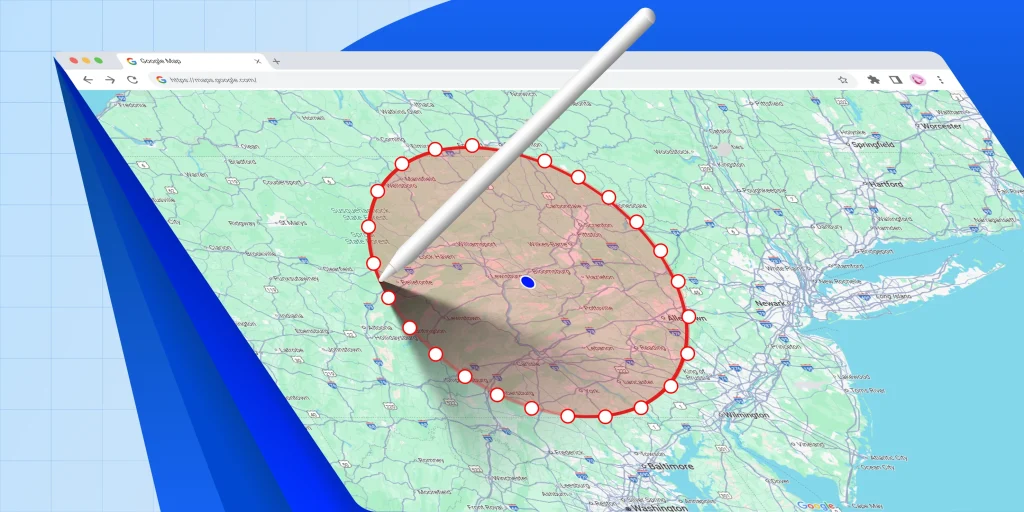
Google Maps makes it easy to search for places, get directions, and estimate travel time. But when you need to draw a radius around a location to check distance coverage, service areas, or delivery zones, things are not as straightforward.
**There is no built-in option in Google Maps to visually draw a radius, which often leaves users searching for workarounds**.
If you are trying to understand how far a location reaches, define a serviceable area, or plan routes within a specific distance, drawing a radius becomes essential. This is especially useful for delivery teams, sales planners, field service managers, and businesses that rely on location-based planning.
**In this guide, you will learn how to draw a radius on Google Maps using simple and practical methods**. We will walk through different approaches, explain when to use each one, and highlight common limitations. By the end, you will know the easiest way to visualize distance around any location and how to take the next step toward smarter route planning.
Mark it the Upper Way!
Before your next delay costs you a customer, discover how simple it is to mark your service zones the right way with Upper.
Get Started 
Table of Contents
- [What Is a Radius Map (and Why It Matters)?](#what-is-a-radius-map-and-why-it-matters)
- [How to Draw a Radius on Google Maps?](#how-to-draw-a-radius-on-google-maps)
- [6 Benefits of Drawing A Radius For Businesses](#6-benefits-of-drawing-a-radius-for-businesses)
- [What to Consider When Choosing a Radius Tool?](#what-to-consider-when-choosing-a-radius-tool)
- [What is the Best Map Radius Tool?](#what-is-the-best-map-radius-tool)
- [Why Upper for Radius-Based Territory Management?](#why-upper-for-radius-based-territory-management)
- [FAQs](#faqs)
## What Is a Radius Map (and Why It Matters)?
A radius map shows a circular boundary around a specific location, usually measured in miles or kilometers, to highlight the serviceable area within that distance.
Instead of guessing how far a technician or driver should travel, a radius map provides a clear visual zone that helps teams understand coverage limits instantly.
### Why is it important?
A radius map helps businesses control travel time, reduce fuel costs, and avoid overcommitting to jobs outside their ideal service area. Dispatchers can quickly see which drivers or technicians fall within the radius, ensure faster response times, and maintain profitable routes.
It also prevents scheduling errors by keeping work within realistic travel boundaries, especially for teams managing daily appointments or urgent service calls.
Now that you understand what a radius map is and why it matters, let’s look at who benefits most from using one.
## How to Draw a Radius on Google Maps?
**A)** Mobile users:
- Go to Google Maps on your device.
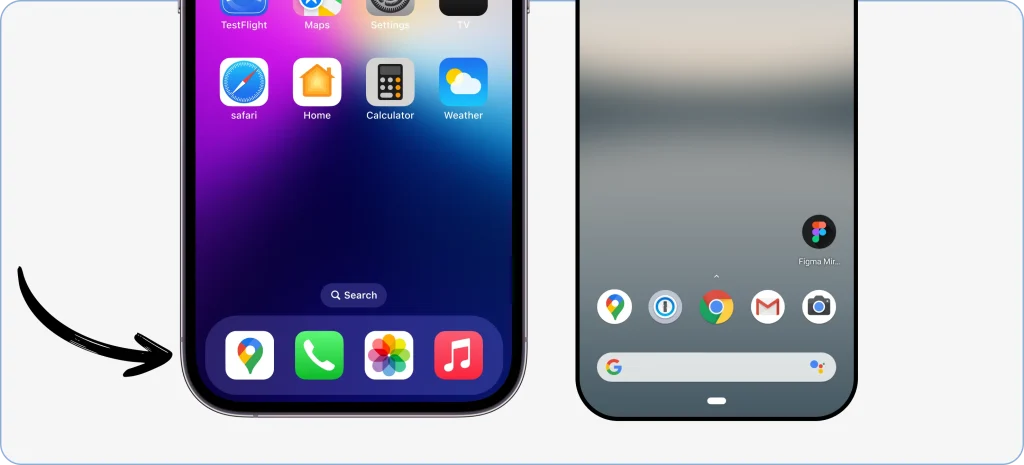- Find the location in the search bar or do it manually by panning on the maps.
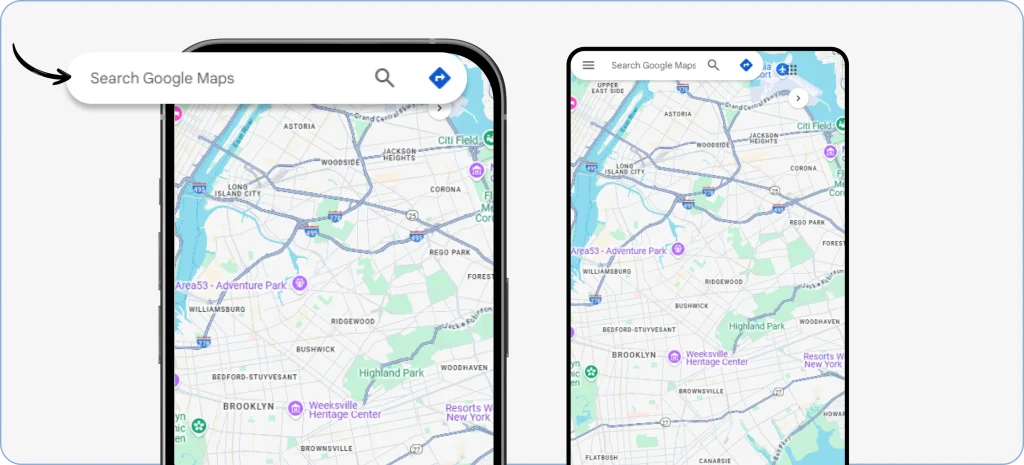- Once you discover the location you want to draw a radius around, zoom in on it and hold until a red pin pops up.
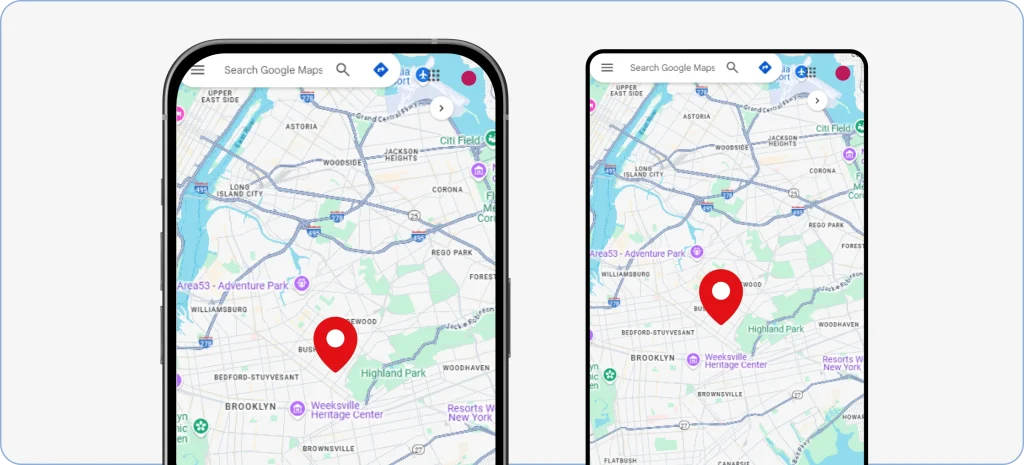- Now, you will see an information bar about the location on the screen.
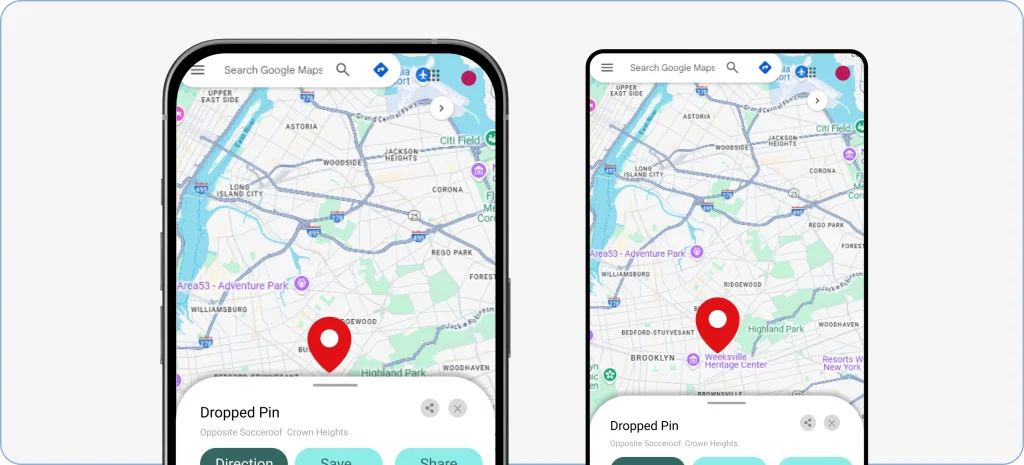- Scroll below, and you will see longitude and latitude numbers. Copy them and keep them for later use.
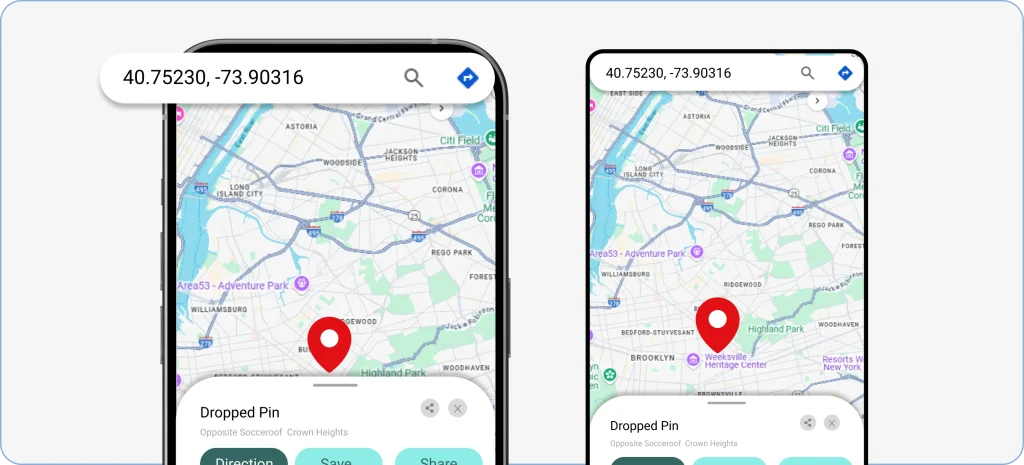> **Here’s an example of how decimal degrees look:**
>
> **Correct:** 41.40338, 2.17403**Incorrect:** 41,40338, 2,17403
>
> It’s important to note that the first number is latitude and the second is longitude.
**B)** Web users:
- Open your web browser and type Google Maps in the search bar.
**OR**
- Simply click on this link **(**[**https://www.google.com/maps**](https://www.google.com/maps)**)** to visit the website.
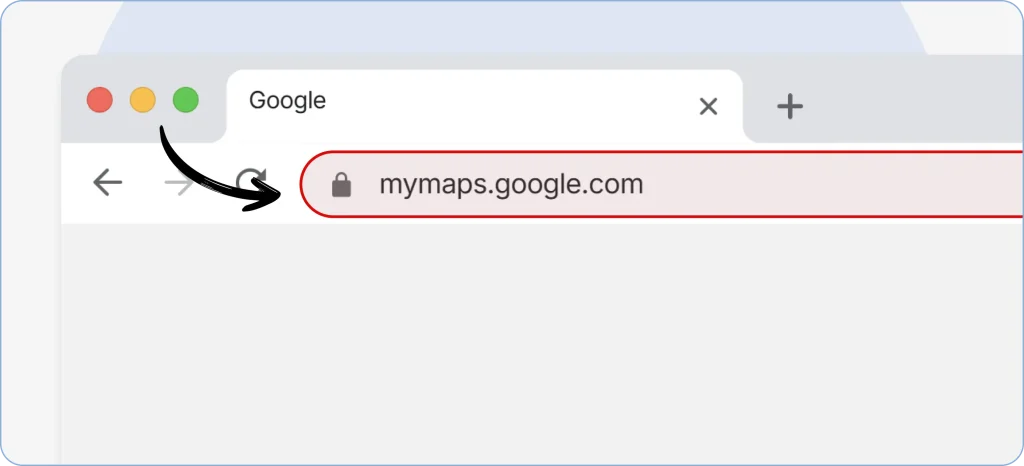- Find the location you want to draw a circle around from the search bar, or do it manually with a zoom on the Maps.
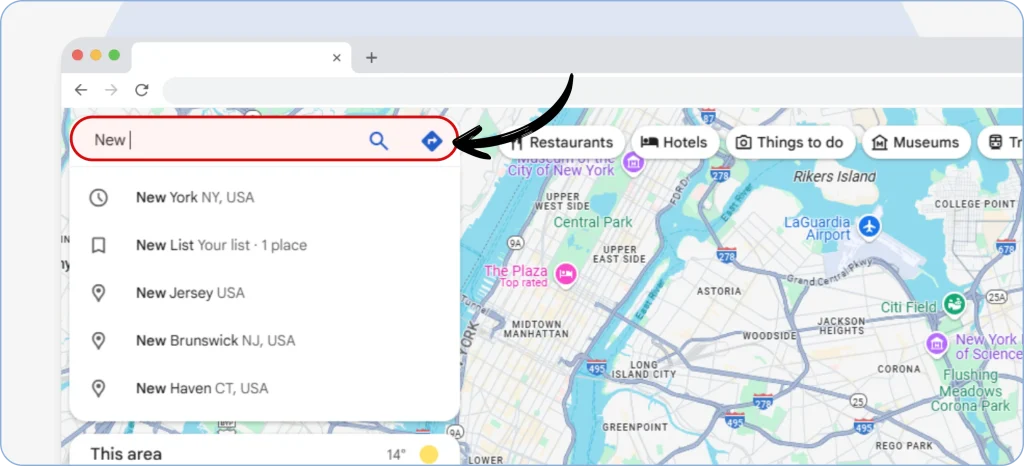- Once you discover the desired location, you will see a red pin on it.
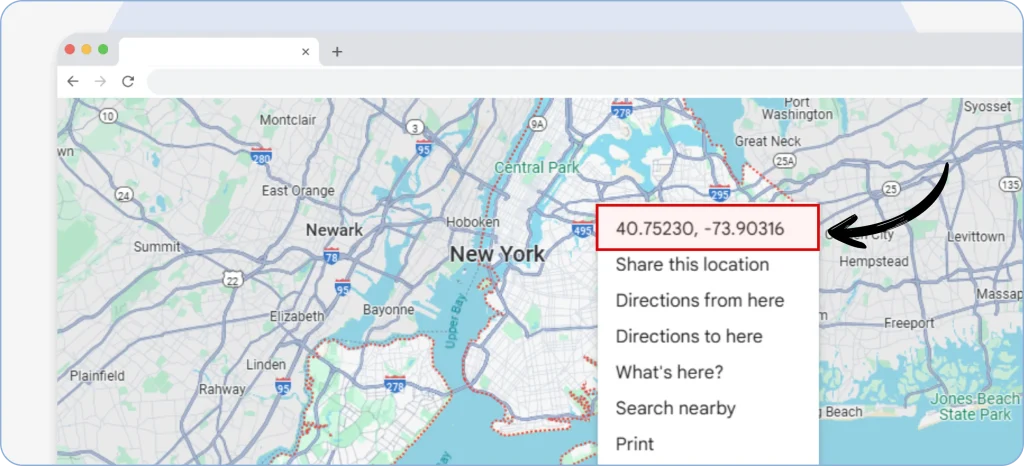
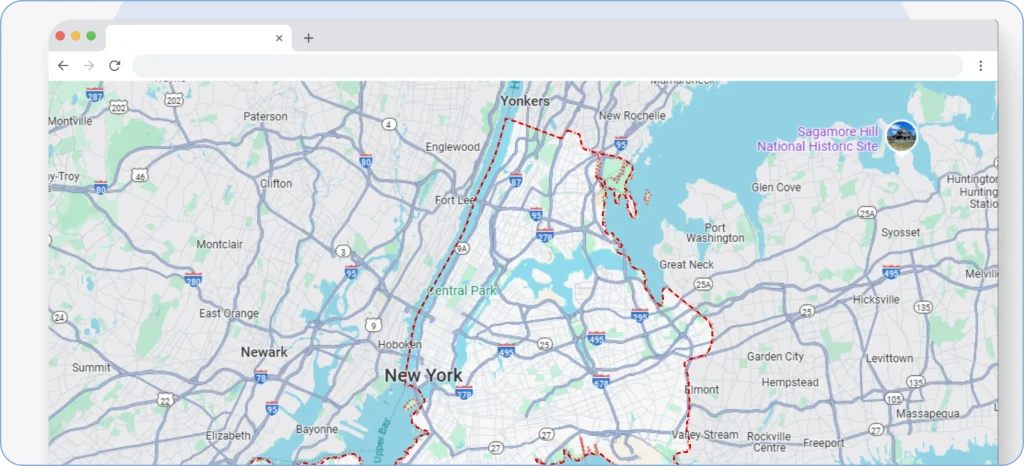- Right-click on it, and at the top, you will find the coordinates, which you have to copy and save for later use.
**C)** Since you have the coordinates, let us move forward to the next steps.
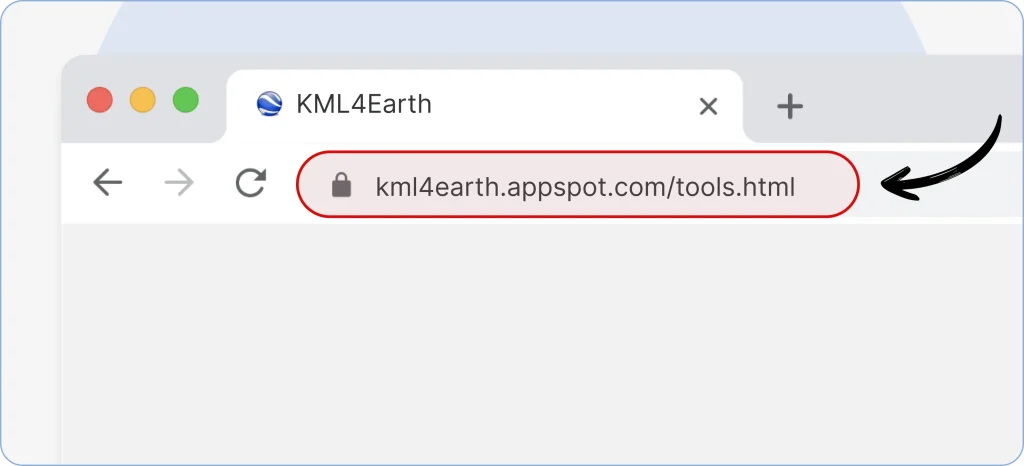
- To map a radius circle, use a trusted third-party tool like KML4Earth: **(**[**https://kml4earth.appspot.com/tools.html**](https://kml4earth.appspot.com/tools.html)**)**
- As you open the website through your desktop or mobile, select the circle’s radius in kilometers, nautical miles, feet, meters, and miles.
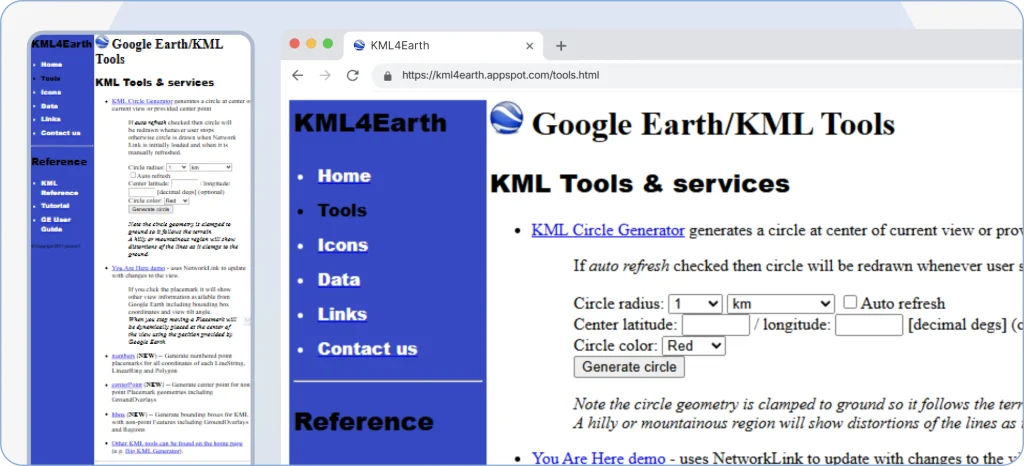- Now, input coordinates we saved earlier.
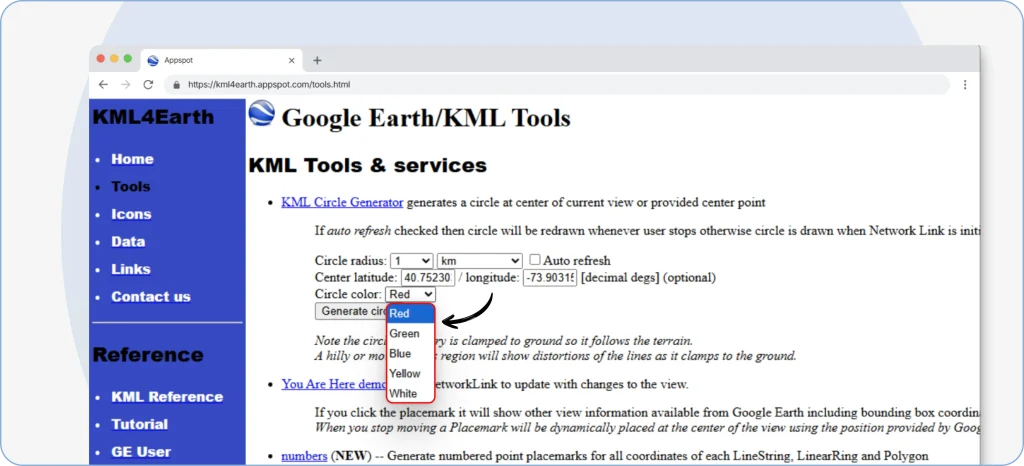
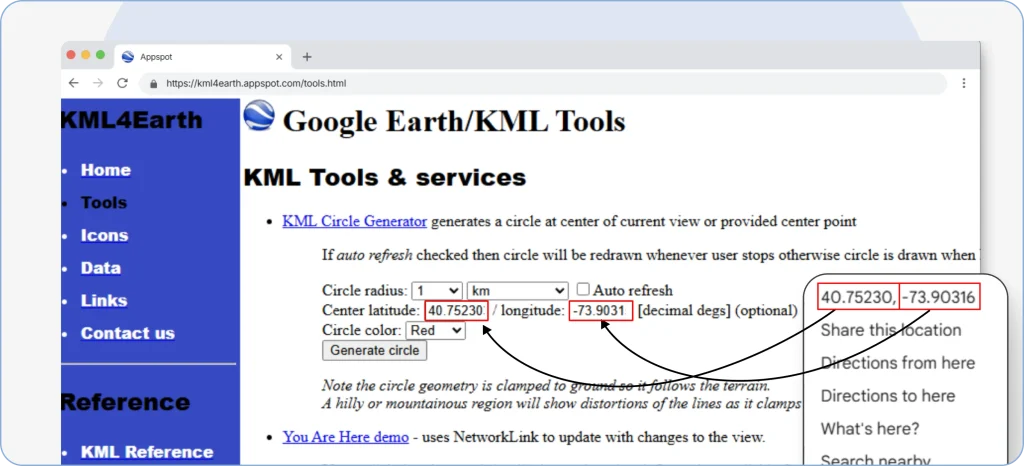- Select the color of your choice — Red, green, blue, yellow, or white.
- Once done, hit **_“Generate Circle.”_**
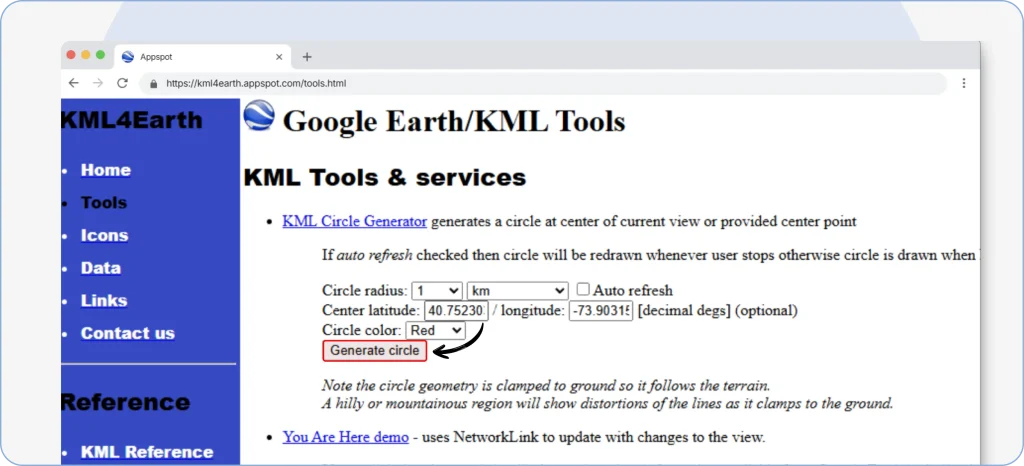The tool will generate a KML file of the details you mentioned and save it in the **_“Download”_** section of your file manager.
**D)** Keep this file aside for now, and we shall head to the final stage.
- Visit Google My Maps on desktop or mobile by searching on a web browser or clicking on this link: **(**[**https://www.google.com/mymaps**](https://www.google.com/mymaps)**)**
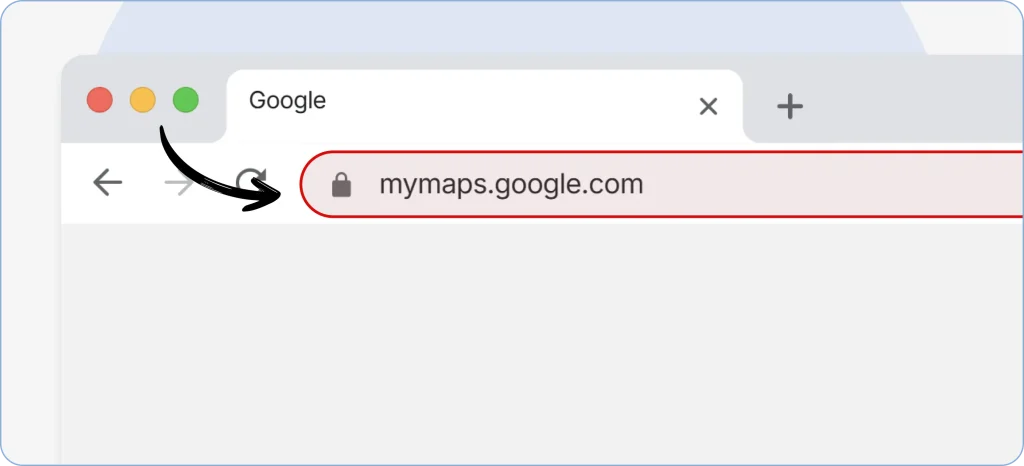- Tap on **_“Create A New Map”_** at the top.
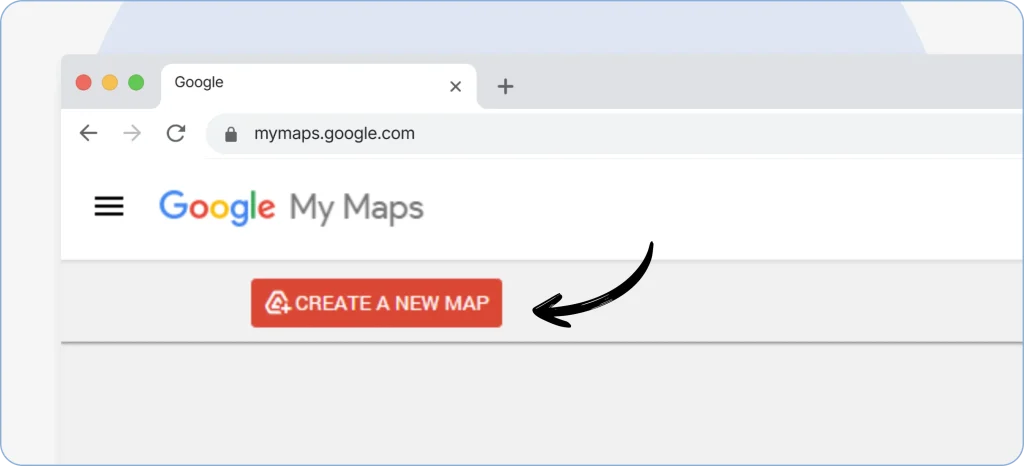- Upon opening the Maps, you will see a small side panel on the left, which will have a **_“Layer”_** option.
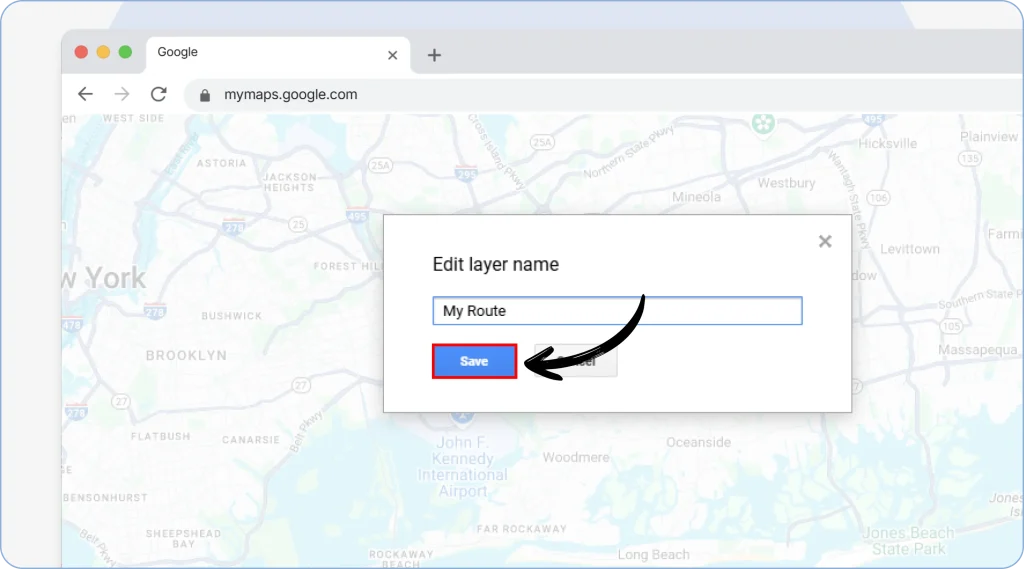
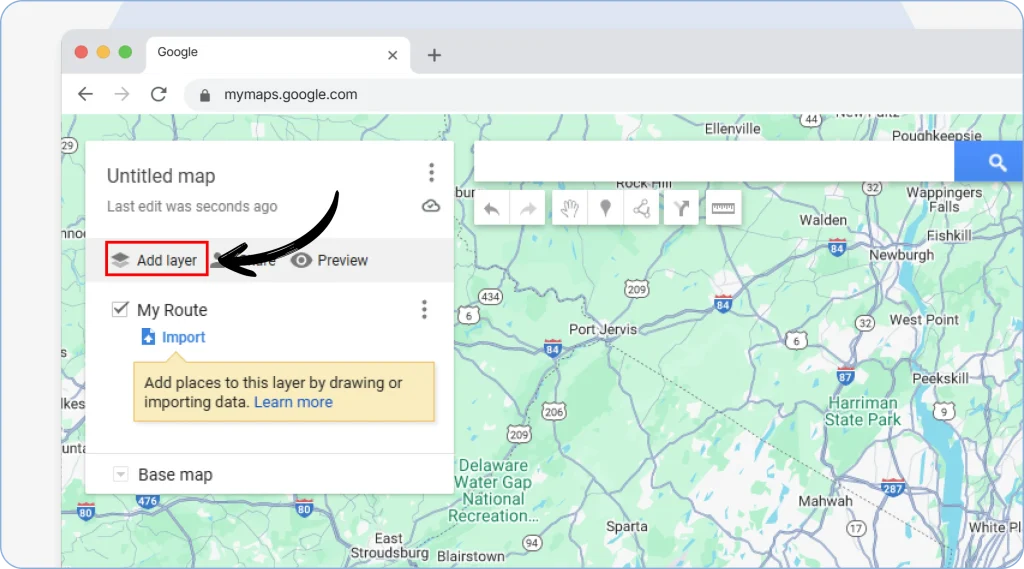- Click on it, name the layer, and tap on **_“Save.”_**
- Now, click on the **_“Import”_** button right below the layer’s name and import the KML file you downloaded earlier.
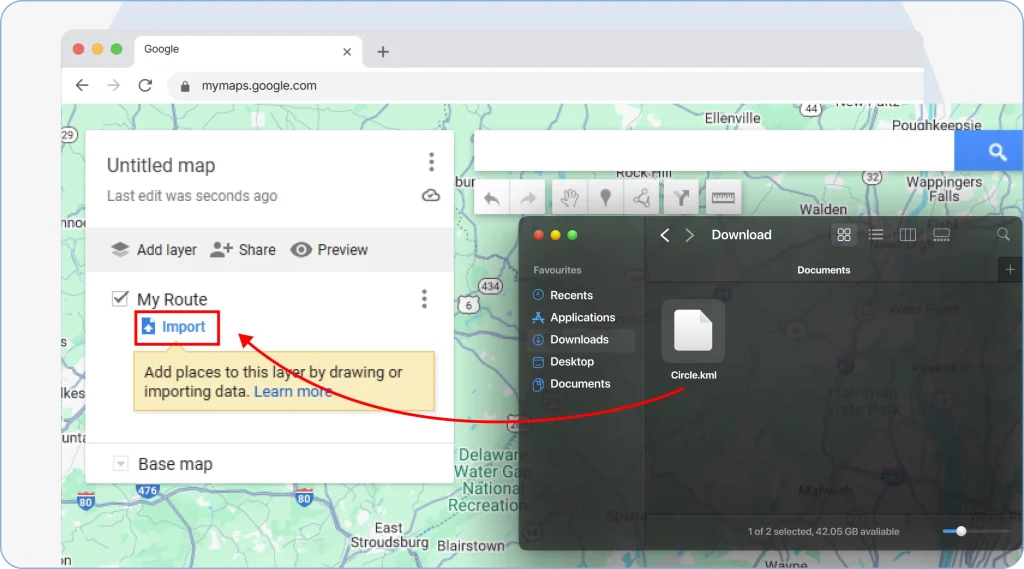- As you upload the file, the Maps will take you to the location of the coordinates you added and create a circle of the size you selected.
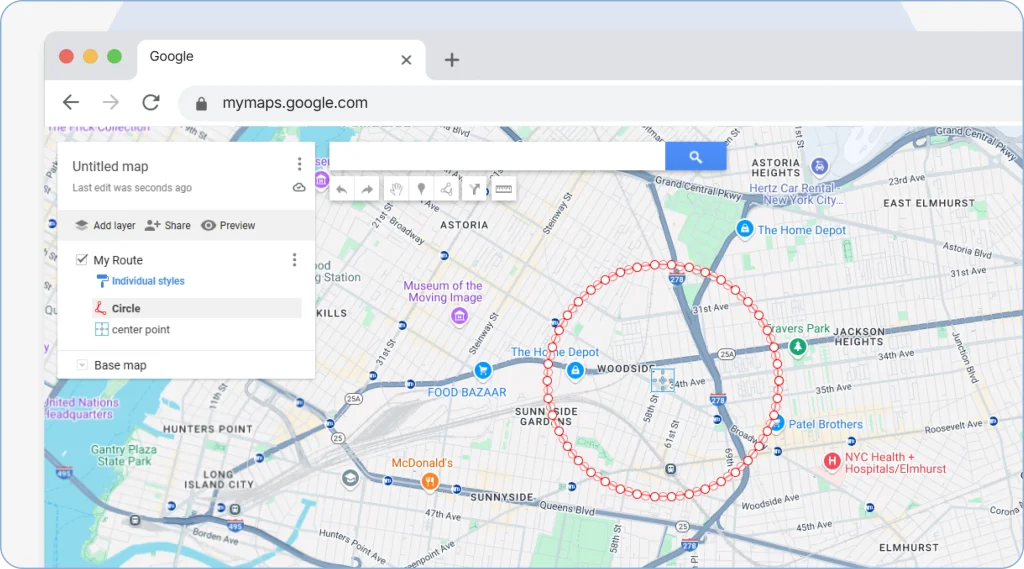That’s it! You have your radius ready.
Customize it the way you want by changing the color of the border, selecting the icon for the center point, and even updating the color of the circle.
> **Pro Tips:**
>
> - Always double-check your GPS coordinates for an accurate radius.
> - Ensure the tool is set to the correct measurement unit (miles or kilometers) depending on your regional standard.
> - Draw a slightly bigger circle than required to avoid traffic, road conditions, or unwanted detours.
> - Draw multiple radii for better organization of delivery zones.
> - Don’t just consider distance. Travel time between points A and B is important to measure distance properly.
This was all about how to draw a radius on Google Maps. Now, let’s discuss the advantages of it.
Radius Mapping Shows Coverage. Upper Optimizes the Route.
While Google Maps helps visualize distance, Upper Route Planner helps you plan the fastest and most efficient routes within that area.
[Book a Demo](javascript::void(0))
## 6 Benefits of Drawing A Radius For Businesses
### Improved services
Whether you own a [flower delivery business](https://demo.upperinc.com/blog/how-to-start-a-flower-delivery-business/) or offer medicine delivery services, mapping a radius can define your service boundaries. It also ensures your staff delivers the orders on time, without being overwhelmed.
Moreover, these factors directly contribute to the growth of your business.
When you consistently provide top-notch services, customers rely on you, leading to customer satisfaction and loyalty.
They also might spread a good word about your offerings, bringing in new clients.
### Targeted marketing
Let’s assume you are a wedding planner in Belltown, Seattle, specializing in elegant, high-end weddings for couples living in upscale vicinities.
But what if you end up targeting areas like industrial zones, student-heavy suburbs, or rural towns?
Not only will you miss out on your ideal client base, but also waste your marketing efforts and pour all the money down the drain.
Instead, if you draw a precise circle with a radius tool covering prominent neighborhoods like Capitol Hill, Queen Anne, and parts of downtown, you can generate fruitful results.
This can also help you tailor your message, showcase relevant packages, and give you a better understanding of your market.
### Better resource allocation
Your team is your greatest asset; protect and prioritize them by allotting them specific areas.
By drawing a radius, you can assign them to the different map points. This allows your team to manage and emphasize important deliveries. Plus, it saves your fuel costs, as your drivers are not wandering off in multiple circles.
### Route planning
One of the other perks of a radius circle is that it can help logistics teams to plan and optimize delivery routes pretty efficiently. Pairing this with [software for route planning](https://demo.upperinc.com/), you can divide the dispatchers or drivers according to different regions.
Once you identify the coordinates you want to target, you can divide the dispatchers or drivers according to different regions. This guarantees smooth operations and management of orders more logically.
It also reduces the overall miles driven and gives an understanding of how much capacity a vehicle can carry in one go.
> Transform how your logistics team works. Use [_Upper’s Chrome extension_](https://chromewebstore.google.com/detail/free-google-maps-route-op/jdegbpgmagmcaoogamgechdmljmndglf) to optimize routes in your service zone areas with a click.
### Scalability
As you operate in a particular radius size, you must measure delivery times, order region and volume, and profitability.
These insights not only help you identify per-zonal performance but also determine the current coverage area and where you can open your next hub.
For example, if the majority of your customers place orders outside your predefined zone, let’s say 10 km, that may be your perfect spot to open the new branch.
### Cost control
Expenses in a business are a major priority and a matter of concern, especially if you are taking care of logistics. Without defining a radius, the costs can spiral out, and you might end up spending a lot on fuel, labor, and vehicle maintenance.
Shaping a radius can limit how far your drivers will go, leading to smarter planning and measurable savings.
Now that you know which businesses need to draw a radius and why, let’s jump straight into how to do it.
We know what you might be thinking, **“This is all great, but how do I choose a tool that’s reliable and accurate?”**
Like we said, we are always here for you!
## What to Consider When Choosing a Radius Tool?
### User-friendliness
When choosing a radius tool for your needs, the first aspect that you must take into account is a simple and easy-to-understand layout. A complicated interface can confuse you and your team members, especially if you are not technically sound.
It’s best to choose a tool that’s effortless to set up and has no code or steep learning curve.
### Radius drawing capabilities
If you are a small business owner managing limited areas, a free tool might be enough for you. However, if you are covering a range of service zones, a paid tool with versatile drawing capacity is a must.
It should allow you to create multiple radii and freeform shapes, and have the ability to switch between miles and kilometers. This ensures you draw accurate service boundaries and can measure the distance between branches, distribution centers, or potential service locations.
### Google Maps compatibility
The radius tool should be compatible with Google Maps to ensure that the radius created accurately overlays on the Map’s environment. This is especially crucial for delivery businesses and their core team, who need real-time visualization of streets, buildings, landmarks, and traffic.
### Data upload and export
A robust and comprehensive radius tool should allow you to upload CSV or Excel files of your delivery addresses and [place pins on Google Maps](https://demo.upperinc.com/blog/how-to-drop-a-pin-on-google-maps/).
This helps you comprehend your customers and delivery points and whether or not the delivery areas are outside your service scope.
Additionally, it should permit you to export Maps in image format or a KMZ/KML file so you can attach them to presentations or websites.
### Pricing, limits, and scalability
There is a range of radius tools on the market, each one fitting different needs. So, choose the one that aligns with your needs and budget.
Moreover, if you plan to grow your business anytime soon, it’s best to opt for a solution that scales with you. It should offer features like coverage of multiple zones, data imports, and brand customizations to easily manage your logistics.
### Mobile and cross-device accessibility
Gone are the days when everything was managed on desks, printed maps, highlighters, and spreadsheets. Today’s digital-first mindset has changed how we approach work.
Whether you are a field agent or an on-site manager, you need solutions that can be easily accessed on all your devices, tablet, mobile phone, or PC, including a radius tool.
Select the one that’s responsive and device-friendly so you can manage your work at any time from anywhere you want.
### Support
Even the most powerful tools can fall short when you are confused and need assistance. This is why it is fundamental to go for a tool that comes with a user manual, video tutorials, help centers, and live chat support.
The right support gives you the well-deserved peace of mind and eases your route planning and customer targeting journey.
## What is the Best Map Radius Tool?
### Google Maps
Google Maps doesn’t offer a built-in radius tool, but with third-party add-ons or custom overlays, you can quickly draw distance-based circles around any location. It’s ideal for users who want a free, familiar, and accessible mapping environment.
### Smappen
Smappen is a business-focused mapping platform that lets you create radius maps, travel-time zones, and service territories with precision. It’s especially useful for field service teams, marketers, and delivery businesses needing deeper location analytics.
### Maptive
Maptive provides advanced mapping capabilities on top of Google Maps, allowing users to build custom radius boundaries, heatmaps, and geographic visualizations. It’s great for large teams that need data-driven mapping for planning and analysis.
### CalcMaps
CalcMaps offers simple online tools to draw radius circles, generate travel-time maps, and calculate distances with just a few inputs. It’s perfect for quick, no-frills radius mapping without the need for sign-ups or complicated features.
### Free Map Tools
Free Map Tools is a beginner-friendly website that lets you draw radius maps around any point in seconds. It’s a popular choice for users looking for free, fast, and straightforward distance visualization.
### TravelTime
TravelTime creates radius boundaries based on travel minutes instead of distance, making mapping far more realistic for urban environments. It helps businesses understand true reachability by factoring in real travel times, transportation modes, and traffic conditions.
## Why Upper for Radius-Based Territory Management?
Running a logistics business isn’t just about dispatching orders; it’s a full operation that demands speed, strategy, and seamless execution.
This is exactly why Upper was built. Unlike standalone radius tools that only visualize boundaries, Upper [route optimization software](https://demo.upperinc.com/) combines territory management with intelligent route optimization, so you’re not just drawing circles, you’re putting them to work.
### How Upper’s Radius-Based Planning Works
- **Draw service zones directly in the app** — no KML files, no third-party tools, no coordinate copying.
- **Create radius boundaries using contacts and tasks** — define zones based on where your customers actually are.
- **Auto-assign drivers to zones** — when you create a territory, Upper’s intelligent routing automatically assigns drivers based on location and capacity.
- **Restrict drivers to designated areas** — prevent deliveries outside service boundaries for tighter cost control.
- **Optimize routes within each zone** — radius planning connects directly to route optimization, reducing miles and delivery times.
### Results Teams are Seeing with Upper
- **20% reduction in delivery times** and **24% reduction in costs**
- **48% lower fuel costs** with optimized routes
- **11+ hours saved per week** by automating route planning
- **99% fewer routing errors** compared to manual planning
- **76% fewer last-minute delays** with real-time route adjustments
- **24% more daily deliveries** without adding extra drivers
- **99.9% on-time delivery rate** across 1.22B+ shipments optimized
- **95% customer satisfaction score**
With Upper, your radius isn’t just a visual boundary; it’s an operational tool that informs driver assignments, route sequences, and delivery schedules automatically. That’s why 10,000+ businesses trust Upper to manage their deliveries.
For businesses planning multi-stop trips within their service zones, Upper eliminates the complexity that tools like[ Google Maps trip planner](https://demo.upperinc.com/blog/using-google-maps-trip-planner/) can’t handle at scale.
Ready to see how it works for your team? [**Book a demo**](https://calendly.com/upper/demo) and let us show you how Upper turns service zones into optimized operations.
Curious how it works? Try Upper for Free
## Frequently Asked Questions
Yes. On a desktop, right-click any point on Google Maps and select **“Measure distance”**, then click additional points to draw a line and see the total distance.
On mobile, tap and hold to drop a pin, then select **“Measure distance”** from the menu. This measures point-to-point distance but does not create a radius boundary.
For basic needs, you can use free tools like CalcMaps or Free Map Tools to generate a radius circle and then import it into Google My Maps.
For delivery businesses that need radius zones tied to real operations, a dedicated tool like Upper lets you draw service territories and automatically optimize routes within those zones—eliminating manual workarounds entirely.
Open Google My Maps in your browser and click **“Create a New Map.”** Select the **“Draw a Line”** tool below the search bar, then choose **“Add Line or Shape.”**
Click on the map to start drawing your boundary, add points as needed, and double-click to finish the shape. You can customize colors and add descriptions to clearly define each boundary.
Several apps support radius mapping with Google Maps integration. Free options include CalcMaps, Free Map Tools, and KML4Earth for basic radius circles.
For business use, Smappen offers territory analysis, Maptive provides advanced visualizations, and Upper combines radius drawing with route optimization for delivery and field service teams.
---
_View the original post at: [https://demo.upperinc.com/blog/how-to-draw-radius-google-maps/](https://demo.upperinc.com/blog/how-to-draw-radius-google-maps/)_
_Served as markdown by [Third Audience](https://github.com/third-audience) v3.4.7_
_Generated: 2026-02-20 10:04:50 UTC_