---
title: "Customer Notifications Software for Construction Delivery"
url: "https://demo.upperinc.com/customer-notification/for-construction-delivery/"
date: "2026-04-30T14:12:29+00:00"
modified: "2026-05-01T08:34:34+00:00"
author:
name: "Riddhi Patel"
word_count: 2074
reading_time: "11 min read"
summary: "Automated Delivery Notifications for Construction Material Deliveries
A late material delivery doesn't just delay one task. It cascades across the entire project schedule. Upper Route Planner..."
description: "Coordinate construction material deliveries with automated notifications. Upper sends real-time ETAs to job sites so crews and equipment are ready when the t..."
keywords: "Customer Notifications Software for Construction Delivery"
language: "en"
schema_type: "WebPage"
---
# Customer Notifications Software for Construction Delivery
_Published: April 30, 2026_
_Author: Riddhi Patel_
# Automated Delivery Notifications for Construction Material Deliveries
A late material delivery doesn’t just delay one task. It cascades across the entire project schedule. Upper Route Planner sends automated delivery notifications with real-time ETAs, tracking links, and arrival confirmations to project managers, site supervisors, and receiving crews so equipment is staged, access is cleared, and nobody’s waiting on a truck that’s still three stops away.
[Book a Demo  ](https://calendly.com/upper/demo) Start Free Trial 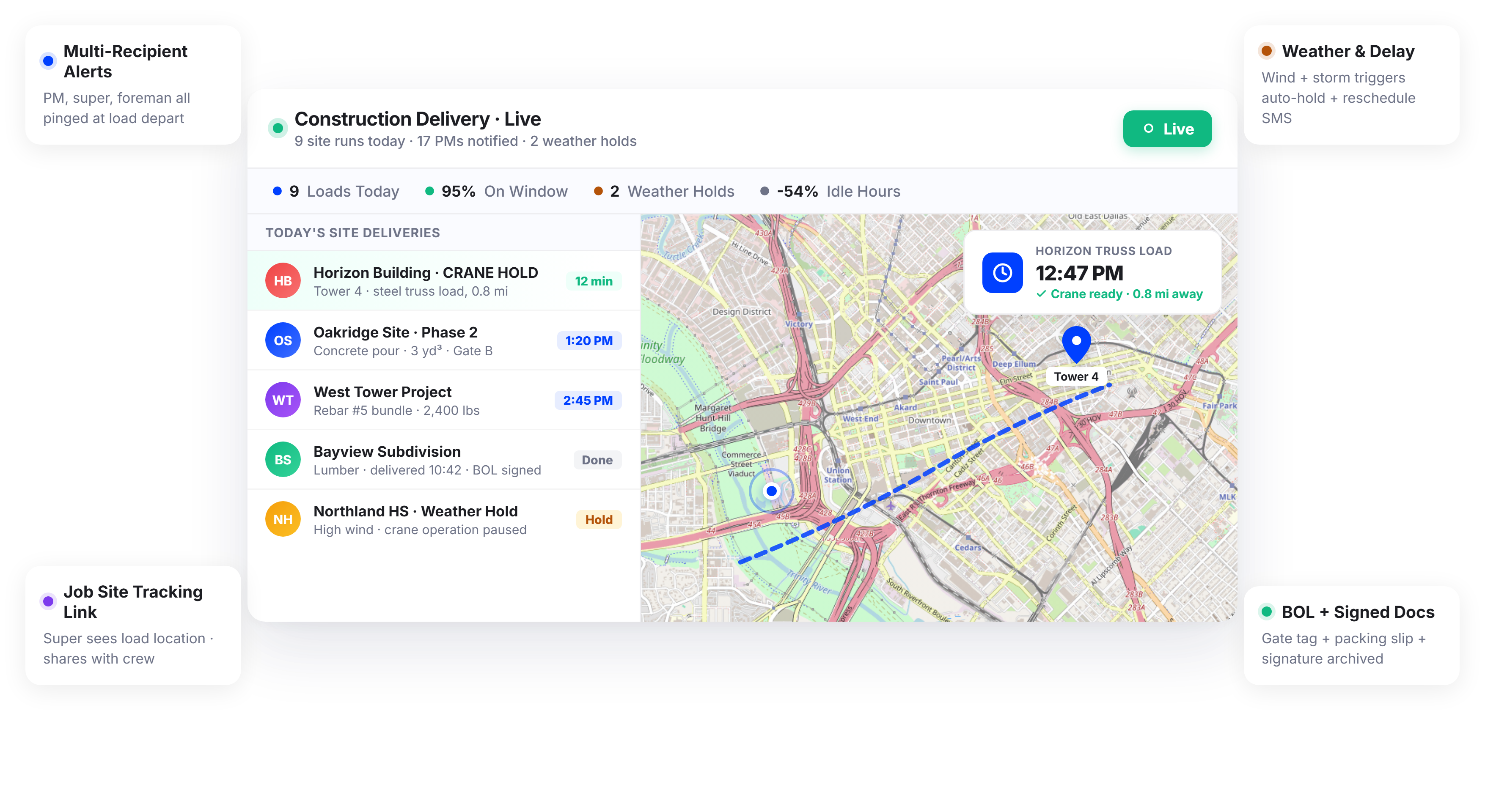 
### What Construction Delivery Communication Promises
-  Site crews know exactly when materials will arrive-  Equipment and labor are scheduled around actual delivery times-  Project managers have real-time visibility into every incoming load-  Deliveries are confirmed with documentation for project records
### What Actually Happens
-  Site super calls dispatch multiple times for ETAs due to lack of real-time delivery updates.-  Crane sits idle 45 minutes waiting for steel delayed in traffic, causing costly downtime.-  Materials arrive early before site is ready, blocking staging areas and disrupting workflow.-  No clear records of what was delivered, when, or in what condition, causing confusion.
### Dispatch and Load Notifications
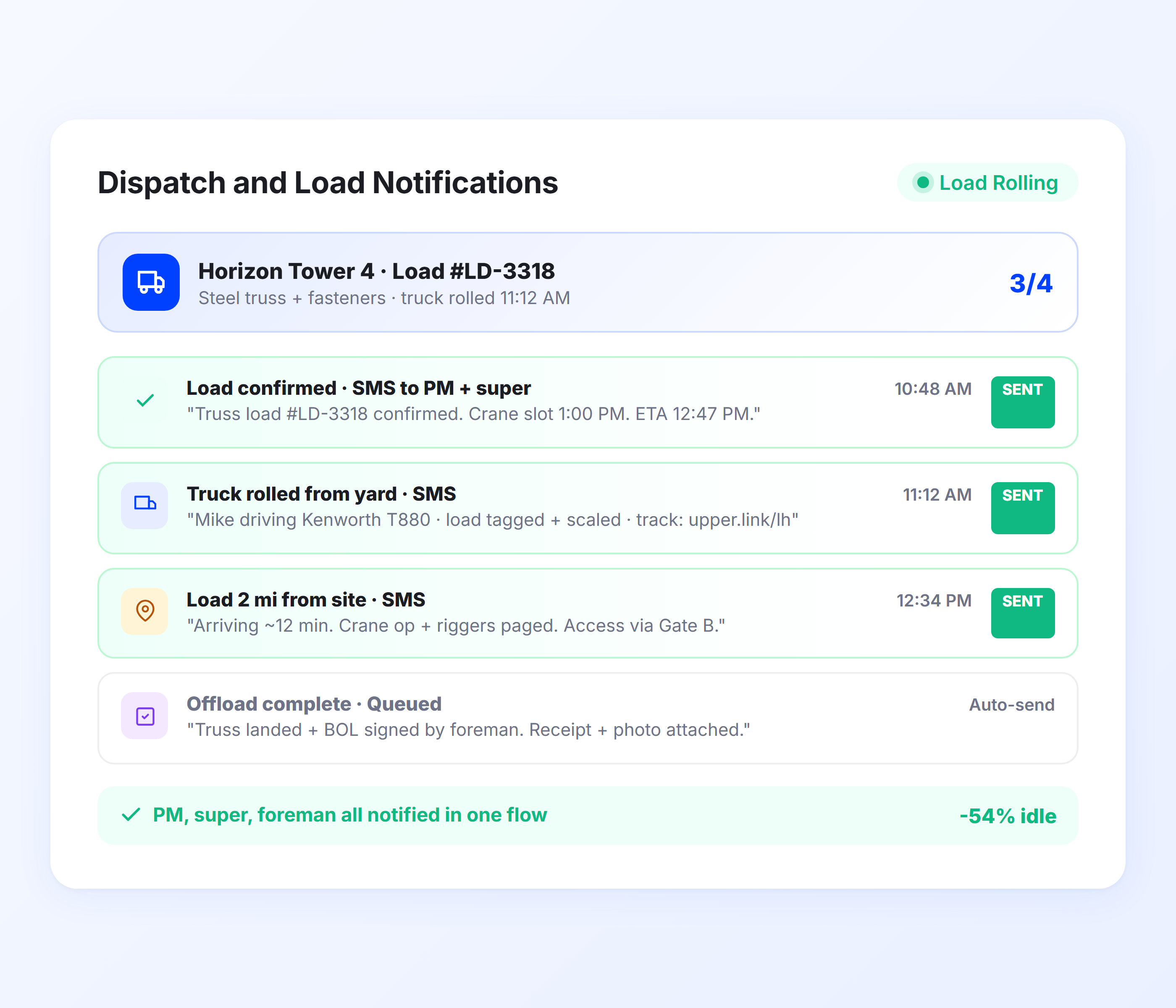
When a material delivery departs your yard or warehouse, Upper sends an automated notification to the receiving job site with the estimated arrival time. The site supervisor, project manager, or receiving crew knows a truck is en route and can prepare the staging area, schedule equipment, and coordinate labor.
- Automatic dispatch notification to job site contacts- Estimated arrival time based on optimized route sequence- Load details and truck identification in notification- Multiple recipients per delivery (PM, site super, foreman)- Customizable templates for different material types- Notification sent the moment the route starts
### Real-Time Material Delivery ETAs
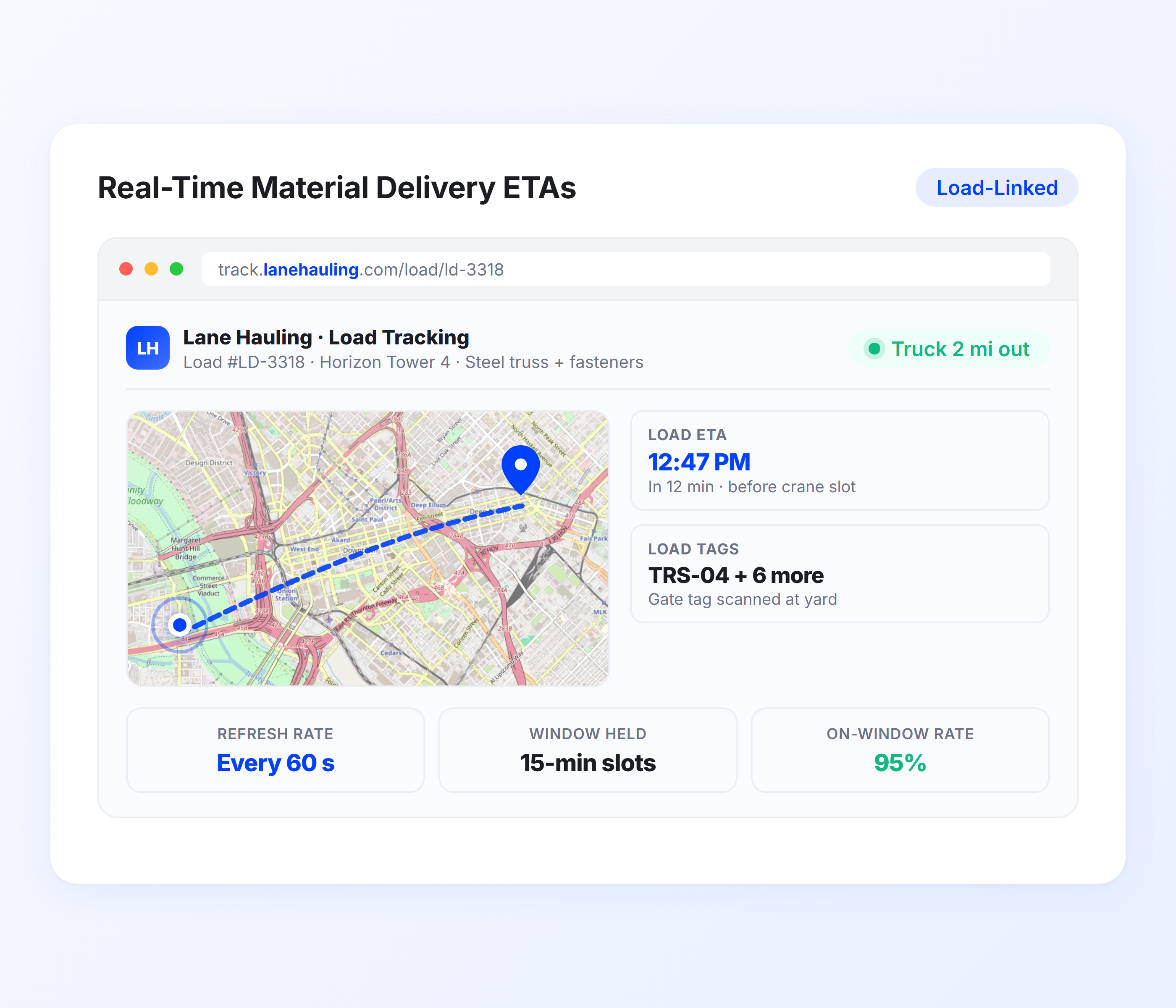
Upper calculates ETAs from live route optimization data, traffic conditions, and real-time driver progress. For construction deliveries where equipment rental costs run by the hour and crews are scheduled around material arrivals, accurate ETAs prevent the idle time that bleeds project budgets.
- Live ETA from route optimization and GPS data- Auto-recalculation for traffic delays and schedule changes- Accurate enough for crews to schedule equipment staging- SMS and email notification with tracking link- Updates sent automatically as conditions change- Same accuracy for single-stop and multi-stop delivery routes
### Job Site Tracking Links
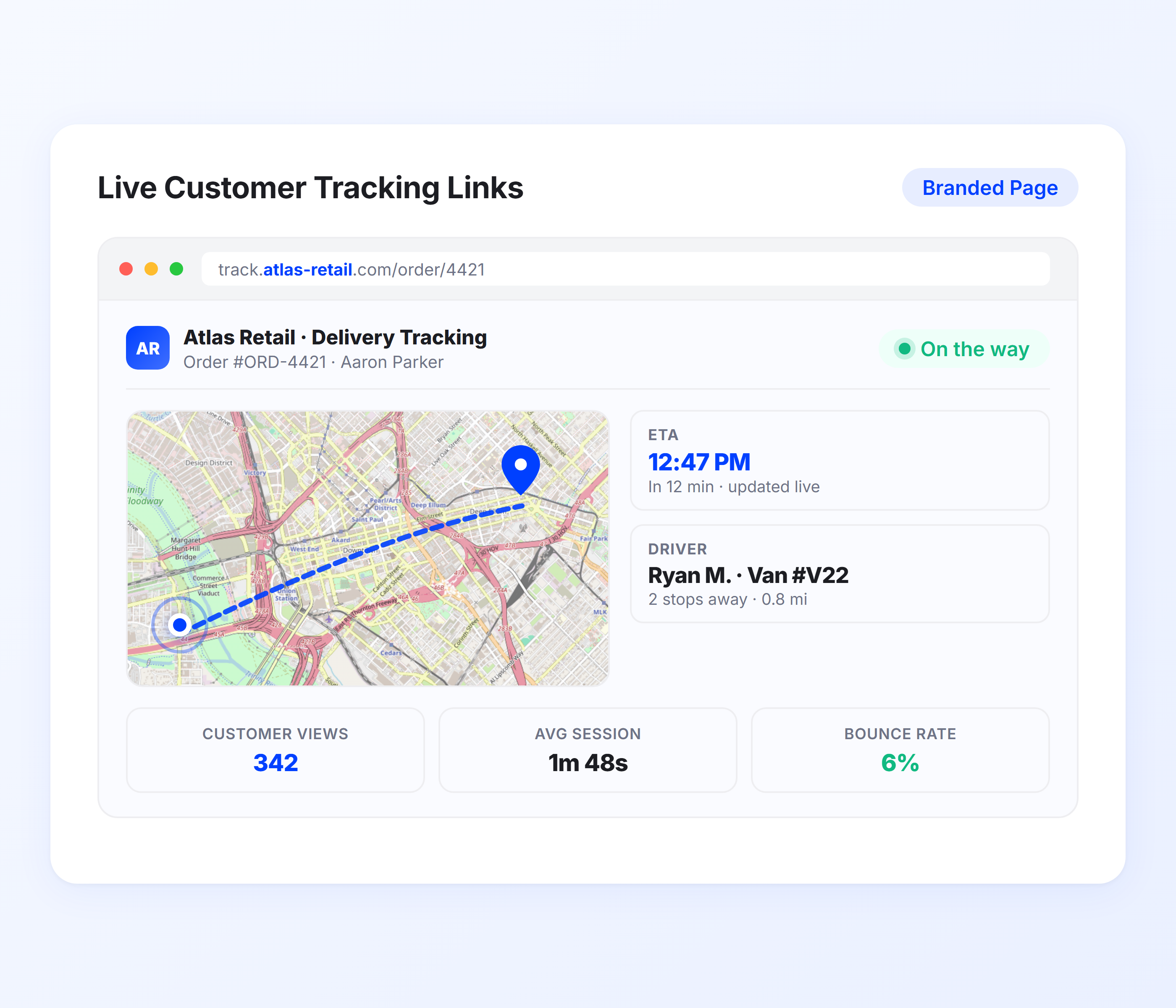
Every notification includes a tracking link that opens in a mobile browser. Project managers, site supervisors, or foremen can check the truck’s real-time position and updated ETA from the field. No app download, no login, and no calling dispatch to ask “where’s the truck?”
- Real-time truck position on mobile-optimized map- Updated ETA visible on tracking page- No app or account required from the job site- Shareable with any project stakeholder- Works on any mobile device on-site- Reduces inbound “where’s my delivery?” calls
### Load and Material Verification Notifications
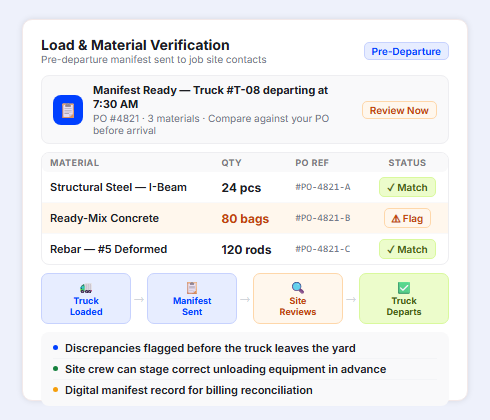
Before the truck departs, Upper sends the job site a manifest notification listing exactly what materials are on the truck, quantities, and purchase order references. The receiving crew can compare the manifest against their PO before the truck arrives, flag discrepancies immediately, and have the right equipment staged for unloading. This prevents the partial-load disputes and material shortage discoveries that delay project timelines.
- Pre-departure manifest notification sent to job site contacts- Material list with quantities and PO reference numbers- Receiving crew can verify against their purchase order before arrival- Discrepancies flagged before the truck leaves the yard- Helps site crew stage correct unloading equipment- Digital manifest record for project documentation and billing reconciliation
### Arrival and Delivery Confirmations
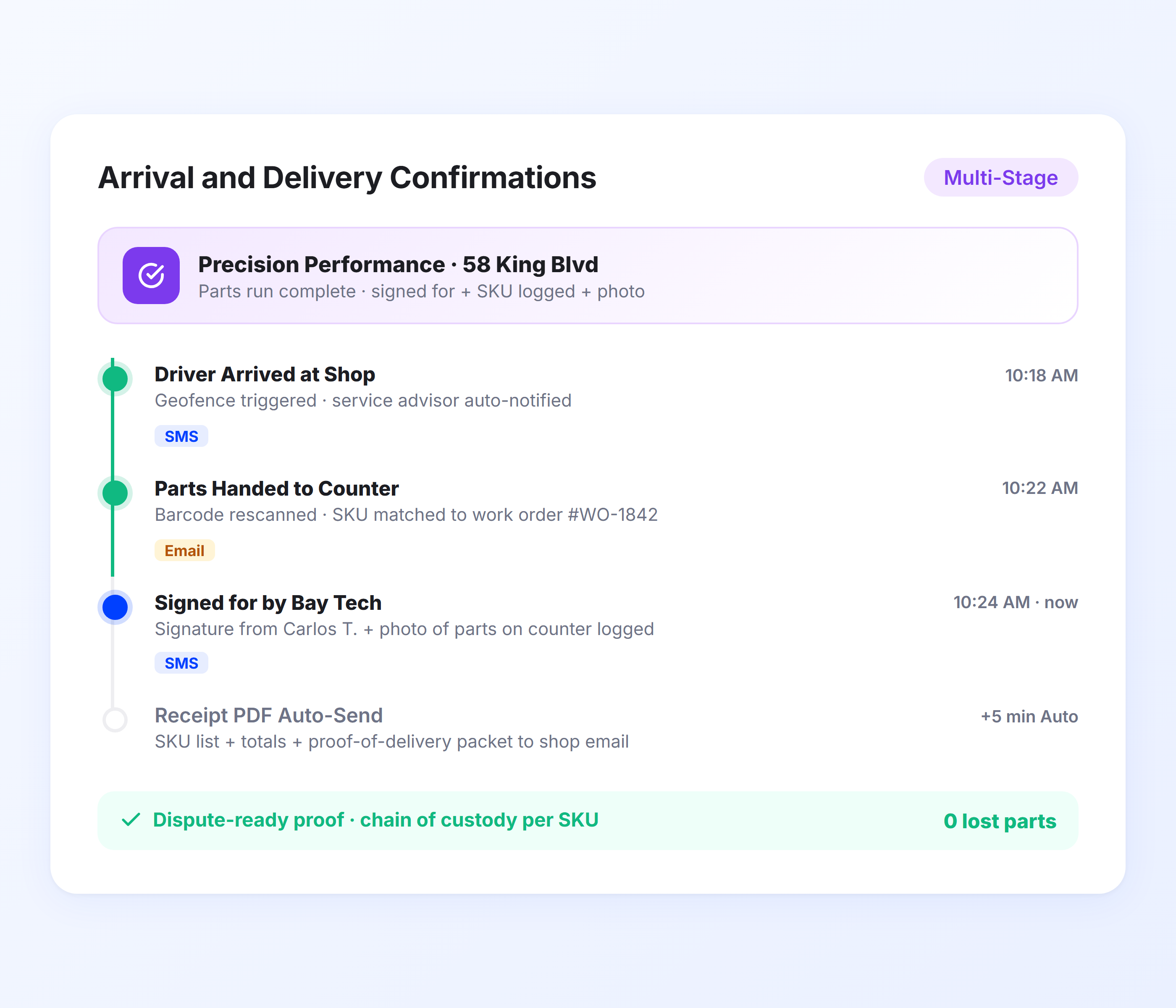
When the truck arrives at the job site, Upper sends a confirmation notification. When the delivery is marked complete with proof of delivery, recipients get a second confirmation with photos of delivered materials, condition documentation, and a signature from the receiving party. This creates a project record for every material delivery.
- “Truck arriving” notification when entering site zone- Delivery completion confirmation with timestamp- Photos of delivered materials and site conditions- Receiving party signature captured digitally- Delivery notes for partial loads or damaged items- Project-grade documentation for every delivery
### Weather and Delay Notifications
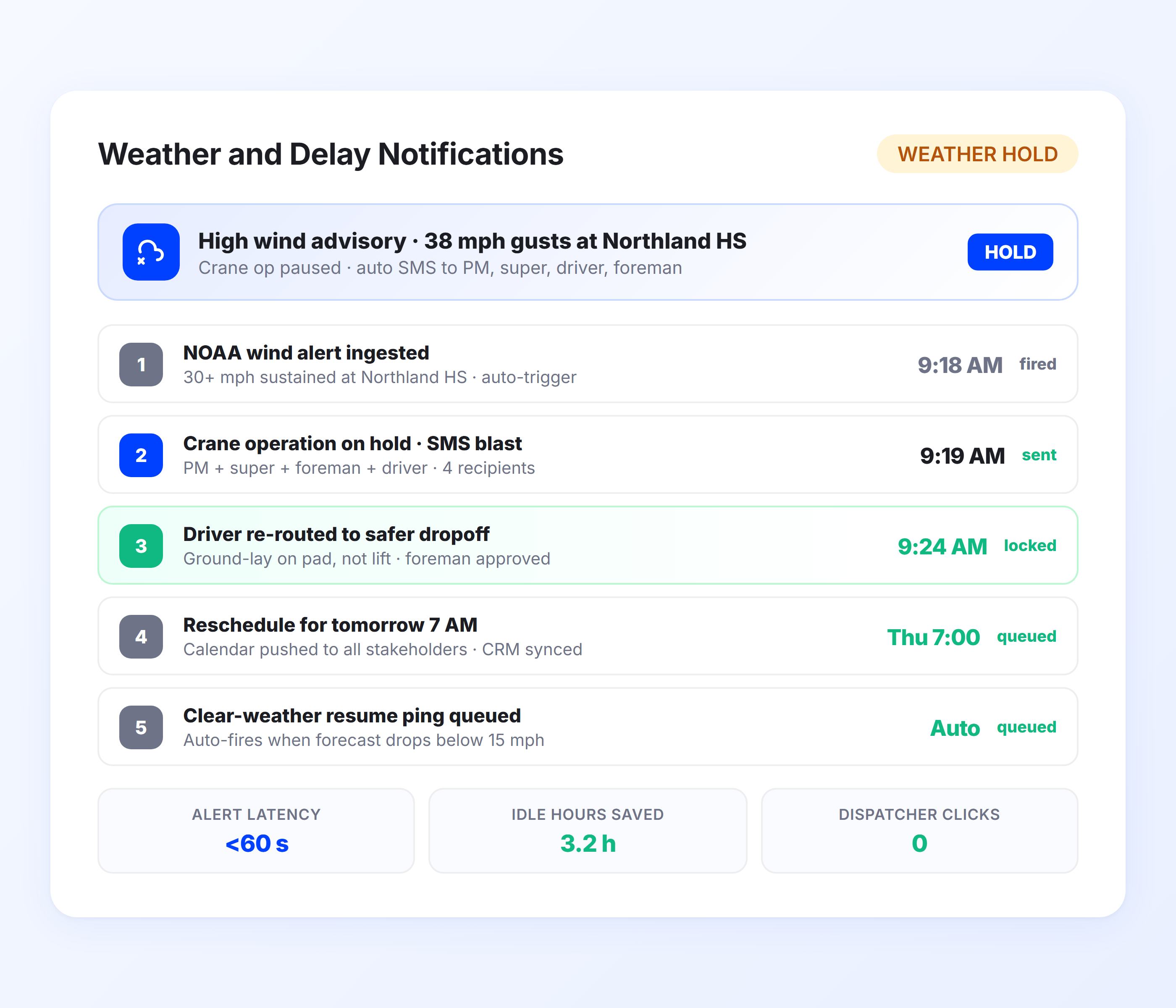
Construction schedules shift constantly. When a delivery is delayed due to traffic, weather, or a schedule change, Upper automatically notifies the job site with an updated ETA. Site teams can adjust their plans in real time instead of discovering the delay when the truck doesn’t show up on time.
- Automatic delay notification with updated ETA- Reason for delay included in notification- Site contacts notified immediately when schedule changes- Integrates with driver dispatch for rescheduling- Prevents equipment idle time from unannounced delays- Keeps project managers informed across all active deliveries
## Send Live ETAs to Every Job Site on Every Material Run
Upper notifies site crews the moment materials are dispatched, sends real-time ETAs that update as the truck progresses, and confirms every delivery with photos and signatures.
See Upper in Action  “We used to spend 2 hours every morning planning routes in spreadsheets. Now it takes 10 minutes. Upper paid for itself in the first week.”
[Read More →](https://demo.upperinc.com/success-stories/winwaste-waste-management/)
Tracy S
Owner, WinWaste Solutions
 “What sold me was how easy it is to make changes. My schedules change a lot and I drag & drop stops and we’re back on track in 30 seconds. With our old software, that would’ve been an hour of replanning.”
[Read More →](https://demo.upperinc.com/success-stories/a2z-logistics-third-party-logistics/)
Harry D
Dispatcher, a2zlogistics
 “Our drivers actually follow the routes now. The app is simple, the navigation works, and they’re not calling me every 10 minutes asking where to go next.”
[Read More →](https://demo.upperinc.com/success-stories/poolpros-pool-maintenance-and-service/)
Kim M
Dispatch Lead, PoolPros
## Construction Delivery Notification Features for On-Schedule Projects
Delivery notifications keep construction projects on track with real-time ETAs, automated alerts, and updates—reducing missed deliveries and improving coordination.
- Multi-Recipient Notifications
- Geofenced Site Alerts
- Delivery Documentation
- Schedule Change Alerts
- Delivery Analytics
### Multi-Recipient Notifications
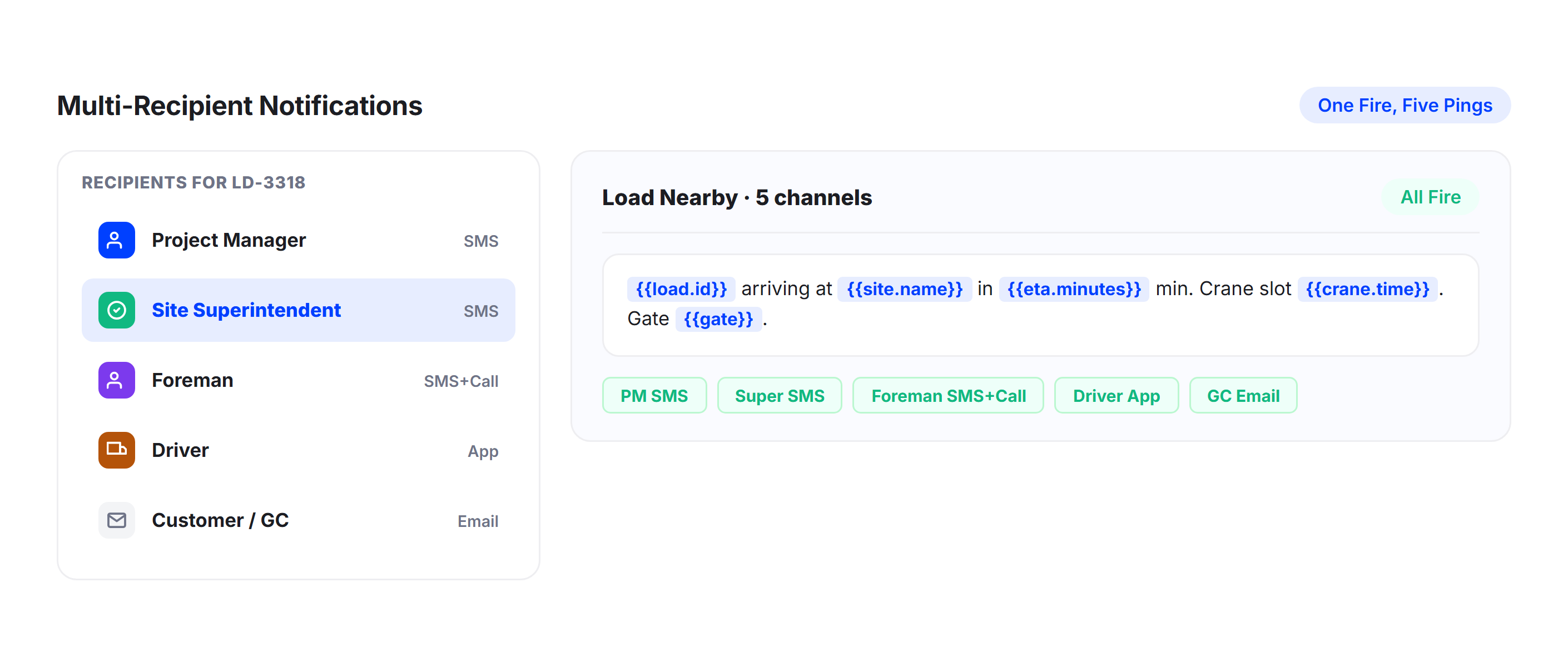
Send delivery notifications to multiple contacts per job site. The project manager, site supervisor, foreman, and receiving crew can each receive updates through their preferred channel. Upper lets you configure recipient lists per site or per delivery.
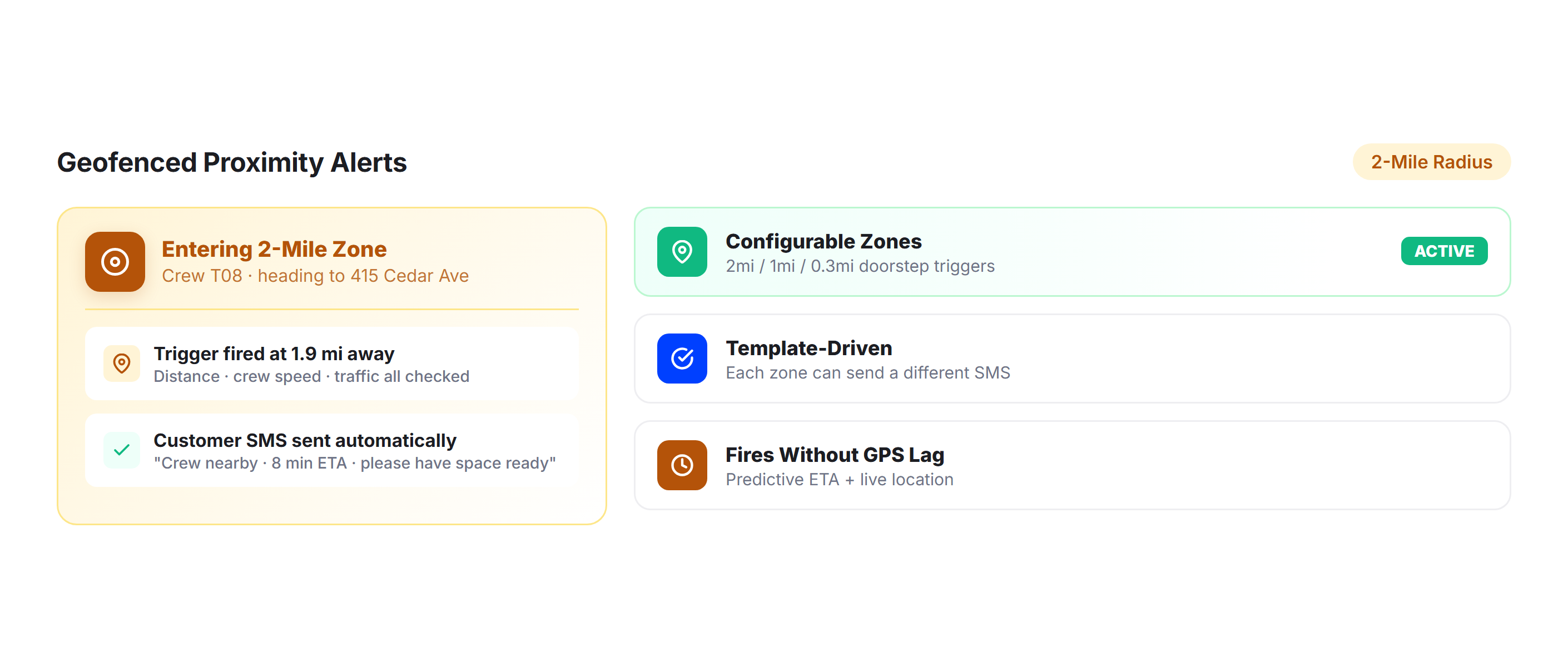
### Geofenced Site Alerts
Trigger automatic “truck approaching” notifications when the delivery vehicle enters a job site’s geofenced zone. Give site crews the lead time they need to clear the staging area, position equipment, and prepare for unloading.
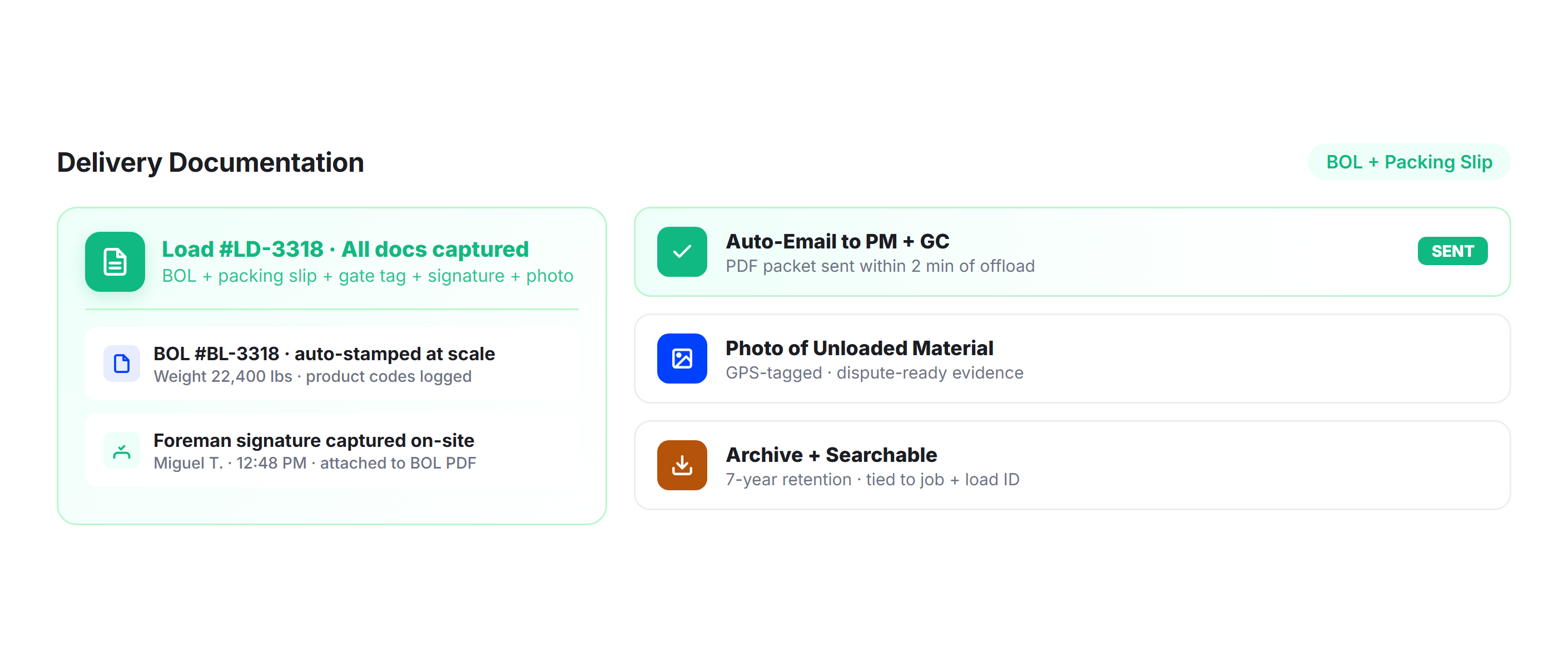
### Delivery Documentation
Capture photos of delivered materials, site conditions at drop-off, and receiving party signatures. Upper creates a timestamped, GPS-tagged record for every delivery that serves as project documentation for GCs, inspectors, and accounting.
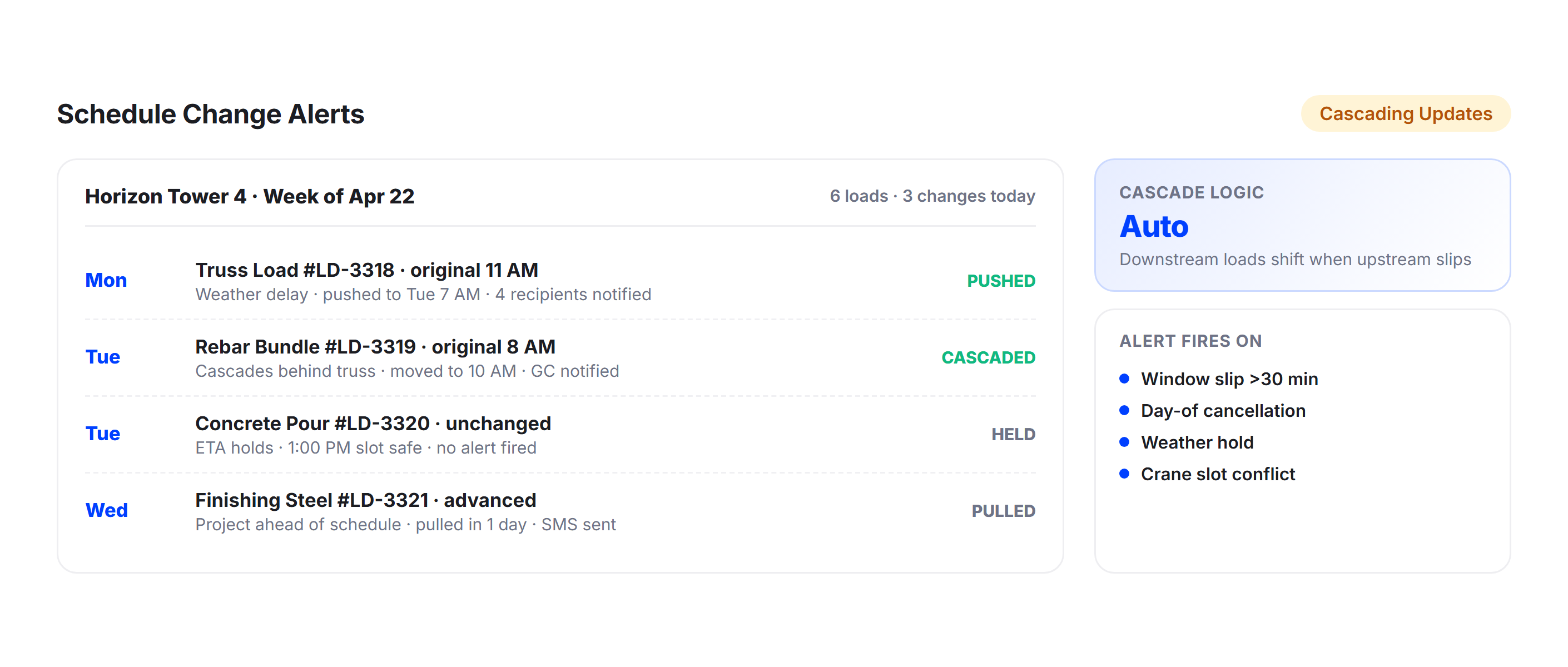
### Schedule Change Alerts
When a delivery is rescheduled, delayed, or rerouted, Upper automatically notifies all job site contacts with the updated timeline. No more calling every stakeholder individually to communicate a schedule change.
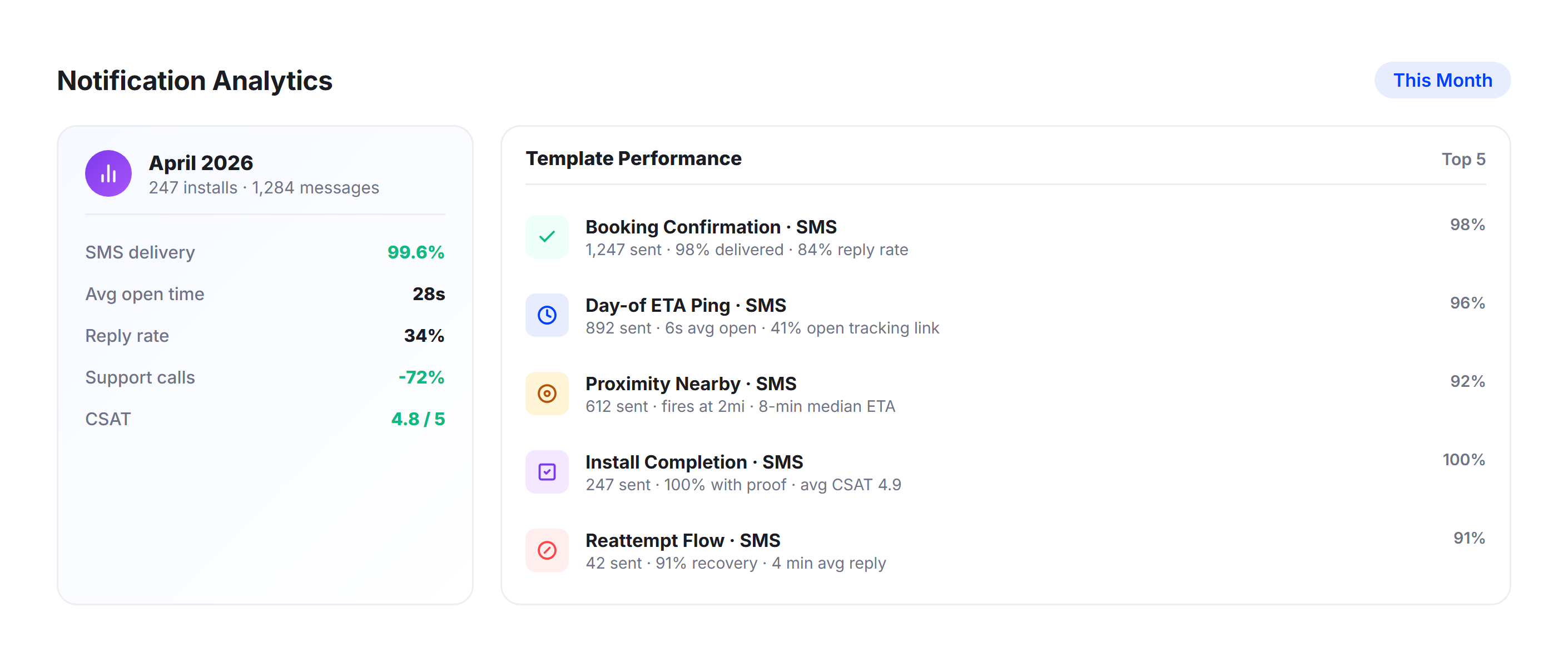
### Delivery Analytics
Track delivery times per job site, on-time rates, and notification engagement through Upper’s analytics dashboard. Identify sites where drivers consistently wait or where deliveries are frequently delayed. Use the data to optimize delivery schedules and site coordination.
## Why Construction Delivery Companies Choose Upper for Customer Notifications

### Prevent Equipment Idle Time
When site crews clearly know the exact truck arrival time in advance, they can better plan and schedule cranes, forklifts, and labor around actual deliveries. No more unnecessary hourly equipment rentals wasted waiting on a delayed truck.

### Reduce Project Schedule Cascades
A late material delivery that nobody knew about can push tasks back across the entire project. Real-time ETAs and delay notifications give project managers time to adjust before the delay compounds.

### Eliminate Dispatch-to-Site Phone Tag
Drivers, dispatchers, site supers, and project managers all calling each other about delivery status wastes everyone’s time. Automated notifications and tracking links keep every stakeholder informed without a single phone call.

### Document Every Material Delivery
Photos, signatures, and timestamps create a complete and detailed project-grade record for every delivery. When a GC disputes quantities, timing, or material condition, you always have clear and reliable documentation.

### Coordinate Multi-Site Delivery Days
When your fleet is running materials to a dozen sites in one day, Upper sends individual notifications with accurate per-site ETAs for every stop. Each site knows exactly when their delivery is coming.

### Scale Deliveries Without Adding Coordinators
Whether you deliver to five sites or 50, every job site on every route gets the same automated notification and documentation experience. Add trucks, add routes, and the system seamlessly scales efficiently.
## Connect Construction Delivery Notifications with Your Existing Tools
[
### Zapier Integration
Connect Upper’s delivery events to your project management platform, ERP, or accounting system through Zapier. Automatically update material delivery status, trigger receiving workflows, or flag delayed deliveries for project managers. ](https://demo.upperinc.com/integrations/grazecart/) [
### API and Webhooks
Use Upper’s route planner API to push delivery notifications into your construction management software, supplier portal, or custom job site dashboard. Webhooks fire in real time for dispatch, arrival, and delivery events. ](https://demo.upperinc.com/integrations/shopify/) [
### Spreadsheet Import
Upload daily delivery manifests from Excel or CSV with job site names, addresses, and contact details. Upper’s spreadsheet import validates addresses, maps site contacts, and queues notifications for every delivery automatically. ](https://demo.upperinc.com/integrations/woocommerce/)
## Keep Every Job Site Informed from Dispatch to Material Drop-Off
Upper automates dispatch alerts, live ETAs, tracking links, arrival notifications, and delivery documentation for every construction material delivery on every route.
Try Upper - Can project managers track the delivery truck in real time?**Yes. Every notification includes a tracking link that opens in a mobile browser. Anyone on the job site can check the truck’s real-time position and update ETA without downloading an app, creating an account, or calling dispatch. The link is shareable, so the PM can forward it to the foreman or equipment operator who needs to coordinate staging.
- How does this help coordinate equipment scheduling with material arrivals?**Upper sends real-time ETAs calculated from live route data, traffic conditions, and driver progress. When a crane, forklift, or specialized equipment needs to be on-site for unloading, the site team can schedule it around the actual truck arrival time rather than blocking out a multi-hour window. If the delivery is delayed, Upper automatically sends an updated ETA so equipment scheduling can adjust.
- Does Upper handle notifications for multi-stop delivery routes across several job sites?**Yes. Upper calculates individual ETAs for each job site on a multi-stop route. As the driver completes earlier deliveries, downstream site ETAs recalculate automatically. Each site receives its own notifications with arrival times specific to their delivery, not generic “truck left the yard” updates.
- What delivery documentation does Upper capture at the job site?**Drivers capture photos of delivered materials, site conditions, and receiving party signatures directly in the Upper mobile app. For construction deliveries, this can include photos of material placement, documentation of any visible damage, notes about partial loads, and the signature of the person who received the delivery. Every record is timestamped and GPS-tagged for project documentation.
- How does Upper handle delivery delays and schedule changes?**When a delivery is delayed due to traffic, weather, or a routing change, Upper automatically notifies all job site contacts with an updated ETA and the reason for the delay. Site teams can adjust their crew scheduling, equipment staging, and task sequencing in real time rather than discovering the delay when the truck doesn’t arrive on time.
- Can I send notifications to multiple people at the same job site?**Yes. Upper supports multiple recipients per delivery stop. You can configure the project manager to receive email notifications with full delivery details while the site foreman gets SMS alerts with the tracking link. Recipient lists can be set per job site and reused across deliveries.
- Does Upper work for both scheduled deliveries and same-day urgent loads?**Yes. Scheduled deliveries follow the standard notification sequence (dispatch confirmation, ETA updates, arrival alerts). Urgent same-day loads can use priority notification templates with more frequent ETA updates and immediate dispatch alerts. The job site knows the delivery is being fast-tracked and gets real-time visibility into the truck’s approach.
- Is construction delivery notification data exportable for project records?**Yes. All delivery records, including notification timestamps, delivery photos, signatures, GPS coordinates, and exception logs, are exportable from Upper’s analytics dashboard. This data serves as project-grade documentation for GC reporting, inspector reviews, and accounting reconciliation.
---
_View the original post at: [https://demo.upperinc.com/customer-notification/for-construction-delivery/](https://demo.upperinc.com/customer-notification/for-construction-delivery/)_
_Served as markdown by [Third Audience](https://github.com/third-audience) v3.5.3_
_Generated: 2026-05-01 08:34:35 UTC_