
AI Dispatcher Software That Assigns the Right Route to the Right Team Member, Automatically

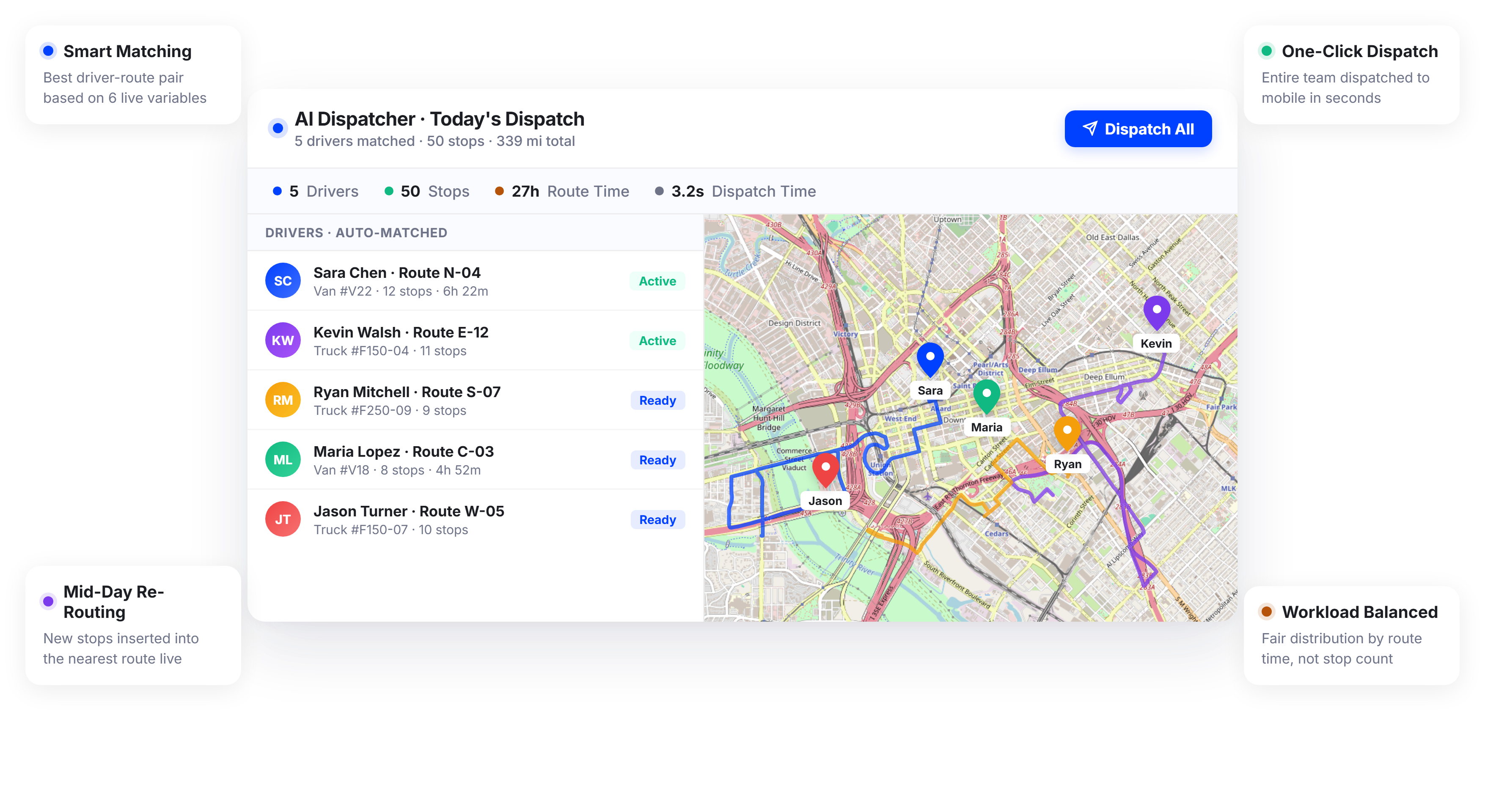
Delivery and Field Service Teams Using Upper Cut Dispatch Time by 85% and Eliminate Manual Route Assignments





You Have the Team. You Just Do Not Have a Dispatch Process That Scales.
What AI Dispatching Software Promises
-
 Routes assigned to the best-fit driver or technician based on real constraints
-
Dispatch completed in seconds, not 45 minutes of back-and-forth
-
Workloads balanced so no one is overloaded while others sit idle
-
One system handles optimization, assignment, and tracking together

What Actually Happens
-
The dispatcher assigns routes based on habit, not data, and the same three people get overloaded every day
-
New stops or service calls come in mid-day and someone spends 20 minutes on the phone rearranging the entire schedule
-
Driver availability, vehicle type, and service areas live in different spreadsheets that are never current
-
By the time routes are assigned, the delivery windows are already tight and your crew is already frustrated
How Upper’s AI Dispatcher Software Handles Every Dispatch Decision for You
Upper does not just optimize routes and hand them off for manual assignment. The AI dispatch system evaluates team member location, shift availability, vehicle capacity, skills, service areas, and time windows in a single pass, then assigns each route to the person best positioned to execute it. Whether you manage delivery drivers or field service technicians, you go from planning to dispatch in minutes instead of managing a morning-long assignment process.
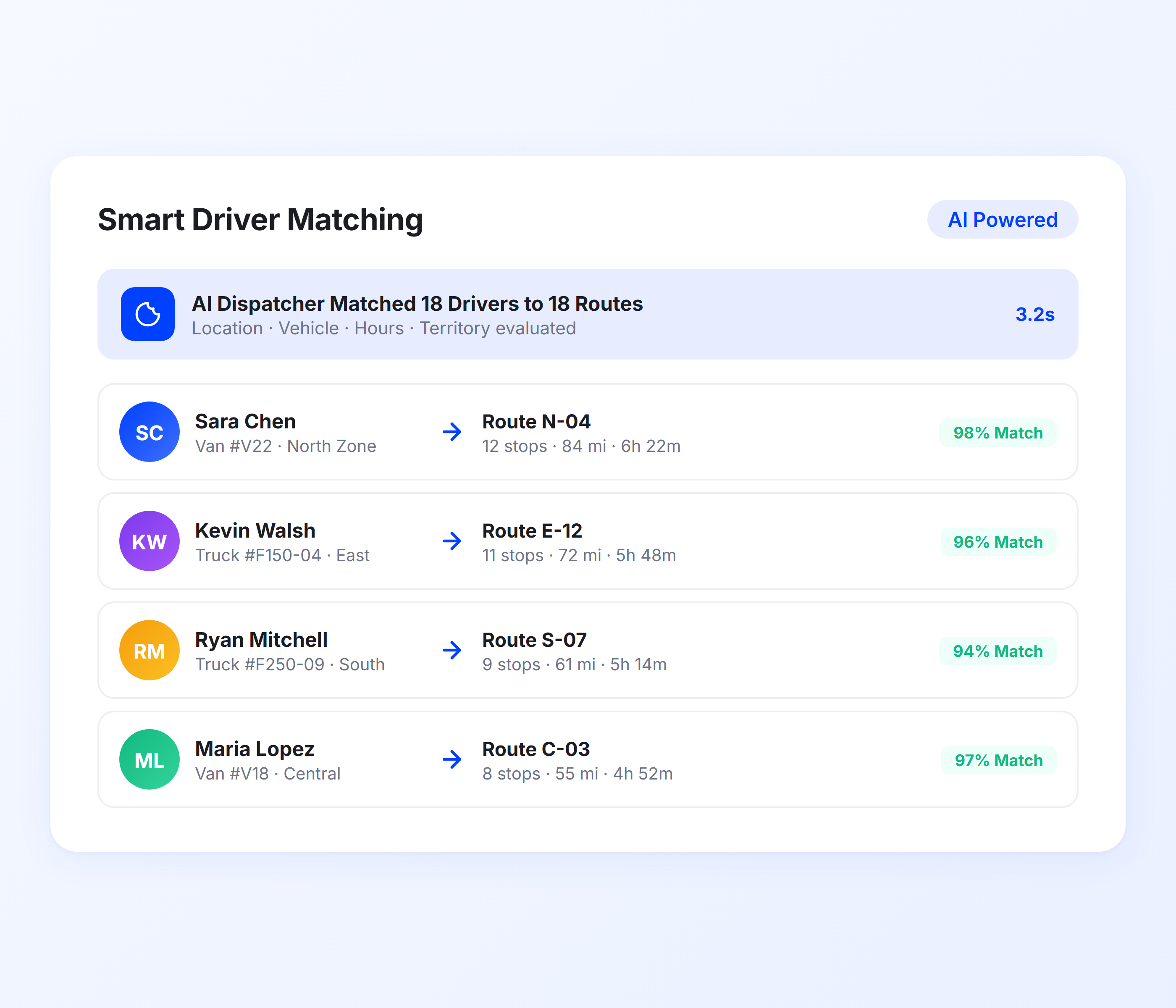
Smart Driver-Route Matching
Most dispatch tools let you drag routes onto team members. Upper’s AI dispatcher software does the matching for you. The system evaluates each person’s start location, vehicle type, available hours, and assigned territory, then pairs them with the routes they are best positioned to complete. Operations managers review the assignments on the dispatch dashboard and approve with one click.
-
 Automatic driver-route pairing based on proximity and availability
-
Vehicle capacity matching to prevent overloaded trucks or vans
-
Skill-based assignment for specialized deliveries or service jobs
-
Territory and zone preferences enforced automatically
-
Shift time constraints prevent assignments beyond scheduled hours
-
Priority flagging for time-sensitive deliveries or urgent service calls

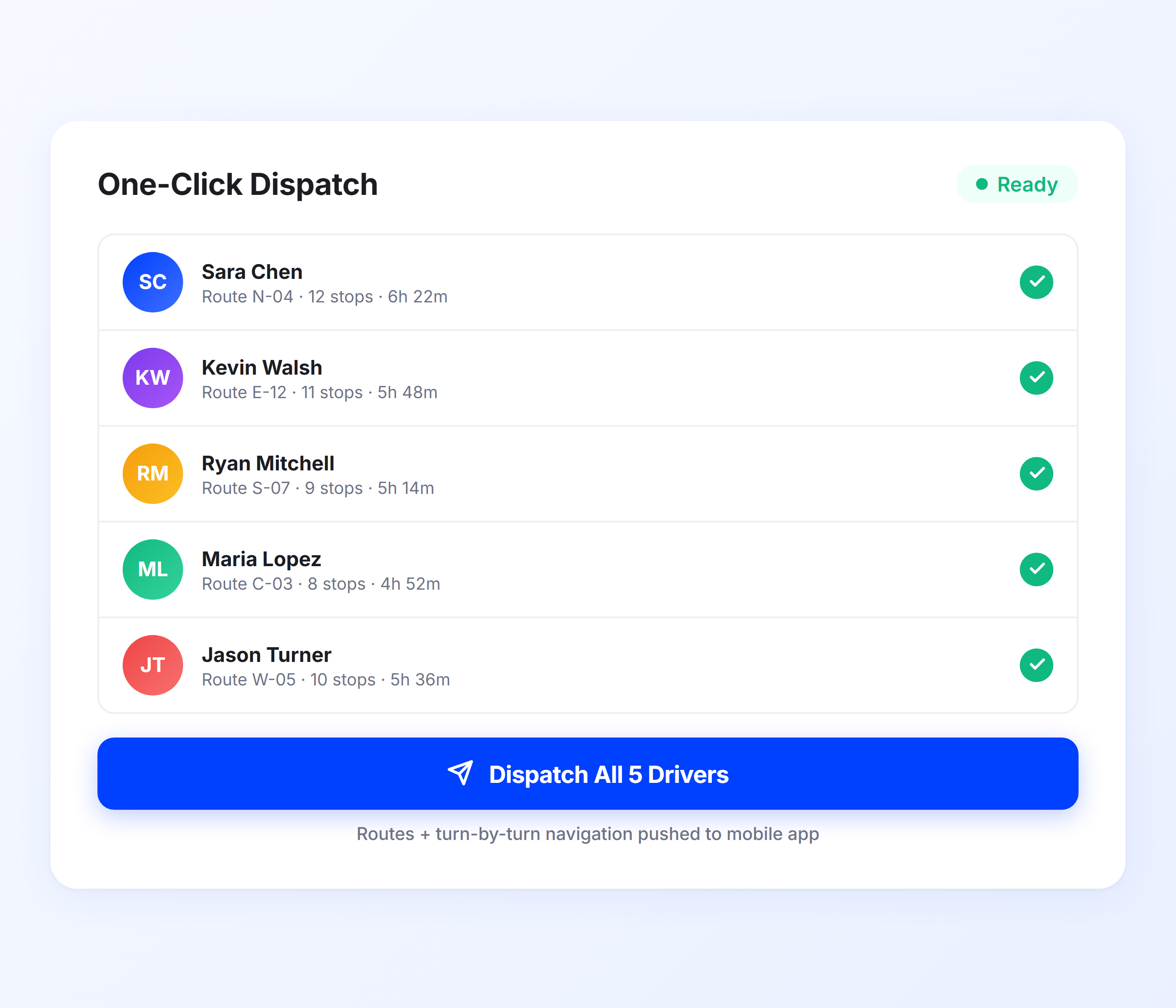
One-Click Team Dispatch
Once routes are optimized and team members are matched, Upper lets you dispatch everyone at once. Every driver and technician receives their route, stop sequence, and turn-by-turn directions on the Upper mobile app. No phone calls. No printing route sheets. No texting addresses one by one. The AI dispatch software handles the handoff so dispatchers and operations managers move on to other work.
-
Team-wide dispatch in a single click
-
Routes pushed directly to driver and technician mobile app
-
Turn-by-turn navigation included with every dispatched route
-
Team member confirmation and acceptance notifications
-
Dispatch history log for every route and assignment
-
Scheduled dispatch for recurring delivery days or service appointments
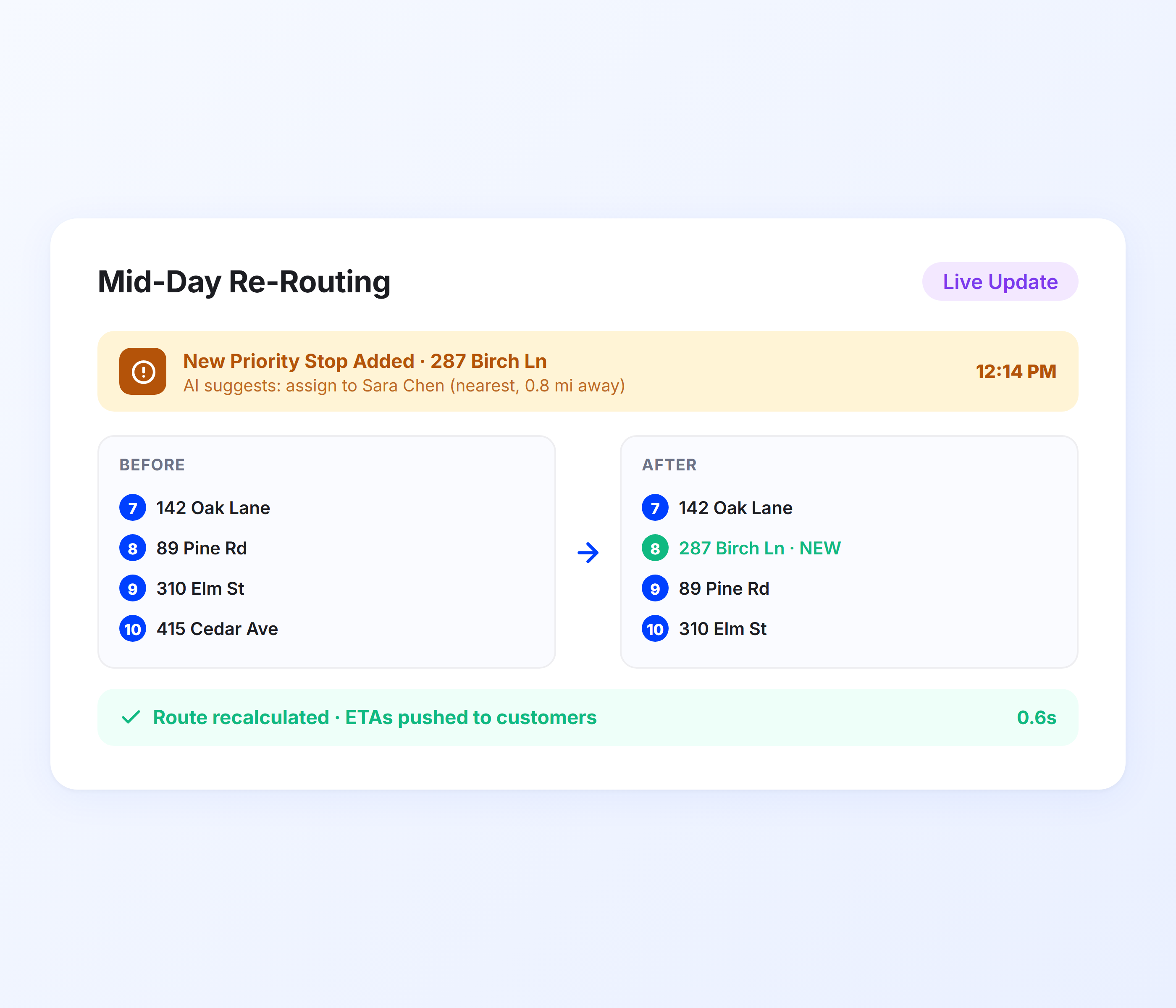
Dynamic Mid-Day Re-Routing
Dispatching is not a one-time event. Customers cancel, new orders arrive, service calls get added, and team members run into delays. Upper’s AI dispatching software handles mid-day changes without requiring a full re-plan. Add a new stop and the system identifies the nearest available person with remaining capacity. Cancel a stop and the affected route recalculates automatically. Managers stay in control through the real-time tracking dashboard without rebuilding every route.
-
New stop assignment to the optimal team member based on live location
-
Automatic route recalculation when stops are added or removed
-
Delay detection with suggested reassignments
-
Priority delivery or urgent service call injection into active routes
-
Live map showing all team positions and remaining stops
-
Customer ETA updates pushed automatically after route changes
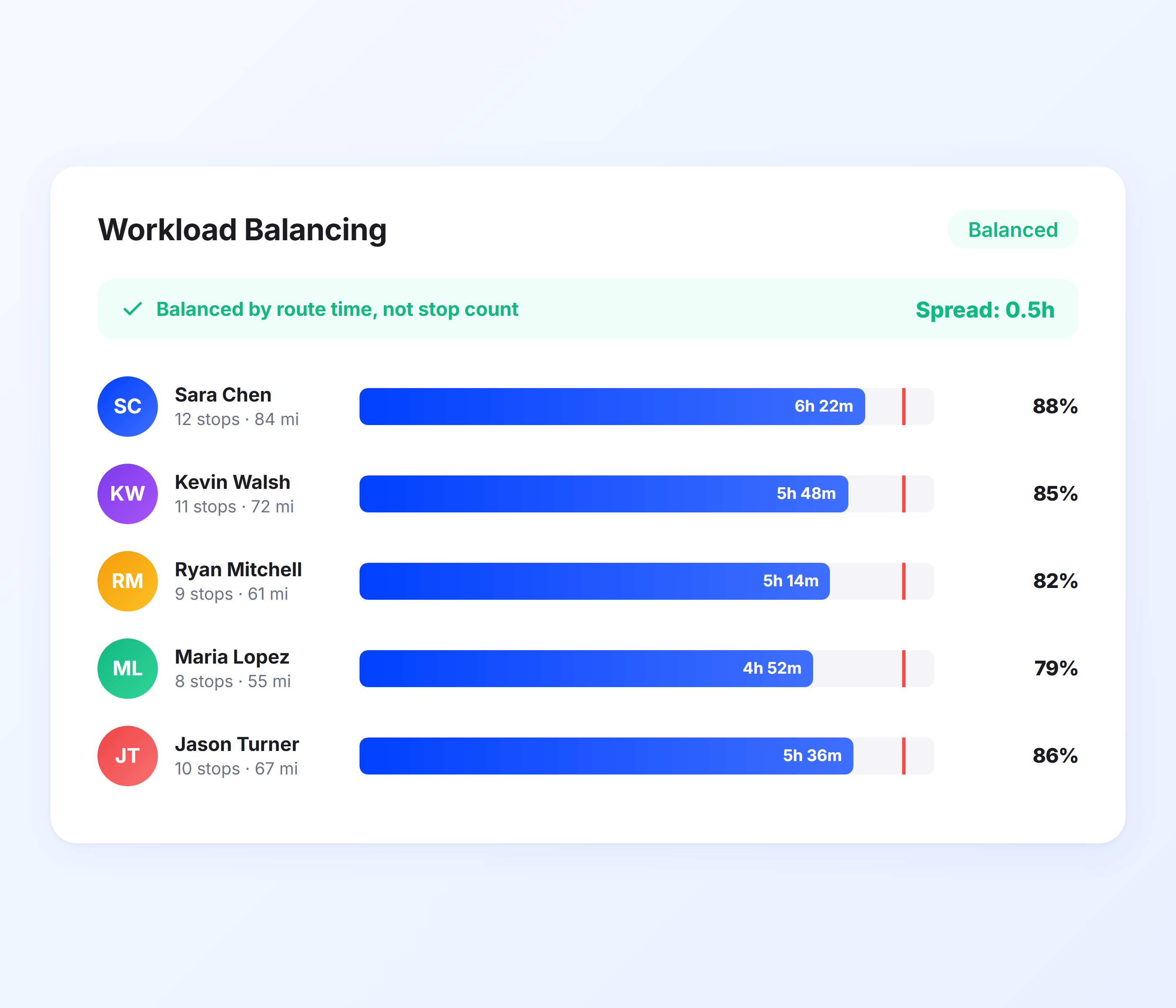
Workload Balancing
Intelligent dispatch means more than fast assignment. It means fair assignment. Upper’s AI dispatcher distributes work across your team so no one is running 50 stops while another finishes at noon. The system balances by total route time, not just stop count, factoring in drive distances, service durations, and time windows. Every team member carries a productive load and capacity is fully utilized.
-
Route time balancing instead of stop count balancing
-
Service duration factored into workload distribution
-
Overtime prevention through shift-length constraints
-
Utilization metrics visible before dispatch
-
Drag-and-drop adjustments for manual fine-tuning
-
Historical workload trends per team member
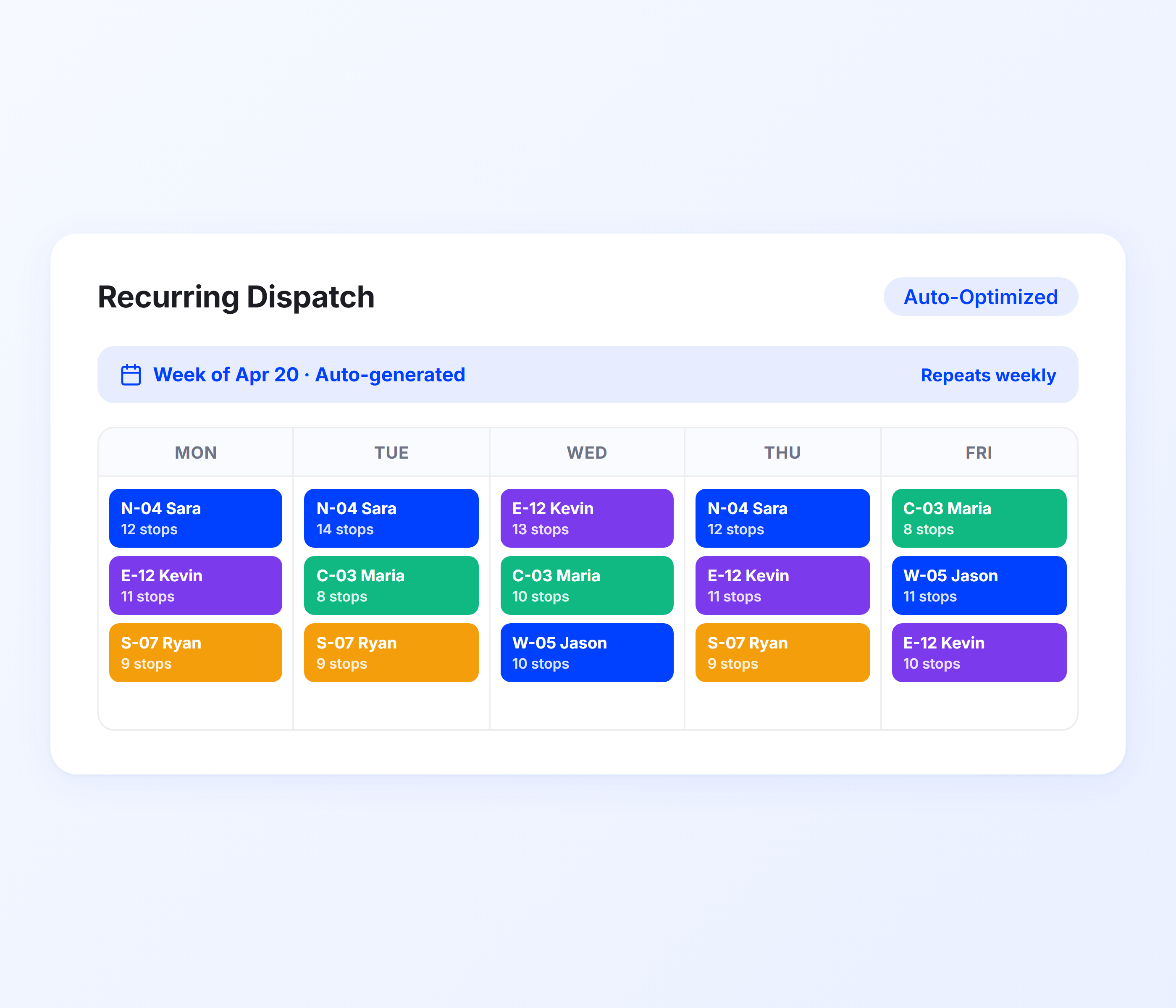
Automated Schedule and Recurring Dispatch
Teams with regular delivery days or recurring service appointments should not rebuild dispatch assignments from scratch every week. Upper lets operations managers create recurring route schedules with assignments locked in. The AI dispatch software re-optimizes for any changes (new stops, team member unavailability, updated time windows) while preserving the base schedule. Monday’s routes are ready before Monday morning.
-
Recurring schedule templates with locked assignments
-
Automatic re-optimization when stops or team members change
-
Day-of-week scheduling for repeat delivery or service routes
-
Substitution handling when regulars are unavailable
-
Bulk stop import from spreadsheets for scheduled routes
-
Pre-built routes editable up to dispatch time
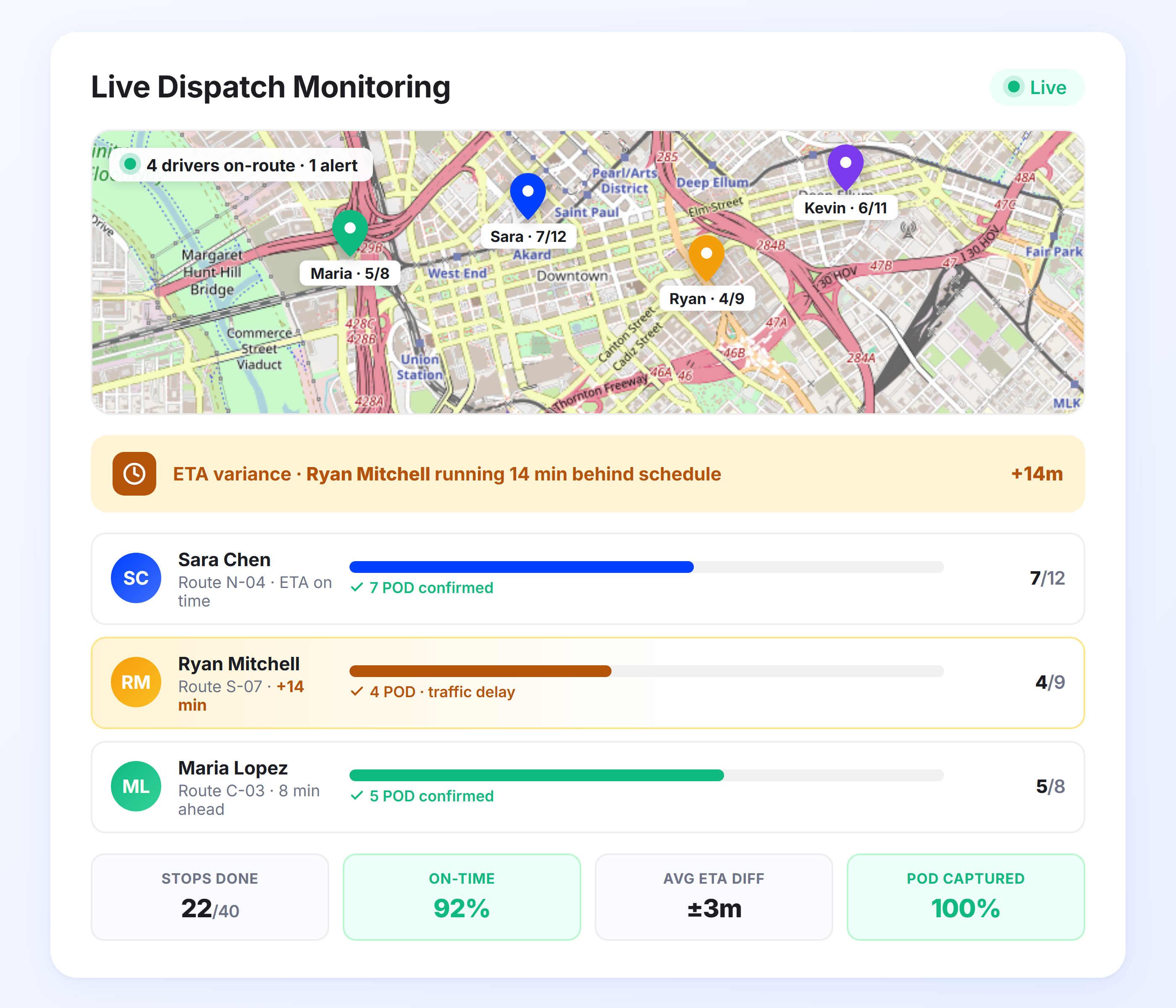
Live Dispatch Monitoring and Status Tracking
Dispatching routes is half the job. Knowing whether those routes are executing on schedule is the other half. Upper gives operations managers a real-time view of every dispatched route so they can spot problems before customers call. The fleet tracking feature shows each team member’s position, completed stops, remaining stops, and current ETA accuracy in one screen. When a driver falls behind or a technician finishes early, managers see it immediately and can reassign stops or adjust priorities without waiting for a phone call.
-
Real-time stop completion status for every dispatched route
-
Driver and technician location overlay on a single map view
-
ETA variance alerts when team members fall behind schedule
-
Completed vs. remaining stop counts per team member
-
Proof of delivery confirmation is visible as stops are completed
-
End-of-day dispatch performance summary per route and team member
Let AI Handle Your Dispatch So You Can Focus on Your Business
Upper’s AI dispatcher software assigns, optimizes, and dispatches routes to your team in minutes. No spreadsheets, no guesswork.
Client Success Stories

“We used to spend 2 hours every morning planning routes in spreadsheets. Now it takes 10 minutes. Upper paid for itself in the first week.”


“What sold me was how easy it is to make changes. My schedules change a lot and I drag & drop stops and we’re back on track in 30 seconds. With our old software, that would’ve been an hour of replanning.”


“Our drivers actually follow the routes now. The app is simple, the navigation works, and they’re not calling me every 10 minutes asking where to go next.”

AI Dispatch Software Features for Complete Operations Control
- Route Optimization
- Real-Time GPS Tracking
- Proof of Delivery
- Customer Notifications
- Route Analytics

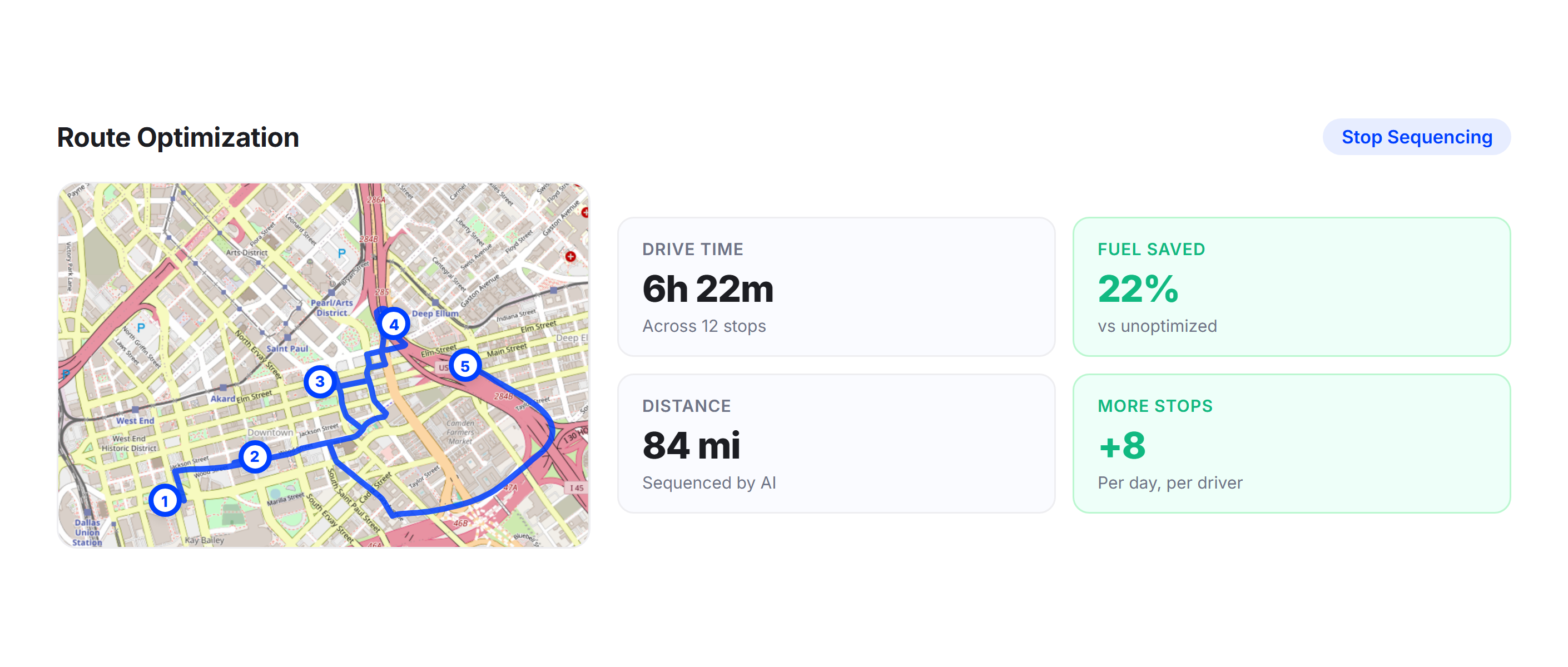
Route Optimization
Upper’s route optimization engine sequences every stop to minimize drive time and distance before the AI dispatcher assigns routes. Drivers and technicians receive routes that are already optimized, not just assigned. The result is fewer miles, less fuel, and more stops or service calls per shift.
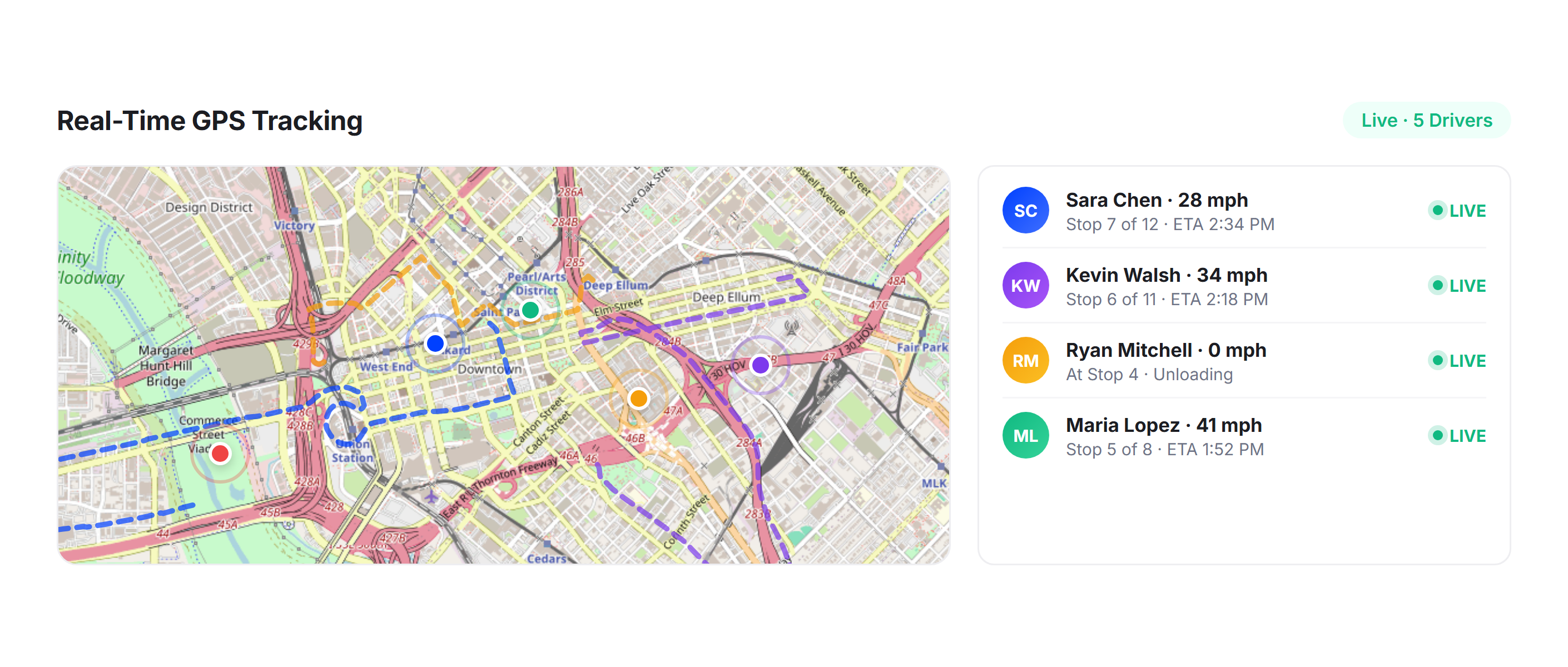
Real-Time GPS Tracking
Track every team member’s location, speed, and route progress live on the tracking dashboard. Managers use real-time data to make smarter mid-day dispatch decisions and give customers accurate ETAs without calling drivers or technicians.
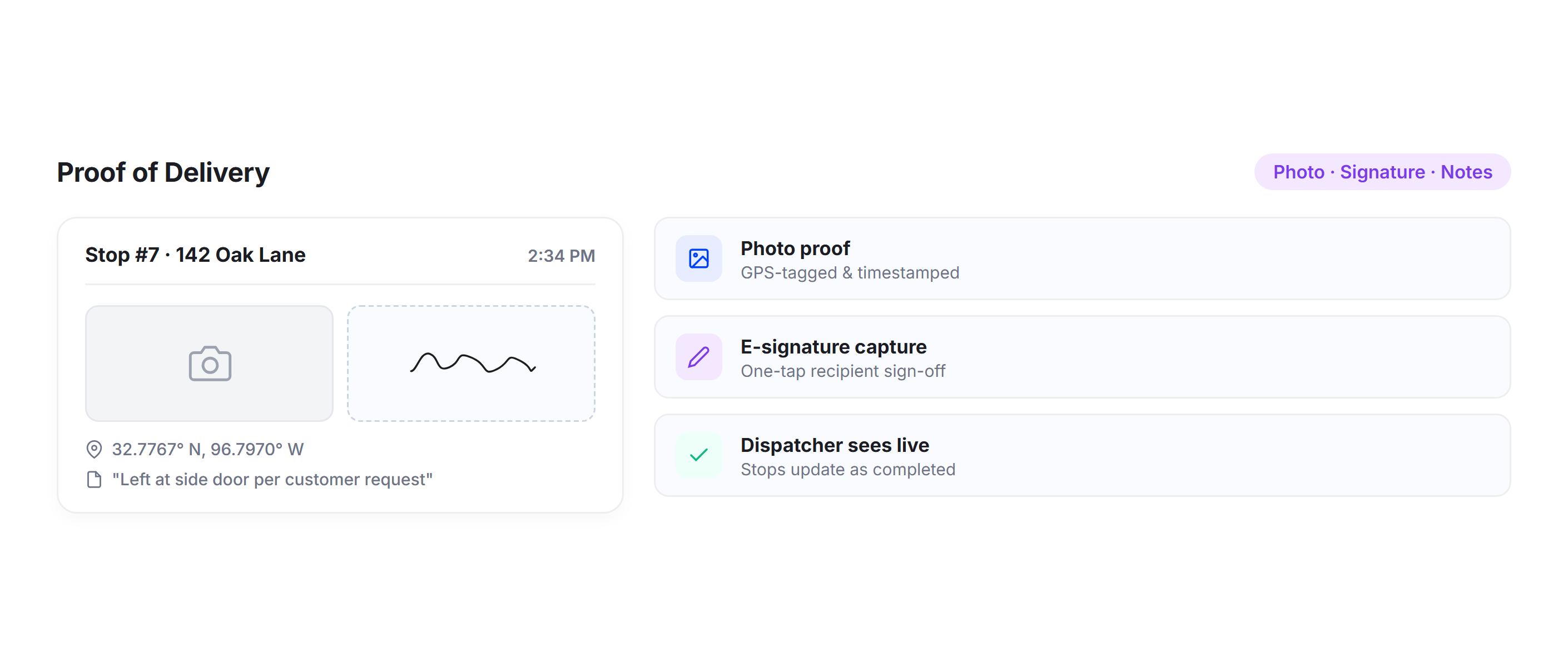
Proof of Delivery
Drivers and technicians capture photo proof, signatures, and service notes at every stop through the Upper mobile app. Dispatchers see completed stops update in real time, confirming that assigned routes are executing as planned.
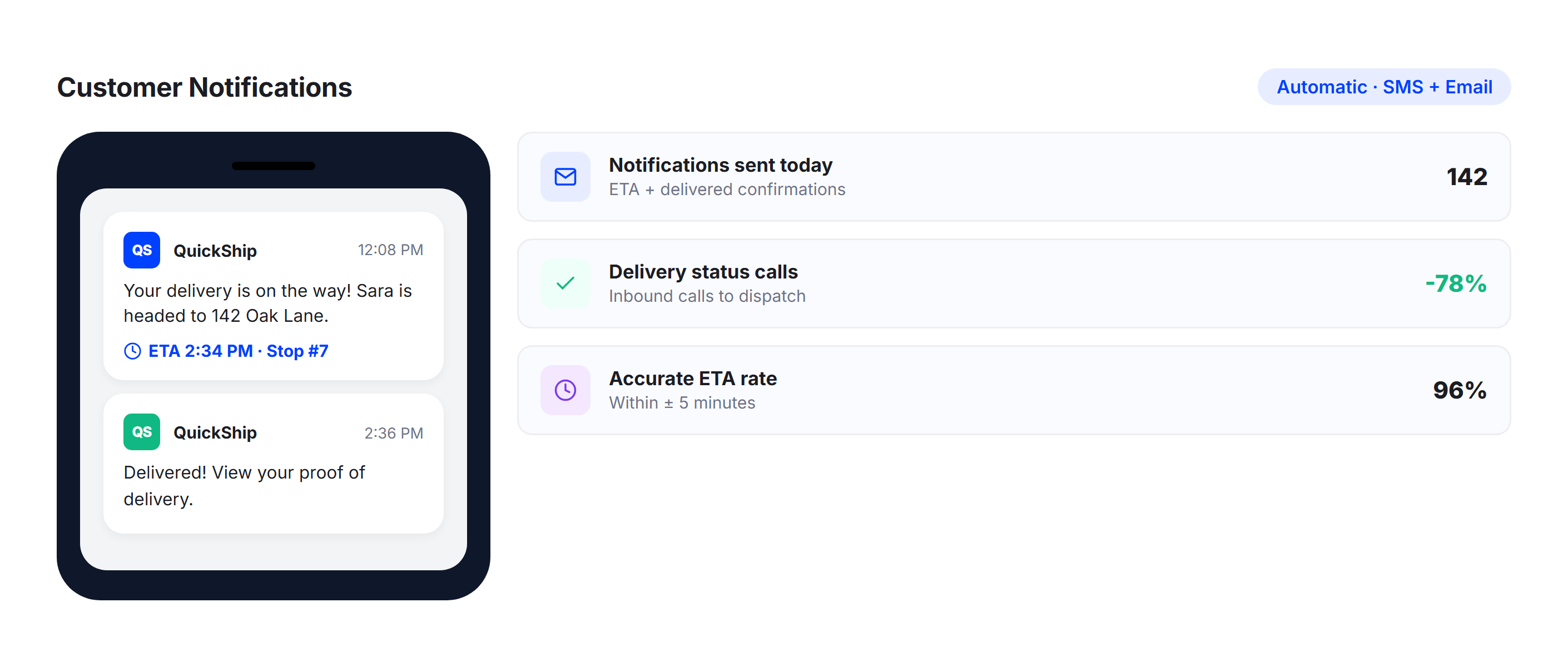
Customer Notifications
Automated notifications keep customers informed with real-time ETAs and status updates. Fewer “where’s my delivery?” or “when is the technician arriving?” calls mean dispatchers spend less time on the phone and more time managing operations.
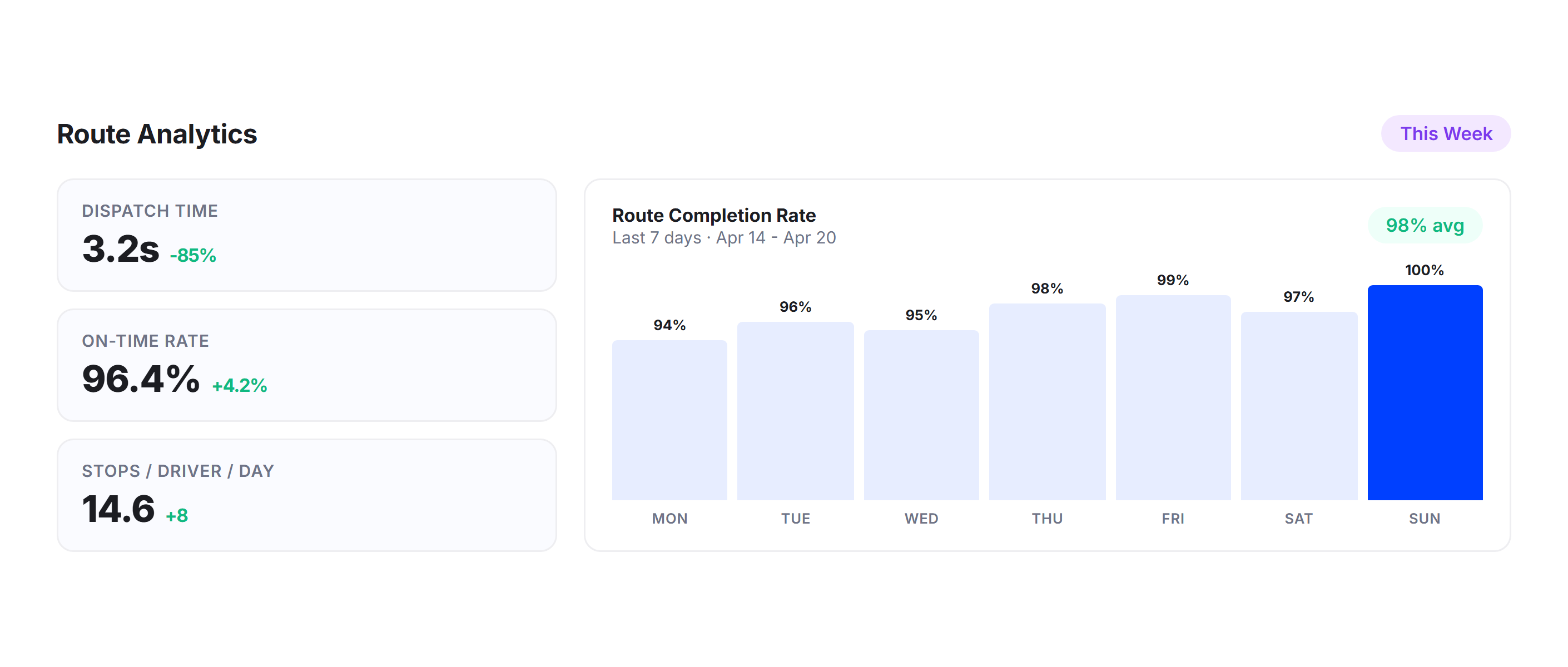
Route Analytics
Upper’s analytics dashboard tracks dispatch efficiency, team performance, on-time rates, and route completion metrics. Use the data to spot patterns, improve future dispatch decisions, and measure the impact of AI-powered assignment.
Why Delivery and Field Service Companies Choose Upper

Cut Dispatch Time From Hours to Minutes
Upper’s AI dispatcher evaluates every variable and assigns routes across your team in seconds. Operations managers move from planning to dispatch before the first team member finishes their coffee.

Eliminate Manual Assignment Errors
Human dispatchers forget constraints, overlook availability, and default to habit. The AI dispatch software evaluates every team member and every constraint simultaneously so the best assignment is the default.

Scale Without Hiring More Dispatchers
Adding drivers or technicians to your team should not mean adding dispatch staff. Upper’s AI dispatching software handles 5 team members or 50 with the same one-click workflow and zero additional overhead.

Reduce Overtime and Burnout
Balanced workloads mean no one consistently absorbs the overflow. Upper distributes work fairly based on route time, capacity, and availability so your team stays productive without burning out.

Adapt to Mid-Day Changes Instantly
New orders, cancellations, emergency service calls, and delays do not require a full re-dispatch. Upper reassigns and recalculates in real time so the rest of the team stays on schedule.

Make Dispatch Decisions Backed by Data
Every dispatch creates a data trail. Upper tracks assignment patterns, utilization, and route efficiency over time so managers can refine their operation with actual performance metrics instead of intuition.
Sync Your Dispatch Data with the Tools You Already Use


Stop Dispatching by Guesswork
Join thousands of delivery and field service teams who use Upper’s AI dispatcher software to assign optimized routes in seconds, balance workloads, and eliminate manual dispatch entirely.
Frequently Asked Questions
-
Can I override the AI dispatcher’s assignments before dispatching?
Yes. Upper handles the automatic matching first, then managers can adjust anything on the dispatch screen. Drag stops between team members, reassign entire routes, lock specific assignments the optimizer should not change, or manually add stops to a specific person. Every change triggers an instant recalculation of drive times, ETAs, and workload balance across the team.
-
Does the AI dispatch software handle mid-day changes like new orders or emergency service calls?
Upper’s AI dispatching software handles changes in real time. When a new stop or service call is added, the system identifies the nearest available team member with remaining capacity and suggests the optimal insertion point. When a stop is cancelled, the affected route recalculates automatically. Managers can also manually reassign stops based on live positions shown on the tracking map.
-
How does Upper’s AI dispatcher balance workloads across the team?
The AI dispatcher balances by total route time, not just stop count. A technician with 8 service appointments spread across 40 miles gets a different workload than a driver with 15 deliveries in a two-mile radius. Upper factors in drive distance between stops, service duration at each stop, time window constraints, and vehicle capacity to ensure every team member carries a fair and productive workload.
-
What happens when a driver or technician calls in sick or becomes unavailable?
Managers select the unavailable person’s route and redistribute their stops across the remaining team with one click. Upper’s AI dispatch software suggests optimal reassignment based on each remaining team member’s current workload, live location, and available capacity. Affected stops integrate into existing routes without a full rebuild, and updated ETAs are pushed to customers automatically.
-
Does Upper’s AI dispatcher work with time windows and priority jobs?
Time windows are treated as hard constraints during route optimization and dispatch. The AI dispatcher software will not assign a time-sensitive stop to someone who cannot reach it within the required window. Priority deliveries and urgent service calls are assigned first to the nearest qualified team member, and the remaining stops are distributed to balance the overall workload around those fixed commitments.
-
Can I schedule dispatch in advance for recurring delivery days or service appointments?
Upper supports recurring route schedules with team assignments built in. Set up your weekly delivery patterns or service appointment schedules once, and the AI dispatch software re-optimizes for any changes each day while preserving your base schedule. Monday’s routes are ready before Monday morning, with assignments, time windows, and stop sequences already locked in.