---
title: "Workwave Reviews"
url: "https://demo.upperinc.com/reviews/workwave-review/"
date: "2023-08-02T13:02:28+00:00"
modified: "2026-03-18T00:00:00+00:00"
author: "Rakesh Patel"
categories: ["Reviews"]
word_count: 2503
reading_time: "13 min read"
summary: "Discover the ins and outs of WorkWave RouteManager! Is it the perfect solution for your business? Uncover features, limitations, pricing, and better alternative to optimize your routes efficiently."
description: "Evaluate WorkWave with our %currentyear% review. Learn why Upper is a better choice, with standout features and competitive pricing. Try Upper for FREE!"
keywords: "Reviews"
language: "en"
schema_type: "Article"
related_posts:
  - title: "Track-POD Reviews"
    url: "https://demo.upperinc.com/reviews/track-pod/"
  - title: "Ultimate RouteSavvy Reviews 2026: Features, Pricing, and Alternatives"
    url: "https://demo.upperinc.com/reviews/routesavvy/"
  - title: "Comprehensive Samsara Reviews 2025: Features, Pricing &#038; Alternatives"
    url: "https://demo.upperinc.com/reviews/samsara/"
---

# Workwave Reviews

_Published: August 2, 2023_  
_Author: Rakesh Patel_  

![Workwave](https://demo.upperinc.com/wp-content/uploads/2023/08/Workwave.png)

> Discover the ins and outs of WorkWave RouteManager! Is it the perfect solution for your business? Uncover features, limitations, pricing, and better alternative to optimize your routes efficiently.

<div id="bsf_rt_marker"></div><div class="review-content"><div class="row large-content"><div class="col-sm-12"><section id="about"><div class="row"><div class="col-lg-12">## <span class="ez-toc-section" id="top-features"></span>Top Features

<div class="row"><div class="col-sm-5"><div class="feature-compares"><div class="d-flex mb-32 align-items-center"><div class="">![workwave](https://demo.upperinc.com/wp-content/uploads/2023/08/workwave-small-logo.svg)</div><div class="ml-24"><div class="d-flex">### Workwave

 </div> <span class="small-title">by Workwave</span> </div> </div><div class="compare-feature-list">- <span class="px-16">3.9</span>Planning &amp; Scheduling
- <span class="px-16">4.0</span>Route Optimization
- <span class="px-16">3.9</span>Reports &amp; Analytics
- <span class="px-16">4.0</span>Team Management
- <span class="px-16">3.8</span>Customer Support

 </div><div class="com-page-btn">[Go To Website](https://www.route-manager.com/ "route-manager.com")</div> </div> </div><div class="col-sm-6"><div class="feature-compares feature-compares-socialpilot "><div class="top-other-user-choose"><div>Other Users Choose

 </div> </div><div class="d-flex mb-32 align-items-center"><div class="">![Upper](/wp-content/uploads/2023/06/upper-logo-small.svg)</div><div class="ml-24"><div class="d-flex">### Upper

 </div><div><div class="d-flex"><div class="star-rating rating-50">    </div> <span class="px-8">5.0 (5)</span> </div> </div> </div> </div><div class="compare-feature-list">- <span class="px-16">4.8</span>Planning &amp; Scheduling
- <span class="px-16">5.0</span>Route Optimization
- <span class="px-16">4.8</span>Analytics
- <span class="px-16">4.7</span>Team Management
- <span class="px-16">5.0</span>Customer Support

 </div><div class="com-page-btn actv">Try Upper for FREE</div> </div> </div> </div><div class="overview-text pt-lg-5 pt-4">## <span class="ez-toc-section" id="overview"></span>Overview

WorkWave RouteManager is a comprehensive **route management software** made for delivery businesses, vehicle dispatchers, and delivery drivers. It has a variety of features and capabilities that are designed to make route planning simpler, improve delivery times, and increase overall operational efficiency.

The [route planning software](https://demo.upperinc.com/features/route-planning/) streamlines route planning for vehicle dispatchers and cuts down on time spent on manual operations. WorkWave RouteManager reduces dispatchers’ work and provides transparency throughout the delivery process with features like real-time updates and seamless communication with drivers and end customers.

Delivery drivers benefit from the software’s mobile app, which let them see the job assignments and allows for smooth communication with dispatchers and customers. The delivery process is improved by the ability of drivers to update delivery statuses in real-time.

With its easy-to-use interface and considerable routing functionalities, WorkWave Route Manager helps businesses save time, cut costs, improve customer satisfaction, and streamline their delivery operations.

 </div> </div> </div> </section><section class="ratings progressbar-rating" id="ratings"><div class="container-md pt-lg-5 pt-4"><div class="row"><div class="col-lg-12 col-md-12"><div class="rating-title">## <span class="ez-toc-section" id="hootsuite-rating"></span>Workwave Route Planner Rating

 </div> </div> </div><div class="row"><div class="col-md-12"><div class="table-responsive"> | Ratings | <div class="d-flex align-items-center"><div class="Ht-box crbx"></div> Workwave </div> | <div class="d-flex align-items-center "><div class="sp-box crbx"></div> Upper </div> |
|---|---|---|
| Meet Requirements | <div class="cm-rating"><div class="rating-bar"><div class="d-flex align-items-center"><div class="pro-bar"><div class="progress"><div aria-valuemax="100" aria-valuemin="0" aria-valuenow="70" class="progress-bar" role="progressbar" style="width: 80%;"></div> </div> </div><div class="bar-total ml-16">4.0 </div> </div> </div> </div> | <div><div class="rating-bar"><div class="d-flex align-items-center"><div class="pro-bar"><div class="progress"><div aria-valuemax="100" aria-valuemin="0" aria-valuenow="70" class="progress-bar" role="progressbar" style="width: 96%;"></div> </div> </div><div class="bar-total ml-16">4.8 </div> </div> </div> </div> |
| Ease of Use | <div class="cm-rating"><div class="rating-bar"><div class="d-flex align-items-center"><div class="pro-bar"><div class="progress"><div aria-valuemax="100" aria-valuemin="0" aria-valuenow="70" class="progress-bar" role="progressbar" style="width: 82%;"></div> </div> </div><div class="bar-total ml-16">4.1 </div> </div> </div> </div> | <div><div class="rating-bar"><div class="d-flex align-items-center"><div class="pro-bar"><div class="progress"><div aria-valuemax="100" aria-valuemin="0" aria-valuenow="70" class="progress-bar" role="progressbar" style="width: 100%;"></div> </div> </div><div class="bar-total ml-16">5.0 </div> </div> </div> </div> |
| Value for Money | <div class="cm-rating"><div class="rating-bar"><div class="d-flex align-items-center"><div class="pro-bar"><div class="progress"><div aria-valuemax="100" aria-valuemin="0" aria-valuenow="70" class="progress-bar" role="progressbar" style="width: 78%;"></div> </div> </div><div class="bar-total ml-16">3.9 </div> </div> </div> </div> | <div><div class="rating-bar"><div class="d-flex align-items-center"><div class="pro-bar"><div class="progress"><div aria-valuemax="100" aria-valuemin="0" aria-valuenow="70" class="progress-bar" role="progressbar" style="width: 100%;"></div> </div> </div><div class="bar-total ml-16">5.0 </div> </div> </div> </div> |
| Ease of Admin | <div class="cm-rating"><div class="rating-bar"><div class="d-flex align-items-center"><div class="pro-bar"><div class="progress"><div aria-valuemax="100" aria-valuemin="0" aria-valuenow="70" class="progress-bar" role="progressbar" style="width: 76%;"></div> </div> </div><div class="bar-total ml-16">3.8 </div> </div> </div> </div> | <div><div class="rating-bar"><div class="d-flex align-items-center"><div class="pro-bar"><div class="progress"><div aria-valuemax="100" aria-valuemin="0" aria-valuenow="70" class="progress-bar" role="progressbar" style="width: 100%;"></div> </div> </div><div class="bar-total ml-16">5.0 </div> </div> </div> </div> |
| Performance | <div class="cm-rating"><div class="rating-bar"><div class="d-flex align-items-center"><div class="pro-bar"><div class="progress"><div aria-valuemax="100" aria-valuemin="0" aria-valuenow="70" class="progress-bar" role="progressbar" style="width: 82%;"></div> </div> </div><div class="bar-total ml-16">4.1 </div> </div> </div> </div> | <div><div class="rating-bar"><div class="d-flex align-items-center"><div class="pro-bar"><div class="progress"><div aria-valuemax="100" aria-valuemin="0" aria-valuenow="70" class="progress-bar" role="progressbar" style="width: 97%;"></div> </div> </div><div class="bar-total ml-16">4.8 </div> </div> </div> </div> |
| Features | <div class="cm-rating"><div class="rating-bar"><div class="d-flex align-items-center"><div class="pro-bar"><div class="progress"><div aria-valuemax="100" aria-valuemin="0" aria-valuenow="70" class="progress-bar" role="progressbar" style="width: 80%;"></div> </div> </div><div class="bar-total ml-16">4.0 </div> </div> </div> </div> | <div><div class="rating-bar"><div class="d-flex align-items-center"><div class="pro-bar"><div class="progress"><div aria-valuemax="100" aria-valuemin="0" aria-valuenow="70" class="progress-bar" role="progressbar" style="width: 98%;"></div> </div> </div><div class="bar-total ml-16">4.9 </div> </div> </div> </div> |
| Quality of Support | <div class="cm-rating"><div class="rating-bar"><div class="d-flex align-items-center"><div class="pro-bar"><div class="progress"><div aria-valuemax="100" aria-valuemin="0" aria-valuenow="70" class="progress-bar" role="progressbar" style="width: 76%;"></div> </div> </div><div class="bar-total ml-16">3.8 </div> </div> </div> </div> | <div><div class="rating-bar"><div class="d-flex align-items-center"><div class="pro-bar"><div class="progress"><div aria-valuemax="100" aria-valuemin="0" aria-valuenow="70" class="progress-bar" role="progressbar" style="width: 100%;"></div> </div> </div><div class="bar-total ml-16">5.0 </div> </div> </div> </div> |

 </div> </div> </div> </div> </section><section id="review"><div class="row"><div class="col-lg-12 col-md-12">## WorkWave RouteManager Review

<div class="cm-list-review"><div class="review-box"><div><div class="positive-review mb-32">Positive

- Saves time and fuel costs by generating the most efficient routes based on distance, traffic, and delivery constraints.
- Enables effective communication, reduces miscommunication, and allows for quick adjustments with real-time updates on route changes, delays, and important information.
- Increases transparency, keeps customers informed, and improves satisfaction with features like customer notifications, live-tracking links, and delivery status updates.
- Offers in-app communication for seamless updates between drivers and the backend team.
- Enhances driver productivity through automated scheduling and dispatching.
- Monitors vehicle performance to improve fuel efficiency and reduce maintenance costs.
- Captures proof of delivery with signatures, notes, and pictures, ensuring total transparency throughout the process.
- Allows for easy modifications with a user-friendly interface and drag-and-drop functionality, enabling quick adjustments, job assignments, and route optimization.
- Provides data-driven analytics for analysis of key performance indicators (KPIs), driver productivity, and overall costs, facilitating informed decision-making.
- Tracks driver’s behavior to incentivize good performance and gauge improvement.
- Provides an open API and seamlessly integrates with Zapier, allowing users to automate workflows and connect RouteManager with other applications.

 </div> </div><div class="negative-review">Negative

- Importing spreadsheets with multiple sheets and the need to open and close them for modifications can be time-consuming and frustrating.
- There is some instability in the new system, leading to information loss. This issue not only affects data integrity but also results in increased time required for routing tasks.
- Negative experiences with customer service have been reported, including feeling scammed into a yearly commitment and encountering difficulties in receiving proper onboarding support.
- There have been instances where the software placed stops in different states or countries because of identical address formats.
- Users have expressed the need for easier driver route adjustments and highlighted slow performance when adding locations.
- Some users pointed out that the software is difficult to use initially, citing non-standard language usage, complicated navigation, and poor visibility of breadcrumb trails on the map.
- The software seems outdated, with limited color-coding options, and GPS functionality that relies on coordinates rather than addresses.
- There are some performance issues when using the software in conjunction with other tabs in Google Chrome, leading to a drop in performance.
- Users have found the report generation process to be challenging and the reports themselves to have a dull appearance.
- There have also been complaints about the lack of certain features, such as multiday routes, labeled routes, and unfulfilled feature requests.
- The absence of a trial version or trial period prevents potential users from fully exploring the software’s features and capabilities before committing to a subscription.
- The lack of transparent pricing information, with only a vague statement mentioning “Pricing as low as $54 per month per vehicle,” can create uncertainty for potential customers.

 </div> </div> </div> </div> </div> </section><section class="" id="pricing"><div class="row"><div class="col-lg-12 col-md-12"><div class="rating-title">## <span class="ez-toc-section" id="hootsuite-pricing"></span>WorkWave RouteManager Pricing

 RouteManager by WorkWave offers businesses a simple and inclusive pricing structure, allowing them to effectively manage their operations. So, let’s explore the pricing options and the features provided by each plan ### WorkWave RouteManager Pricing Plan

 </div> </div> </div><div class=" pricing-slider row"><div class="item col-sm-4"><div class="pricing-full-box"><div class="pricebox-top-part text-center">#### RouteManager

### $54

 <span class="d-block">PER MONTH PER VEHICLE</span> </div><div class="pricebox-points-lst">- 6 Basic Features

 </div><div class="pricebox-points">#### Key Features

- Route Optimization
- Driver Mobile App
- Order Import
- Simulations
- Zapier Direct Integration
- Open API

 </div> </div> </div><div class="item col-sm-4"><div class="pricing-full-box"><div class="pricebox-top-part text-center">#### RouteManager360

### Contact for pricing

 <span class="d-block">–</span> </div><div class="pricebox-points-lst">- 17 Advanced Features

 </div><div class="pricebox-points">#### RouteManager Features+

- Barcode Scanning
- Event Tracking
- Proof of Job Completion
- Customer Notifications
- Virtual Tracking

 </div> </div> </div><div class="item col-sm-4"><div class="pricing-full-box"><div class="pricebox-top-part text-center">#### RouteManager360+

### Contact for pricing

 <span class="d-block">–</span> </div><div class="pricebox-points-lst">- 17 Professional Features

 </div><div class="pricebox-points">#### RouteManager360 Features+

- Driver Behavior Monitoring
- In-Vehicle GPS Tracking
- Dynamic Load
- Email Support

 </div> </div> </div> </div><div class=""><div class="rating-title price-comparsion-title">## <span class="ez-toc-section" id="price-comparison"></span>Pricing Comparison

While WorkWave RouteManager provides three pricing plans, the specific pricing details for each plan are undisclosed. The pricing page does provide the starting price of $54 per month per vehicle, but there is a lack of complete transparency. This makes it difficult for businesses to evaluate their options accurately.

Fortunately, businesses in search of an alternative with advanced routing features and a more transparent and comprehensive pricing structure can turn to Upper.

So, let’s take a look at the pricing comparison between the plans of both software:

 </div><div>Price Plan For Team _![Logo team](https://demo.upperinc.com/wp-content/uploads/2023/07/logo-team.svg)![Curve arrow](https://demo.upperinc.com/wp-content/uploads/2023/07/curve-arrow.svg)_</div><div class="comparison-full-box cm-list-review"><div class="comparison-box comparison-box-upper d-flex align-items-center"><div class="company-logo"><div class="review-top-logo">![Upper](https://demo.upperinc.com/wp-content/uploads/2023/06/upper-logo-small.svg) **Upper**<div class="star-rating rating-50">    </div> </div> </div><div class="company-content">**Essential**$40<sub>/mo</sub>

 <small>Per user per month</small> </div><div class="company-content">**Free Trial** <small>   Available </small><div class="com-page-btn actv">Try Upper for FREE</div> </div> </div><div class="comparison-box d-flex align-items-center"><div class="company-logo"><div class="review-top-logo myroutelogo">![workwave](https://demo.upperinc.com/wp-content/uploads/2023/08/workwave-small-logo.svg) **WorkWave**<div class="star-rating rating-50">    </div> </div> </div><div class="company-content margin-1">**RouteManager**$162<sub>/mo</sub>

 <small>3 vehicles included</small> </div><div class="company-content company-content-btn margin-4">**Free Trial** <small>   Not Available </small><div class="com-page-btn">[Visit Website](https://www.route-manager.com/ "route-manager.com")</div> </div> </div> </div>---

 </div> </section> <section class="features-app-one features-app-comp db-section accessing-worth-block" id="features-app-one">###  Assessing the Worth: Is Your Investment Worth the Price?

<div class="upper-block upper-db-desc"> When contemplating an investment in route planning software, it’s crucial to evaluate the features and pricing of WorkWave RouteManager. WorkWave RouteManager offers a complete solution for simplifying routing operations with its range of features. However, it’s crucial to thoroughly evaluate if the investment aligns with the requirements and budget of your business. So, let’s evaluate WorkWave RouteManager’s genuine worth and return on investment for your business while considering features, pricing, customization options, and customer support.

 </div><div class="listing-of-features-outer"> | Features | ![WorkWave](https://demo.upperinc.com/wp-content/uploads/2024/07/workwave-small-logo.png) | ![Upper](https://demo.upperinc.com/wp-content/uploads/2023/08/upper-logo-small.png) |
|---|---|---|
| Route Optimization | ![Right](https://demo.upperinc.com/wp-content/uploads/2023/06/ck-right.svg) | ![Right](https://demo.upperinc.com/wp-content/uploads/2023/06/ck-right.svg) |
| Optimization Limit | <span>10,000 orders per day</span> | <span>Unlimited</span> |
| Driver Mobile App | ![Right](https://demo.upperinc.com/wp-content/uploads/2023/06/ck-right.svg) | ![Right](https://demo.upperinc.com/wp-content/uploads/2023/06/ck-right.svg) |
| Set Stops Priority | ![Wrong](https://demo.upperinc.com/wp-content/uploads/2023/06/ck-wrong.svg) | ![Right](https://demo.upperinc.com/wp-content/uploads/2023/06/ck-right.svg) |
| Specify Pickup &amp; Delivery in the Same Route | ![Wrong](https://demo.upperinc.com/wp-content/uploads/2023/06/ck-wrong.svg) | ![Right](https://demo.upperinc.com/wp-content/uploads/2023/06/ck-right.svg) |
| Live Driver Tracking | ![Right](https://demo.upperinc.com/wp-content/uploads/2023/06/ck-right.svg) | ![Right](https://demo.upperinc.com/wp-content/uploads/2023/06/ck-right.svg) |
| Expected Time to Arrive (ETA) | ![Right](https://demo.upperinc.com/wp-content/uploads/2023/06/ck-right.svg) | ![Right](https://demo.upperinc.com/wp-content/uploads/2023/06/ck-right.svg) |
| Parcel Info | ![Wrong](https://demo.upperinc.com/wp-content/uploads/2023/06/ck-wrong.svg) | ![Right](https://demo.upperinc.com/wp-content/uploads/2023/06/ck-right.svg) |
| Curbside Delivery | ![Wrong](https://demo.upperinc.com/wp-content/uploads/2023/06/ck-wrong.svg) | ![Right](https://demo.upperinc.com/wp-content/uploads/2023/06/ck-right.svg) |
| Route Swapping Between Drivers | ![Wrong](https://demo.upperinc.com/wp-content/uploads/2023/06/ck-wrong.svg) | ![Right](https://demo.upperinc.com/wp-content/uploads/2023/06/ck-right.svg) |
| Reverse Routes | ![Wrong](https://demo.upperinc.com/wp-content/uploads/2023/06/ck-wrong.svg) | ![Right](https://demo.upperinc.com/wp-content/uploads/2023/06/ck-right.svg) |
| Customer Notifications | ![Right](https://demo.upperinc.com/wp-content/uploads/2023/06/ck-right.svg) | ![Right](https://demo.upperinc.com/wp-content/uploads/2023/06/ck-right.svg) |
| Proof of Delivery | ![Right](https://demo.upperinc.com/wp-content/uploads/2023/06/ck-right.svg) | ![Right](https://demo.upperinc.com/wp-content/uploads/2023/06/ck-right.svg) |
| Integration | ![Right](https://demo.upperinc.com/wp-content/uploads/2023/06/ck-right.svg) | ![Right](https://demo.upperinc.com/wp-content/uploads/2023/06/ck-right.svg) |
| Contact/Address Book | ![Wrong](https://demo.upperinc.com/wp-content/uploads/2023/06/ck-wrong.svg) | ![Right](https://demo.upperinc.com/wp-content/uploads/2023/06/ck-right.svg) |
| Custom fields | ![Wrong](https://demo.upperinc.com/wp-content/uploads/2023/06/ck-wrong.svg) | ![Right](https://demo.upperinc.com/wp-content/uploads/2023/06/ck-right.svg) |
| Analytics and Reports | ![Right](https://demo.upperinc.com/wp-content/uploads/2023/06/ck-right.svg) | ![Right](https://demo.upperinc.com/wp-content/uploads/2023/06/ck-right.svg) |
| Customer Support | ![Right](https://demo.upperinc.com/wp-content/uploads/2023/06/ck-right.svg) | ![Right](https://demo.upperinc.com/wp-content/uploads/2023/06/ck-right.svg) |

- **Features**  **![Compititor logo](https://demo.upperinc.com/wp-content/uploads/2024/07/workwave-small-logo.png) <small>WorkWave</small>**   **![upper logo](https://demo.upperinc.com/wp-content/uploads/2023/08/upper-logo-small.png) <small>Upper</small>**
- Route Optimization

    ![Right](https://demo.upperinc.com/wp-content/uploads/2023/06/ck-right.svg)

    ![Right](https://demo.upperinc.com/wp-content/uploads/2023/06/ck-right.svg)
- Optimization Limit

    <span>10,000 orders per day</span>

    <span>Unlimited</span>
- Driver Mobile App

    ![Right](https://demo.upperinc.com/wp-content/uploads/2023/06/ck-right.svg)

    ![Right](https://demo.upperinc.com/wp-content/uploads/2023/06/ck-right.svg)
- Set Stops Priority

    ![Wrong](https://demo.upperinc.com/wp-content/uploads/2023/06/ck-wrong.svg)

    ![Right](https://demo.upperinc.com/wp-content/uploads/2023/06/ck-right.svg)
- Specify Pickup &amp; Delivery in the Same Route

    ![Wrong](https://demo.upperinc.com/wp-content/uploads/2023/06/ck-wrong.svg)

    ![Right](https://demo.upperinc.com/wp-content/uploads/2023/06/ck-right.svg)
- Live Driver Tracking

    ![Right](https://demo.upperinc.com/wp-content/uploads/2023/06/ck-right.svg)

    ![Right](https://demo.upperinc.com/wp-content/uploads/2023/06/ck-right.svg)
- Expected Time to Arrive (ETA)

    ![Right](https://demo.upperinc.com/wp-content/uploads/2023/06/ck-right.svg)

    ![Right](https://demo.upperinc.com/wp-content/uploads/2023/06/ck-right.svg)
- Parcel Info

    ![Wrong](https://demo.upperinc.com/wp-content/uploads/2023/06/ck-wrong.svg)

    ![Right](https://demo.upperinc.com/wp-content/uploads/2023/06/ck-right.svg)
- Curbside Delivery

    ![Wrong](https://demo.upperinc.com/wp-content/uploads/2023/06/ck-wrong.svg)

    ![Right](https://demo.upperinc.com/wp-content/uploads/2023/06/ck-right.svg)
- Route Swapping Between Drivers

    ![Wrong](https://demo.upperinc.com/wp-content/uploads/2023/06/ck-wrong.svg)

    ![Right](https://demo.upperinc.com/wp-content/uploads/2023/06/ck-right.svg)
- Reverse Routes

    ![Wrong](https://demo.upperinc.com/wp-content/uploads/2023/06/ck-wrong.svg)

    ![Right](https://demo.upperinc.com/wp-content/uploads/2023/06/ck-right.svg)
- Customer Notifications

    ![Right](https://demo.upperinc.com/wp-content/uploads/2023/06/ck-right.svg)

    ![Right](https://demo.upperinc.com/wp-content/uploads/2023/06/ck-right.svg)
- Proof of Delivery

    ![Right](https://demo.upperinc.com/wp-content/uploads/2023/06/ck-right.svg)

    ![Right](https://demo.upperinc.com/wp-content/uploads/2023/06/ck-right.svg)
- Integration

    ![Right](https://demo.upperinc.com/wp-content/uploads/2023/06/ck-right.svg)

    ![Right](https://demo.upperinc.com/wp-content/uploads/2023/06/ck-right.svg)
- Contact/Address Book

    ![Wrong](https://demo.upperinc.com/wp-content/uploads/2023/06/ck-wrong.svg)

    ![Right](https://demo.upperinc.com/wp-content/uploads/2023/06/ck-right.svg)
- Custom fields

    ![Wrong](https://demo.upperinc.com/wp-content/uploads/2023/06/ck-wrong.svg)

    ![Right](https://demo.upperinc.com/wp-content/uploads/2023/06/ck-right.svg)
- Analytics and Reports

    ![Right](https://demo.upperinc.com/wp-content/uploads/2023/06/ck-right.svg)

    ![Right](https://demo.upperinc.com/wp-content/uploads/2023/06/ck-right.svg)
- Customer Support

    ![Right](https://demo.upperinc.com/wp-content/uploads/2023/06/ck-right.svg)

    ![Right](https://demo.upperinc.com/wp-content/uploads/2023/06/ck-right.svg)
- **[Try Upper for FREE](https://dev8.spaceo.in/project/upper_team/signup?u_referrer_url=https://demo.upperinc.com/reviews/route4me-reviews/&u_source=&u_initial_referrer=https%3A%2F%2Fdemo.upperinc.com%2Freviews%2Froute4me-reviews%2F&u_medium=B_Try_Upper_for_FREE_3&u_clicked_on=2024-05-21)**  <small class="mt-10">No credit card required</small>

 </div> </section> <section class="testimonials">## What People Say About Upper

 ![Ben parker](https://demo.upperinc.com/wp-content/uploads/2023/06/ben-parker.png)<div class="d-flex position-relative">_![Quote](https://demo.upperinc.com/wp-content/uploads/2023/06/curv-quote.png)_<div class="testimonial-content">Saved 10 hours per week &amp; delivering 3x more meals with Upper. It’s easy to take proof of delivery, the speed is great, it’s super super fast!

<div class="d-flex align-items-center">![flavors2go](https://demo.upperinc.com/wp-content/uploads/2023/06/flavors2go.png) <span class="mb-0">Ben Parker,</span> <small>Delivery Manager of Flavors2Go</small></div> </div> ![Ben parker](https://demo.upperinc.com/wp-content/uploads/2023/06/ben-parker.png) </div> </section> <section class="" id="features"><div class="row"><div class="col-lg-12 col-md-12">## <span class="ez-toc-section" id="features"></span>Key Features of Workwave

### 1. Route Planning:

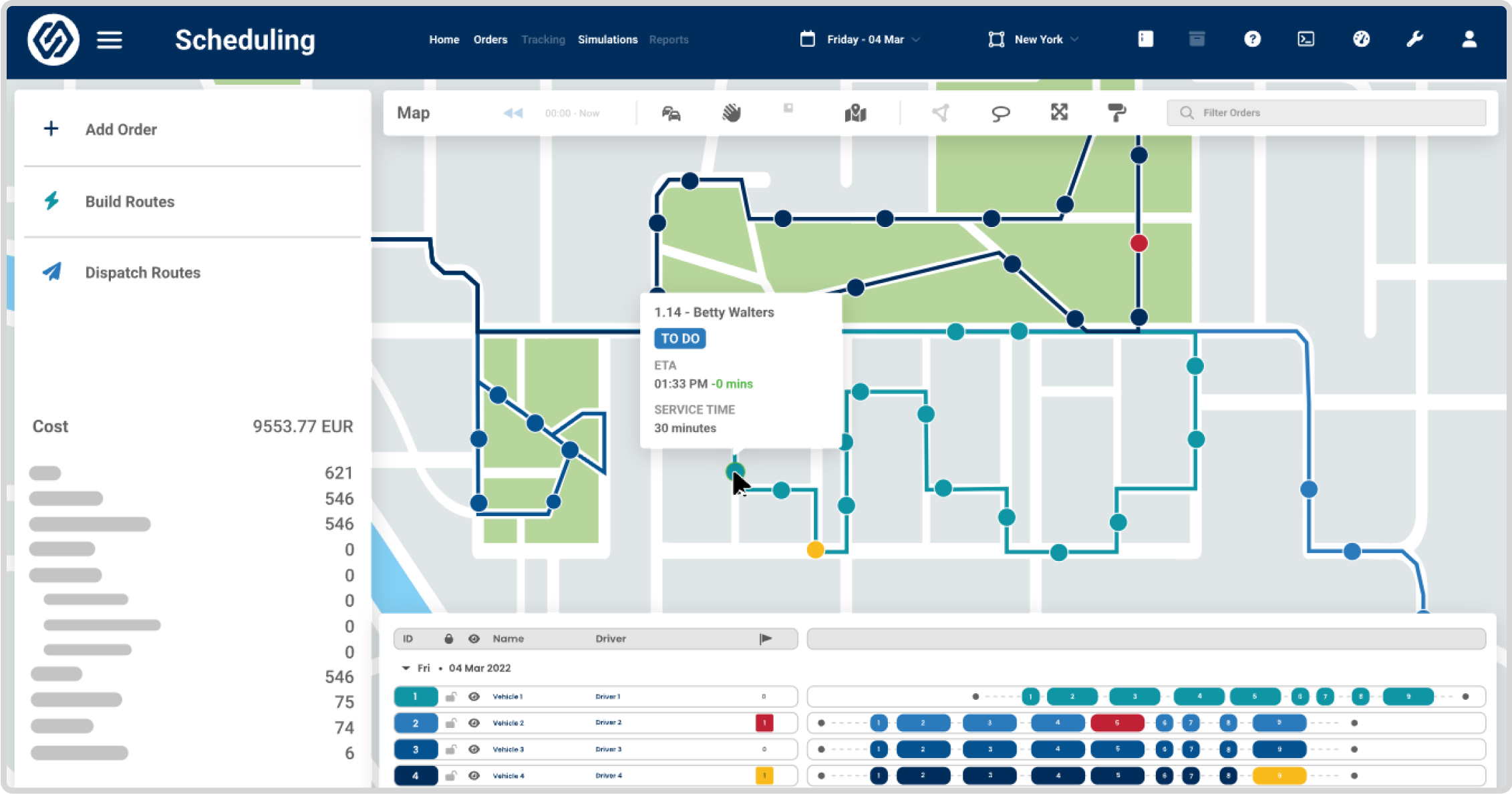
WorkWave RouteManager provides advanced route planning functionality that optimizes and re-optimizes routes to ensure maximum efficiency.

The software allows for easy modifications and updates, including drag-and-drop adjustments, job reassignments, and changing appointment times. Manual route changes trigger automatic rerouting and updates to the assigned driver.
<div class="image-border p-lg-3 p-2">![route planning](https://demo.upperinc.com/wp-content/uploads/2023/08/route-planning.png "Planner") _![zoom ](https://demo.upperinc.com/wp-content/uploads/2023/08/zoom-img.svg)_</div>### 2. Dispatching:

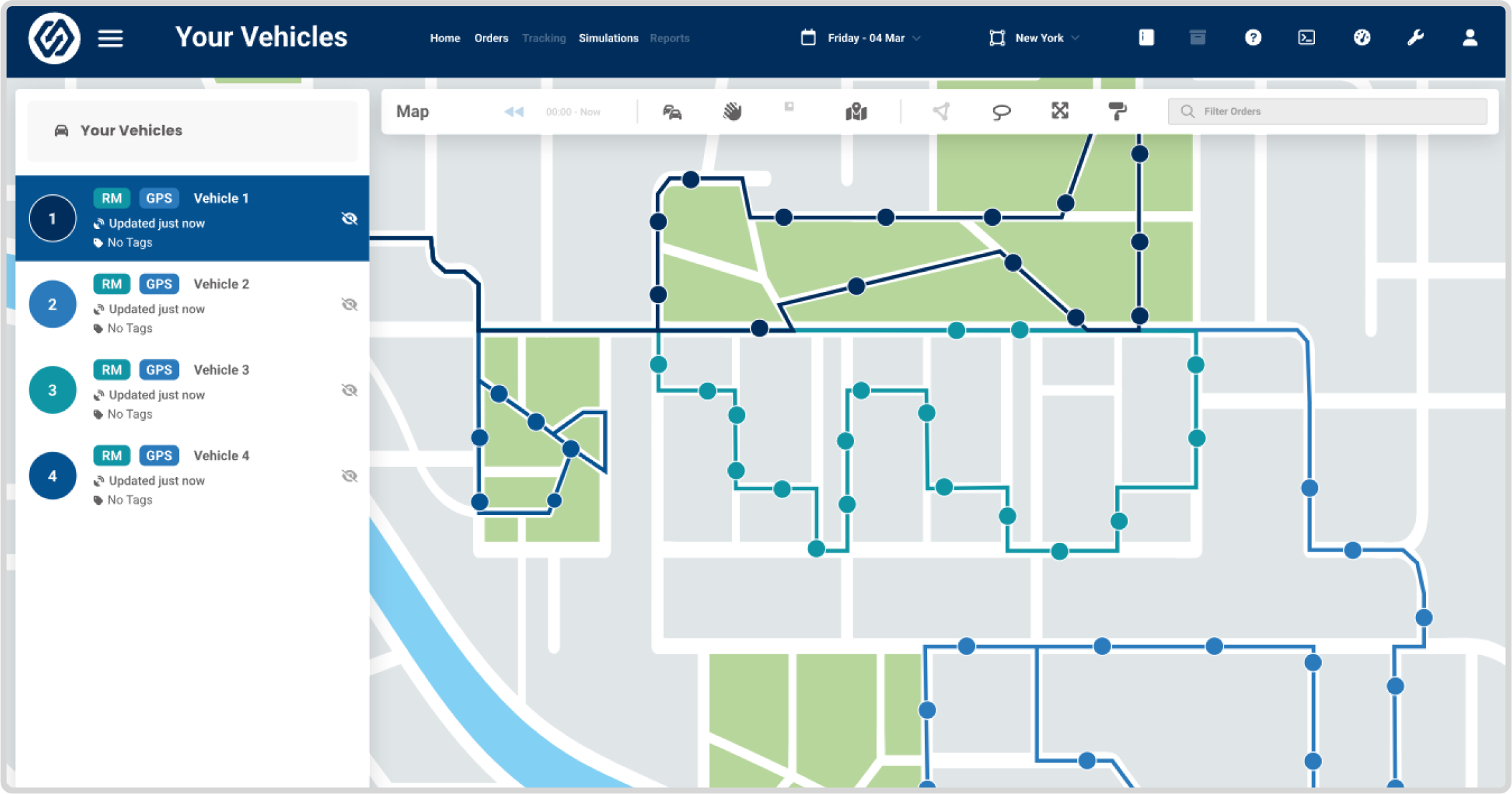
With WorkWave RouteManager’s dispatching features, you can achieve total transparency and improve communication between your back office and drivers.

The software enables you to dispatch routes to drivers, monitor real-time updates on the road, and capture proof of delivery in the form of signatures, notes, and pictures.

It also offers flexibility with a mobile dispatch app available on iOS and Android devices, instant route updates, and automatic re-routing capabilities.
<div class="image-border p-lg-3 p-2">![Auto assign route](https://demo.upperinc.com/wp-content/uploads/2023/08/dispatching_.png "Auto assign route") _![zoom ](https://demo.upperinc.com/wp-content/uploads/2023/08/zoom-img.svg)_</div>### 3. Delivery Driver App:

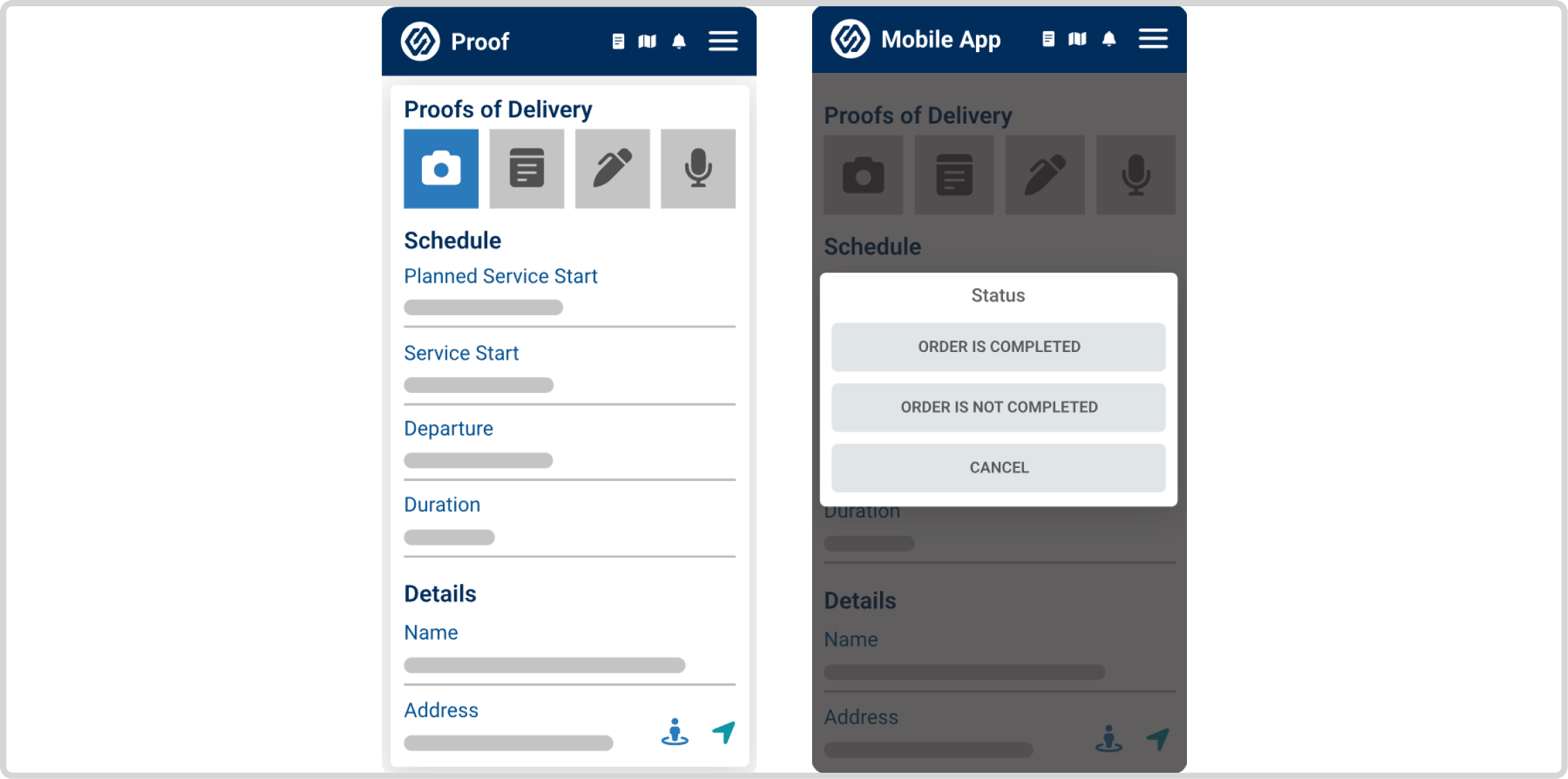
WorkWave RouteManager’s delivery driver app enhances driver productivity and communication. The app provides real-time updates, allowing drivers to see routes and changes in real-time. It enables drivers to capture proof of delivery, including barcode scanning for successful deliveries.

The driver app facilitates efficient in-app communication, allowing drivers to provide reasons for incomplete orders, view their required tasks, and seamlessly update the office.
<div class="image-border p-lg-3 p-2">![Define operating areas](https://demo.upperinc.com/wp-content/uploads/2023/08/delivery-driver-app.png "Define operating areas") _![zoom ](https://demo.upperinc.com/wp-content/uploads/2023/08/zoom-img.svg)_</div>### 4. Customer Notifications:

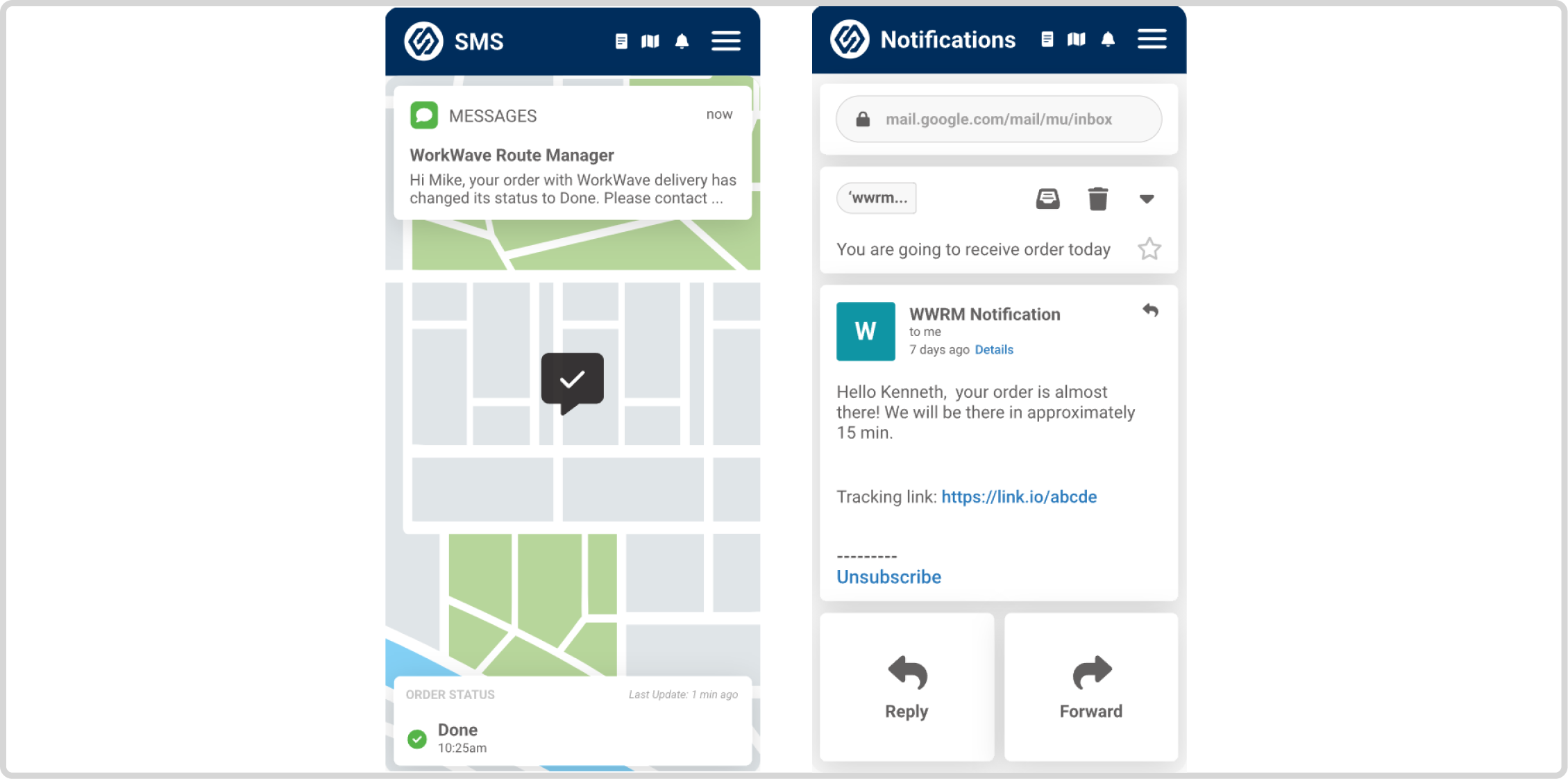
WorkWave RouteManager’s customer notification features help improve customer satisfaction by keeping them informed about the status of their delivery. It offers one-way SMS text messaging, which customers prefer over other communication channels.

Automated notifications can be scheduled to go out based on customer needs. It helps provide transparent delivery updates and allows customers to track their deliveries in real-time. There is also a RouteManager Voice feature that enables drivers to call end customers to notify them about their delivery status.
<div class="image-border p-lg-3 p-2">![Third party](https://demo.upperinc.com/wp-content/uploads/2023/08/customer-notification.png "Analytics") _![zoom ](https://demo.upperinc.com/wp-content/uploads/2023/08/zoom-img.svg)_</div>### 5. Reporting &amp; Analytics:

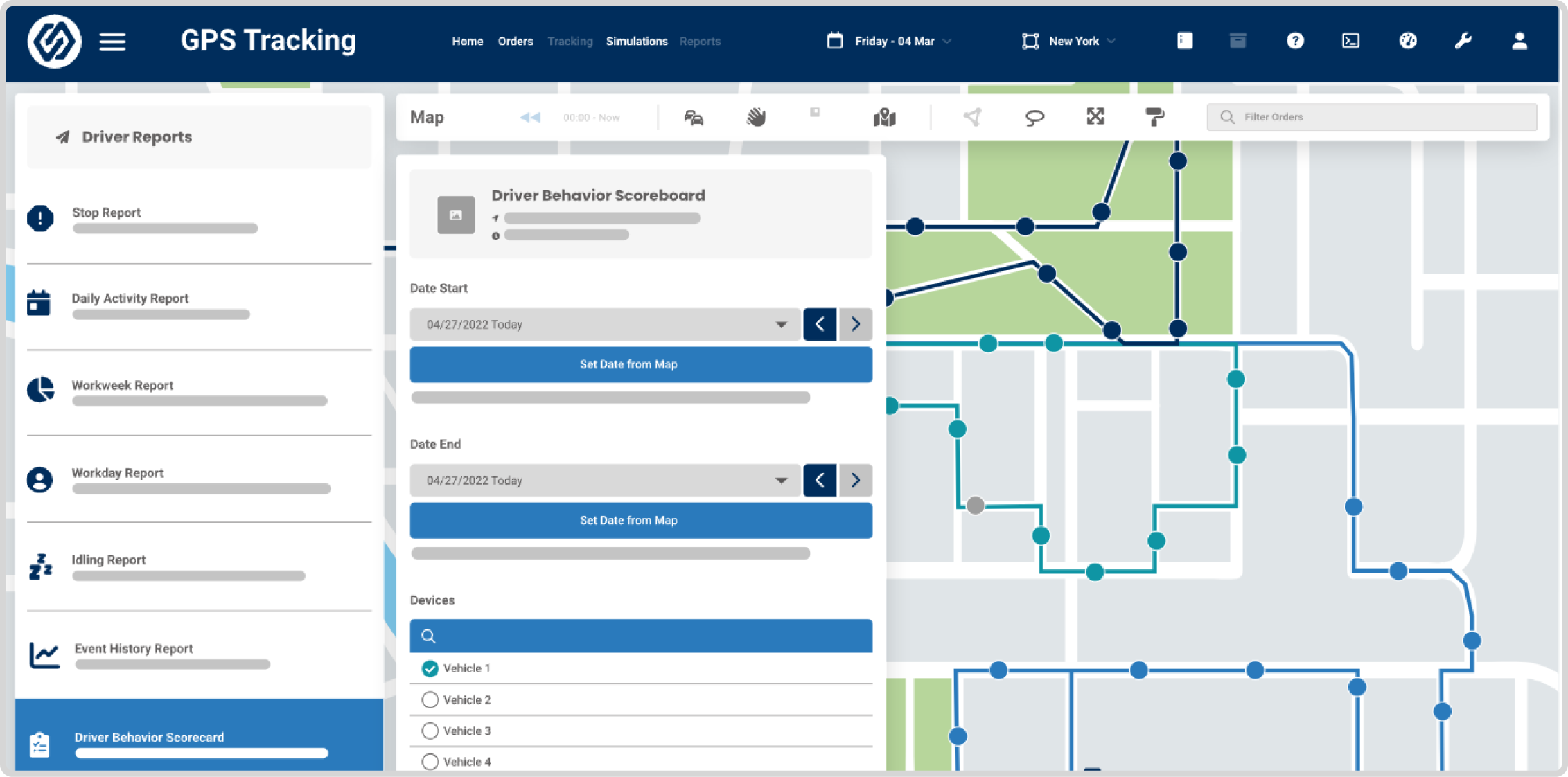
WorkWave RouteManager offers robust reporting and analytics capabilities to monitor vehicle performance, track driver behavior, and optimize delivery operations.

The system provides vehicle performance monitoring through in-vehicle devices that measure driver behavior such as idling, hard braking, and tailgating. Real-time alerts can be received in case of any issues.

Driver behavior tracking helps support and train drivers, incentivize good behavior, and empower dispatchers to evaluate and adjust plans.

The delivery analytics system utilizes data-driven insights to maximize driver output, listen to customer suggestions, and automate route plans with just a few clicks.
<div class="image-border p-lg-3 p-2">![Third party](https://demo.upperinc.com/wp-content/uploads/2023/08/reporting-and-analytic.png "Analytics") _![zoom ](https://demo.upperinc.com/wp-content/uploads/2023/08/zoom-img.svg)_</div>### 6. Large Fleet Management:

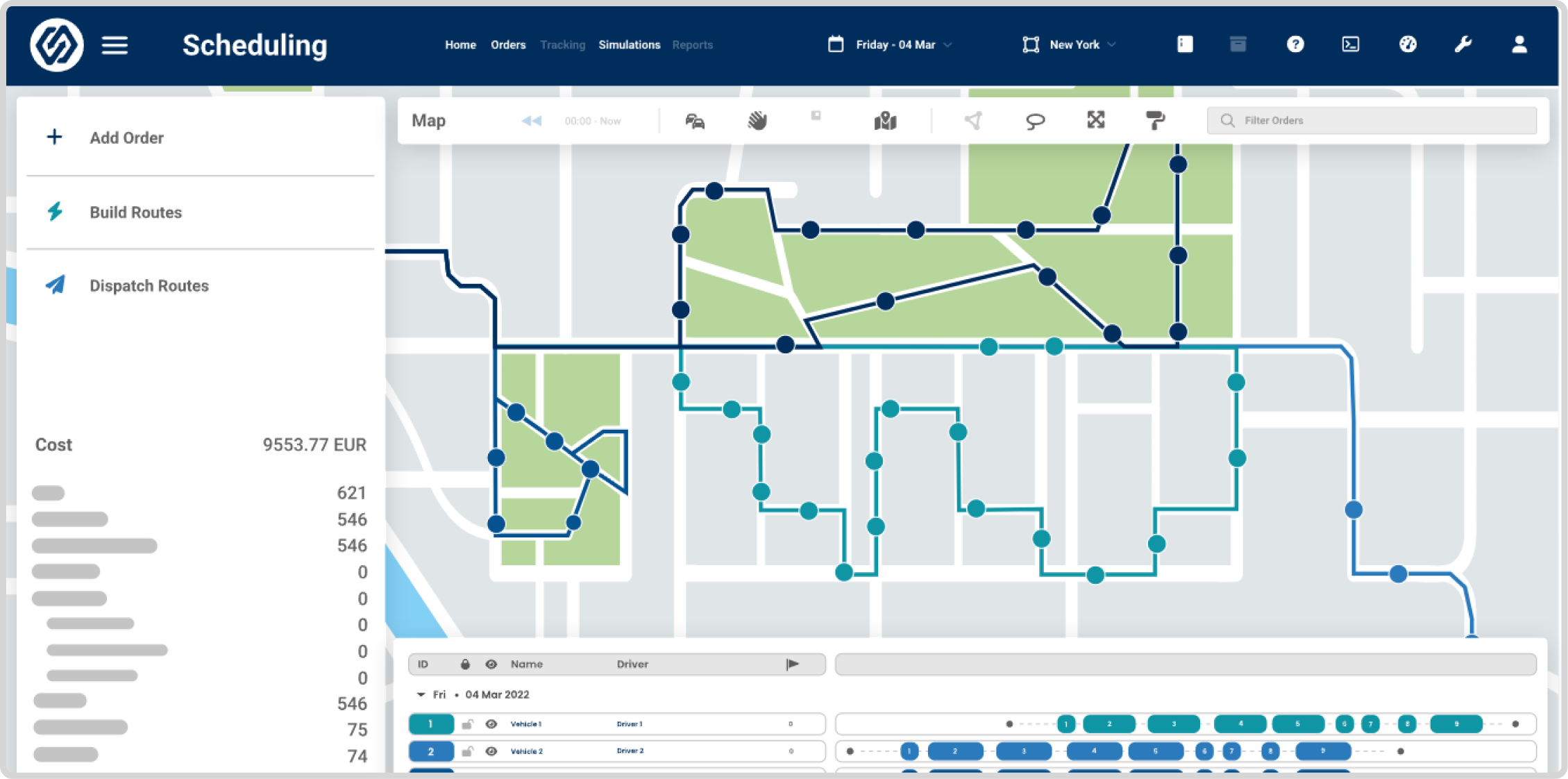
WorkWave RouteManager works as a large fleet management software that optimizes delivery routes with just a few clicks, helping businesses save time and money.

It enables scheduling and dispatching for large fleets, allowing you to create and adjust driver schedules, dispatch drivers easily, and optimize up to 10,000 orders per day.
<div class="image-border p-lg-3 p-2">![Third party](https://demo.upperinc.com/wp-content/uploads/2023/08/large-fleet-management.png "Analytics") _![zoom ](https://demo.upperinc.com/wp-content/uploads/2023/08/zoom-img.svg)_</div> </div> </div> </section> <section class="tbl-ratings one-app-ratings routeoptimization-software active" id="tbl-ratings">## WorkWave Reviews – Route Planning Software

 | Features | ![Competitor logo](https://demo.upperinc.com/wp-content/uploads/2024/07/workwave-small-logo.png)<small>WorkWave</small> | ![Competitor logo](https://demo.upperinc.com/wp-content/uploads/2023/08/upper-logo-small.png)<small>Upper</small> |
|---|---|---|
| Excel Import | <div class="star-rating "><div class="rating-50"></div></div> | <div class="star-rating "><div class="rating-50"></div></div> |
| Route Optimization | <div class="star-rating "><div class="rating-50"></div></div> | <div class="star-rating "><div class="rating-50"></div></div> |
| Proof of Delivery | <div class="star-rating "><div class="rating-50"></div></div> | <div class="star-rating "><div class="rating-50"></div></div> |
| Reports &amp; Analytics | <div class="star-rating "><div class="rating-50"></div></div> | <div class="star-rating "><div class="rating-50"></div></div> |
| API Integration | <div class="star-rating "><div class="rating-50"></div></div> | <div class="star-rating "><div class="rating-50"></div></div> |

 </section> <section class="common-block">## Is WorkWave RouteManger Right for Your Business?

WorkWave RouteManager offers a range of features for efficient route planning and dispatch operations, including route optimization, driver mobile app, and customer notifications.

However, it’s essential to consider its limitations, such as stability issues, data loss, and cumbersome spreadsheet imports. Some users have faced challenges with customization and color coding, and customer service has received negative feedback. The lack of a trial version and transparent pricing structure adds to the decision-making complexity.

To determine the best fit for your business, carefully evaluate your specific requirements and compare WorkWave RouteManager with alternatives like Upper. Consider whether its features align with your needs and priorities to make an informed investment decision for your business.

- **Advanced Route Optimization:** Upper utilizes advanced algorithms to optimize multi-stop delivery routes. It takes into account factors like time, distance, stop priority, delivery time windows, and any other delivery constraints. This results in more efficient routes, reduced fuel costs, and improved overall productivity.
- **Real-Time Driver Tracking:** With Upper, you can track your drivers’ locations in real time. This feature provides an accurate estimated time of arrival (ETA) to customers and allows you to efficiently manage any delays efficiently, ensuring better customer satisfaction.
- **Route Scheduling:** Upper offers intuitive scheduling functionality that allows you to create and adjust driver schedules effortlessly and in advance.
- Customer Notifications: Keep your customers informed about their deliveries through SMS, text messaging, and email alerts. Upper enables you to provide updates, such as delivery confirmations and ETAs, enhancing transparency and customer satisfaction.
- **Intuitive Mobile App:** Upper’s driver mobile app provides a user-friendly interface for drivers. They can access their routes, navigate efficiently, obtain instructions, collect PODs, and provide updates on order status. This seamless communication and visibility improve driver productivity and overall operational efficiency.
- **Reporting and Analytics:** Gain valuable insights into your delivery operations with Upper’s comprehensive reporting and analytics tools. Track key performance indicators, monitor driver performance, and identify areas for improvement. These data-driven insights enable you to make informed decisions and optimize your delivery processes.
- **Seamless integration:** Upper offers custom FTP and API integration, enabling easy data transfer between Upper and other third-party software. This helps to ensure smooth data flow and improve overall workflow.

 </section><section class="pricing-inner-block active"><div class="d-flex"><div class="d-flex mobile-dflex"><div class="pricing-block myrouteonline-pricing">![workwave](https://demo.upperinc.com/wp-content/uploads/2023/08/workwave-small-logo.svg)### workwave

 **$162<sub>/mo</sub>**  **No discount** - 3 vehicles included
- Optimization limit: 10,000 orders per day (360+ plan)
- Free Trial: NA

<div class="com-page-btn">[Visit Website](https://www.route-manager.com/ "route-manager.com")</div> </div><div class="pricing-block upper-pricing">![Upper](https://demo.upperinc.com/wp-content/uploads/2023/06/upper-logo-small.svg)### Upper

 **$40<sub>/mo</sub>**  **Save 20%** with annual billing - Per user per month
- Optimization limit: Unlimited (all plans)
- Free Trial: 7 days

<div class="com-page-btn actv">Try Upper for FREE</div> <small>No credit card required</small> </div> </div><div class="pricing-inner-content">## Make Deliveries Easier

 Use the innovative routing features from Upper without breaking the bank. - Route optimization has now been streamlined with such user-friendly and reasonable software available.
- Go and grab the one that can help you feel worthy for every penny you paid.

 </div> </div> </section><section class="points-listing-block">## A Perfect Alternative for You

In today’s competitive business landscape, finding the right routing and delivery solution is crucial for operational success.

While WorkWave RouteManager has its merits, exploring alternatives that offer enhanced features and functionality is essential. That’s where Upper comes in as a perfect alternative—a powerful and intuitive route planning and optimization software designed to streamline your operations and drive efficiency.

Let’s discover why Upper is the perfect alternative to address your business needs and take your delivery management to the next level.

- Admins are given the option to configure the driver app here. This way, they can have full control and flexibility to configure the app according to their specific needs and requirements.
- The curbside delivery option to serve the users with leverage to get a contactless delivery is freely available with Upper under any plan. The curbside delivery helps you make deliveries faster and avoid taking U-turns.
- Color coding the stops for easy identification and categorization is enabled by Upper. Admins, dispatchers, or drivers can change the pin color as per the nature of stop behaviors.
- Further, the option to customize the stop detail is served by Upper, leading to detailed descriptions of individual stops delivering complete clarity.
- Re-assigning the stops either manually or through a multi-selector tool as well as the option to swap the routes among the driver, is available. This flexibility promotes efficient management in case of last-minute changes, emergencies, or driver reassignments.

Now you might have been aware of the fact that listed above are some of the essential functionalities that you need to have in your [route optimization software](https://demo.upperinc.com/blog/best-route-optimization-software/). And switching towards software like Upper, which flexibly offers you all of these at your fingertips, can surely turn out to be a wise decision.

 </section><section class=" mt-0"><div class="image-border cta-2"><div class="main-cta-tag"><div class="row align-items-center"><div class="col-sm-9"><span class="hurryup-text">DON’T MISS OUT! LIMITED OFFER</span><div class="d-flex"><span class="plan-text">Upper’s Growth Plan now available @ </span> <span class="orange-text plan-rate-text">$239/_mo_</span></div> <span class="discounted-text">Get the Best Cost-Effective WorkWave RouteManger &amp; Speed up Your Deliveries by 3x</span> </div><div class="col-sm-3 text-center"><div class="watch-image">![watch](https://demo.upperinc.com/wp-content/uploads/2023/07/watch.png)</div><div>[Try Upper for FREE](https://crew.upperinc.com/signup?u_referrer_url=https://demo.upperinc.com/reviews/samsara/&u_source=direct&u_initial_referrer=https%3A%2F%2Fwww.upperinc.com%2Freviews%2F&u_medium=B_Try_Upper_For_FREE_2&u_clicked_on=2023-08-01) <small>No credit card required</small></div> </div> </div> </div> </div> </section><section class="conclusion-block"><div class="row"><div class="col-lg-12 col-md-12">## <span class="ez-toc-section" id="conclusion"></span>Conclusion

WorkWave RouteManager offers a range of features for route planning, dispatching, and driver management. While it may meet the needs of some businesses, it does have limitations and drawbacks, such as a lack of pricing transparency and certain functionality issues.

For those seeking a reliable alternative, Upper emerges as a compelling choice. With advanced routing features, Upper provides a comprehensive solution for optimizing delivery operations.

Additionally, Upper offers a 7 days free trial, allowing businesses to experience its benefits firsthand. Try Upper today and elevate your delivery management to new heights. and can avail of an informed decision.

 </div> </div> </section><section class="mt-0" id="reviewfaq"><div class="faq-block" id="faq-block"><div class="row justify-content-center"><div class="col-lg-12"><div class="faq-inner">## Frequently asked questions

- <div class="h6">Is WorkWave RouteManager suitable for small businesses?  </div><div class="accordion-content" style="display: block;"> WorkWave RouteManager offers flexible pricing plans that suit businesses of all sizes, including small businesses. It is a nice option for small businesses looking to optimize routes and streamline operations because of its scalable features and user-friendly interface. </div>
- <div class="h6">How does WorkWave RouteManager pricing compare to other route planning software?  </div><div class="accordion-content"> WorkWave RouteManager offers competitive pricing options, starting as low as $54 per month per vehicle. But if you’re looking for a more cost-effective solution without compromising on features, Upper is a great alternative. With affordable pricing plans and robust functionality, Upper provides excellent value for your investment. </div>
- <div class="h6">What are the key features of WorkWave RouteManager?  </div><div class="accordion-content"> WorkWave RouteManager provides essential features for efficient route planning, including route optimization, a driver mobile app, order import, simulations, a dispatch management system, customer notifications, and reporting and analytics. </div>
- <div class="h6">Can WorkWave RouteManager integrate with other business systems?  </div><div class="accordion-content"> Yes, WorkWave RouteManager offers integration options through Zapier and an open API, enabling connectivity with other software tools and systems your business relies on. </div>
- <div class="h6">Are there any alternatives to WorkWave RouteManager?  </div><div class="accordion-content"> Yes, there are alternatives to WorkWave RouteManager available on the market that offer similar features and functionalities. One such standout alternative is Upper. With its comprehensive feature set, user-friendly interface, and cost-effective pricing, Upper offers a compelling solution for efficient route planning and optimization. </div>
- <div class="h6">Is there a free trial available for WorkWave RouteManager?  </div><div class="accordion-content"> WorkWave RouteManager does not offer a free trial directly on its website. However, there is a better alternative available: Upper. It provides a 7-day free trial, allowing you to experience its powerful features, intuitive interface, and exceptional customer support firsthand. </div>

 </div> </div> </div> </div> </section></div> </div></div>


---

_View the original post at: [https://demo.upperinc.com/reviews/workwave-review/](https://demo.upperinc.com/reviews/workwave-review/)_  
_Served as markdown by [Third Audience](https://github.com/third-audience) v3.4.7_  
_Generated: 2026-03-18 07:04:44 UTC_  
